
Prerequisites
- What is your product version? 10.5.0
- What is your product type (Angular or MVC)? Angular
- What is product framework type (.net framework or .net core)? .Net 5
If issue related with ABP Framework
- What is ABP Framework version? 6.5.0
If issue is about UI
- Which theme are you using? Default
Question
After the latest update to Asp.Net Zero 10.5.0 some events (maybe lazyload events) are not fired when the angular solution is deployed to a environment. It works locally when running angular in debug on localhost.
It is not a backend issue because if I connect the debug localhost instance of angular to the deployed backend it works perfectly.
The example in question is the Tenant impersonation. (We did not make any changes to this. )
It uses the CommonLookupModal and I have put some console log statements to reveal how it is called:
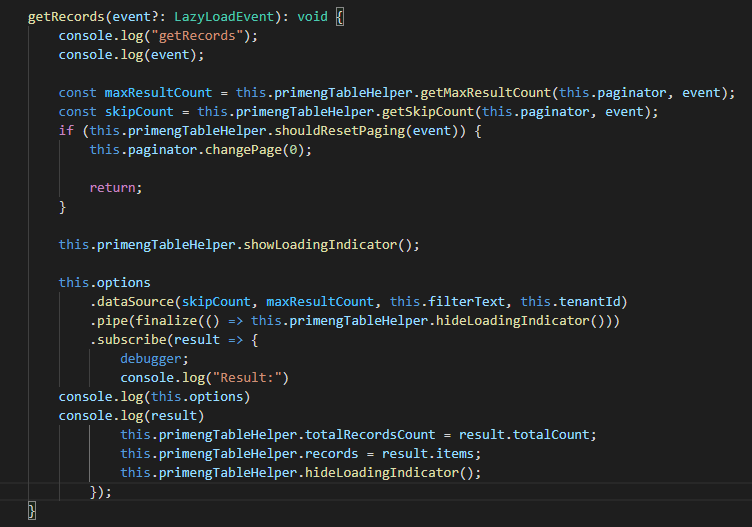
When run locally the getRecords method is called twice upon opening the modal. When run on the environment the getRecords method are only called once with the event value being null.
Hope you have some suggestions
9 Answer(s)
-
0
I have the same problem (same version and all) ...
Commenting out the return statement works:
getRecords(event?: LazyLoadEvent): void {
        ...
        if (this.primengTableHelper.shouldResetPaging(event)) {
            this.paginator.changePage(0);

            // return;
        }
        ...
}
Markdown is supportedCopy & paste or drag & drop images (max 30 MB per image) -
0
Hi @SorenRomer, @alexanderpilhar
We haven't noticed such a behavior on our side. Could you explain steps to reporduce this problem and the problematic outcome ? I can add this to v11 final version.
Thanks,
Markdown is supportedCopy & paste or drag & drop images (max 30 MB per image) -
0
Hi @ismcagdas,
I updated from 10.3.0 to 10.5.0 and then just tested if everything is working as expected - and when testing impersonation I recognized that the list of users to impersonate does not load.
I always use the browser's in-private mode for testing to avoid cache-related issues after an update. Maybe that's why I already stumbled over it in my dev environment, while @SorenRomer only did in production environment.
Markdown is supportedCopy & paste or drag & drop images (max 30 MB per image) -
0
Hi,
Thanks, I created an issue about this for v11 final milestone, https://github.com/aspnetzero/aspnet-zero-core/issues/4136. I will test this as you explained and fix if I can find the bug.
Markdown is supportedCopy & paste or drag & drop images (max 30 MB per image) -
0
Hi @alexanderpilhar
I couldn't reproduce this problem. Could you explain steps you are following and getting this problem ?
Thanks,
Markdown is supportedCopy & paste or drag & drop images (max 30 MB per image) -
0
Hi,
we have the same issue with v11.0.0 and impersonation
If we the disable the return in getRecords in common-lookup-modal.component.ts then it's fixed. But this seems just a workaround.
if (this.primengTableHelper.shouldResetPaging(event)) {
  this.paginator.changePage(0);

  // return;
}
Markdown is supportedCopy & paste or drag & drop images (max 30 MB per image) -
0
Hi @jguldemond,
Could you check if this helps you https://github.com/aspnetzero/aspnet-zero-core/issues/4159#issuecomment-1004794413 ?
Markdown is supportedCopy & paste or drag & drop images (max 30 MB per image) -
0
Hi @ismagdas, yes as I'm also @burodevelopment. So This is fixed for me. But I don't know if this is also the case for the owner of this issue.
Markdown is supportedCopy & paste or drag & drop images (max 30 MB per image) -
0
Thanks @jguldemond :). I have included this issue to next milestone, we will fix the problem but at least we have a workaround at the moment.
Markdown is supportedCopy & paste or drag & drop images (max 30 MB per image)


