
We add an azure functions project in the solution, we want to make the repositories and services (WebCoreModule) successfully injected in our azure functions project. So, how can we achieve that?
Thanks.
18 Answer(s)
-
0
Hi @quTIP
First of all, you need to create a Module in your new project (see https://aspnetboilerplate.com/Pages/Documents/Module-System). Then, you need to add a reference to EntityFrameworkCore module to your new project and also depend on your EFCore module in the new module you have created in your azure functions project.
Markdown is supportedCopy & paste or drag & drop images (max 30 MB per image) -
0
Thanks for the reply, I did as you mentioned and following is my module:
using Abp.Modules; using Abp.Reflection.Extensions; using Bookenta.EntityFrameworkCore; namespace SalesVeeFunctionApp { [DependsOn( typeof(BookentaEntityFrameworkCoreModule) )] public class SalesVeeFunctionAppModule : AbpModule { public override void Initialize() { IocManager.RegisterAssemblyByConvention(typeof(SalesVeeFunctionAppModule).GetAssembly());
    }


}
}
When i try to inject my IRepository in my azure function constructor i got the following error
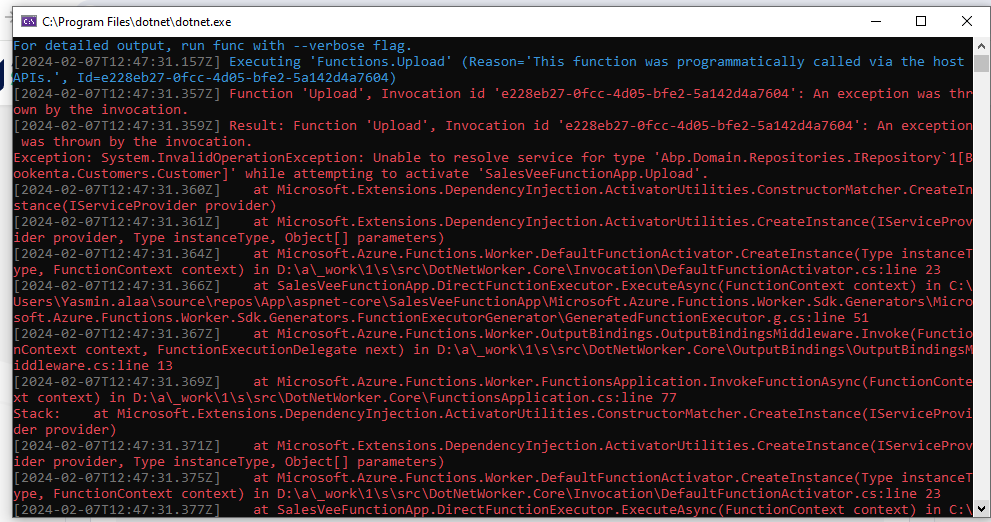
Did i miss something? Thanks.
Markdown is supportedCopy & paste or drag & drop images (max 30 MB per image) -
0
Hi,
Is it possible to share the full stack-trace as a text message ? You should be able to find it in Logs.txt file under App_Data folder.
Markdown is supportedCopy & paste or drag & drop images (max 30 MB per image) -
0
Sure,
This is the full stack trace.
Exception: System.InvalidOperationException: Unable to resolve service for type 'Abp.Domain.Repositories.IRepository`1[Bookenta.Customers.Customer]' while attempting to activate 'SalesVeeFunctionApp.Upload'. [2024-02-09T10:54:38.733Z] at Microsoft.Extensions.DependencyInjection.ActivatorUtilities.ConstructorMatcher.CreateInstance(IServiceProvider provider) [2024-02-09T10:54:38.736Z] at Microsoft.Extensions.DependencyInjection.ActivatorUtilities.CreateInstance(IServiceProvider provider, Type instanceType, Object[] parameters) [2024-02-09T10:54:38.738Z] at Microsoft.Azure.Functions.Worker.DefaultFunctionActivator.CreateInstance(Type instanceType, FunctionContext context) in D:\a_work\1\s\src\DotNetWorker.Core\Invocation\DefaultFunctionActivator.cs:line 23 [2024-02-09T10:54:38.739Z] at SalesVeeFunctionApp.DirectFunctionExecutor.ExecuteAsync(FunctionContext context) in C:\Users\Yasmin.alaa\source\repos\App\aspnet-core\SalesVeeFunctionApp\Microsoft.Azure.Functions.Worker.Sdk.Generators\Microsoft.Azure.Functions.Worker.Sdk.Generators.FunctionExecutorGenerator\GeneratedFunctionExecutor.g.cs:line 51 [2024-02-09T10:54:38.740Z] at Microsoft.Azure.Functions.Worker.OutputBindings.OutputBindingsMiddleware.Invoke(FunctionContext context, FunctionExecutionDelegate next) in D:\a_work\1\s\src\DotNetWorker.Core\OutputBindings\OutputBindingsMiddleware.cs:line 13 [2024-02-09T10:54:38.741Z] at Microsoft.Azure.Functions.Worker.FunctionsApplication.InvokeFunctionAsync(FunctionContext context) in D:\a_work\1\s\src\DotNetWorker.Core\FunctionsApplication.cs:line 77 Stack: at Microsoft.Extensions.DependencyInjection.ActivatorUtilities.ConstructorMatcher.CreateInstance(IServiceProvider provider) [2024-02-09T10:54:38.744Z] at Microsoft.Extensions.DependencyInjection.ActivatorUtilities.CreateInstance(IServiceProvider provider, Type instanceType, Object[] parameters) [2024-02-09T10:54:38.756Z] at Microsoft.Azure.Functions.Worker.DefaultFunctionActivator.CreateInstance(Type instanceType, FunctionContext context) in D:\a_work\1\s\src\DotNetWorker.Core\Invocation\DefaultFunctionActivator.cs:line 23 [2024-02-09T10:54:38.758Z] at SalesVeeFunctionApp.DirectFunctionExecutor.ExecuteAsync(FunctionContext context) in C:\Users\Yasmin.alaa\source\repos\App\aspnet-core\SalesVeeFunctionApp\Microsoft.Azure.Functions.Worker.Sdk.Generators\Microsoft.Azure.Functions.Worker.Sdk.Generators.FunctionExecutorGenerator\GeneratedFunctionExecutor.g.cs:line 51 [2024-02-09T10:54:38.760Z] at Microsoft.Azure.Functions.Worker.OutputBindings.OutputBindingsMiddleware.Invoke(FunctionContext context, FunctionExecutionDelegate next) in D:\a_work\1\s\src\DotNetWorker.Core\OutputBindings\OutputBindingsMiddleware.cs:line 13 [2024-02-09T10:54:38.763Z] at Microsoft.Azure.Functions.Worker.FunctionsApplication.InvokeFunctionAsync(FunctionContext context) in D:\a_work\1\s\src\DotNetWorker.Core\FunctionsApplication.cs:line 77. [2024-02-09T10:54:38.779Z] Executed 'Functions.Upload' (Failed, Id=9b27b8c0-5052-499e-bb71-22af063dd83c, Duration=282ms) [2024-02-09T10:54:38.781Z] System.Private.CoreLib: Exception while executing function: Functions.Upload. System.Private.CoreLib: Result: Failure
Should my program.cs be like this ?
public class Program { private static void Main(string[] args) { var host = new HostBuilder(). ConfigureFunctionsWorkerDefaults().Build(); using (var bootstrapper = AbpBootstrapper.Create<SalesVeeFunctionAppModule>()) { bootstrapper.Initialize(); //Getting a Tester object from DI and running it using (var tester = bootstrapper.IocManager.ResolveAsDisposable<IRepository<Customer>>()) { tester.Object.Count(); } //Disposes tester and all it's dependencies } host.Run(); } }
Markdown is supportedCopy & paste or drag & drop images (max 30 MB per image) -
0
Hi,
Yes, this seems fine. Is Customer entity added to the DbContext ? If so, is it possible for us to access your project and check the source code ?
Markdown is supportedCopy & paste or drag & drop images (max 30 MB per image) -
0
Thanks for the replies,
My issue is solved by doing the following:
1- Updating My Module to be like this:
public class SalesVeeFunctionAppModule : AbpModule
{

    public override void PreInitialize()
    {
        var configuration = GetConfiguration();

        Configuration.BackgroundJobs.IsJobExecutionEnabled = false;

        Configuration.UnitOfWork.Timeout = TimeSpan.FromMinutes(30);
        Configuration.UnitOfWork.IsTransactional = false;


        //Use database for language management
        Configuration.Modules.Zero().LanguageManagement.EnableDbLocalization();

        //**this line solve my issue**
        Configuration.Modules.AspNetZero().LicenseCode = configuration["AbpZeroLicenseCode"];
        Configuration.EntityHistory.IsEnabled = true;
        Configuration.EntityHistory.Selectors.Add("BookentaEntities", typeof(User), typeof(Tenant));


    }
    private static IConfigurationRoot GetConfiguration()
    {
        return AppConfigurations.Get(Directory.GetCurrentDirectory(), addUserSecrets: true);
    }
    public override void Initialize()
    {
            IocManager.RegisterAssemblyByConvention(typeof(SalesVeeFunctionAppModule).GetAssembly());

    }


}
2- Updating my program.cs to be like this:
using Abp;
using Abp.AspNetCore;
using Abp.Dependency;
using Abp.Domain.Uow;
using Abp.PlugIns;
using Castle.Windsor.MsDependencyInjection;
using Microsoft.AspNetCore.Hosting;
using Microsoft.Extensions.DependencyInjection;
using Microsoft.Extensions.Hosting;
using SalesVeeFunctionApp;
using System;
using System.Collections.Generic;
using System.Linq;
using System.Text;
using System.Threading.Tasks;

var host = new HostBuilder().ConfigureFunctionsWorkerDefaults().ConfigureServices(services=> {


    services.AddAbp<SalesVeeFunctionAppModule>();
    var _bootstrapper = AbpBootstrapper.Create<SalesVeeFunctionAppModule>();
    services.AddSingleton(_bootstrapper);
    _bootstrapper.Initialize();


})
    .Build();
host.Run();
So i can get my repositories in my azure function like this:
            var _bootstrapper = AbpBootstrapper.Create<SalesVeeFunctionAppModule>();
            using (var unit = _bootstrapper.IocManager.Resolve<IUnitOfWorkManager>().Begin())
            {
                var tester = _bootstrapper.IocManager.Resolve<IRepository<Customer>>();
                var d = tester.GetAllList();
            }
Markdown is supportedCopy & paste or drag & drop images (max 30 MB per image) -
0
Hi @quTIP
Thanks a lot for sharing the solution. I hope it will help others as well.
Markdown is supportedCopy & paste or drag & drop images (max 30 MB per image) -
0
Hi,
I've been trying to get my Azure Function (project is running Abp 9.2.2) to work, but I'm encountering some issues.
I followed the code example above, but I ran into a couple of problems. The
_bootstrapper.IocManager.Resolve<>()method requires the arguments to be explicitly specified, as does theAbpBootstrapper.Create()method. ForAbpBootstrapper.Create(), I assume you can use your ownProjectModule : AbpModule.When I implement the standard approach for creating Console application projects (similar to the Migrator project), I encounter dependency injection errors related to
IServiceProviderorIUnitOfWorkManager.Is there an example Azure Functions project available, or could you provide guidance on how to resolve these issues?
Thanks.
Markdown is supportedCopy & paste or drag & drop images (max 30 MB per image) -
0
Hi @Web2workNL,
Could you share your Program.cs and your module class?
Markdown is supportedCopy & paste or drag & drop images (max 30 MB per image) -
0
After further debugging, I discovered that moving all the Initialize() into the function it allows it to start properly. The function project is runnig the In-process model. When using the Initialize() in my startup.cs, I get the following error:
Cannot access a disposed object. Object name: 'IServiceProvider'.If using the Initialize() inside the function you can successfully execute a test method from my controller inside the Core project. However, when I run my method with a UnitOfWorkManager, I encounter the following error:
System.Private.CoreLib: Exception while executing function: MyFunction. Castle.Windsor: Component Abp.Domain.Uow.UnitOfWorkDefaultOptions could not be registered. There is already a component with that name. Did you want to modify the existing component instead? If not, make sure you specify a unique name.My Function:
public class MyFunction
{
    private readonly ILogger<MyFunction> _logger;

    public MyFunction(ILogger<MyFunction> logger)
    {
        _logger = logger;
    }

    [FunctionName(nameof(MyFunction))]
    public async Task Run([QueueTrigger("my-queue", Connection = "myConnString")] QueueMessage message)
    {
        using (var bootstrapper = AbpBootstrapper.Create<MyFunctionModule>())
        {
            // initialize here or in startup.cs - performance for starting function?
            bootstrapper.Initialize();

            using (var myCoreController = bootstrapper.IocManager.ResolveAsDisposable<IMyCoreController>())
            {
                // works fine
                var test = await myCoreController.Object.Test();
                _logger.LogInformation(test);

                // generates error:
                await myCoreController.Object.MyMethod();

            }
        }
    }
}
Startup: (if used, it fails to start function)
[assembly: FunctionsStartup(typeof(Startup))]

namespace MyFunctionsNameSpace
{
    public class Startup : FunctionsStartup
    {
        public override void Configure(IFunctionsHostBuilder builder)
        {
            using (var bootstrapper = AbpBootstrapper.Create<MyFunctionModule>())
            {
                bootstrapper.Initialize();
            }
        }
    }
}
MyMethod - inside MyCoreController
private async Task MyMethod()
{
    using (var uow = UnitOfWorkManager.Begin())
    {
        // code fails on first call the repository

        ...

        uow.Complete();
    }
}
MyFunctionModule
[DependsOn(typeof(MyProjectEntityFrameworkCoreModule))]
public class MyFunctionModule: AbpModule
{
    private readonly IConfigurationRoot _appConfiguration;

    public MyFunctionModule(MyProjectEntityFrameworkCoreModule abpZeroTemplateEntityFrameworkCoreModule)
    {
        abpZeroTemplateEntityFrameworkCoreModule.SkipDbSeed = true;

        _appConfiguration = AppConfigurations.Get(
            typeof(MyFunctionModule).GetAssembly().GetDirectoryPathOrNull()
        );
    }

    public override void PreInitialize()
    {
        Configuration.DefaultNameOrConnectionString = _appConfiguration.GetConnectionString("...");
        Configuration.Modules.AspNetZero().LicenseCode = _appConfiguration["..."];
    }

    public override void Initialize()
    {
        IocManager.RegisterAssemblyByConvention(Assembly.GetExecutingAssembly());
        ServiceCollectionRegistrar.Register(IocManager);
    }
}
Markdown is supportedCopy & paste or drag & drop images (max 30 MB per image) -
0
Hi @Web2workNL,
Could you try using the solution here?
https://abp.io/support/questions/4821/Abp-Framework#answer-3a0a5c6a-4610-4c66-69ce-549a079f48c8
Markdown is supportedCopy & paste or drag & drop images (max 30 MB per image) -
0
Thank you for the response. I tried the solution. 2 issues:
- The
IServiceCollectiondoes not contain a definition forAddApplicationonbuilder.Services.AddApplication<MyFunctionsModule>(). - The type or namespace
IAbpApplicationWithExternalServiceProvidercould not be found onserviceProvider.GetRequiredService<IAbpApplicationWithExternalServiceProvider>().Initialize(serviceProvider);.
Markdown is supportedCopy & paste or drag & drop images (max 30 MB per image) - The
-
0
Hi Web2workNL,
We will prepare a blog post and a sample project on this as soon as possible. You can check the progress here https://github.com/aspnetzero/aspnet-zero-core/issues/5330
Markdown is supportedCopy & paste or drag & drop images (max 30 MB per image) -
0
Hi, thanks for preparing a blog post and a sample project. However, the link you sent leads to a 404 page.
Markdown is supportedCopy & paste or drag & drop images (max 30 MB per image) -
0
Hi @Web2workNL,
It is private aspnetzero github repository. If you buy aspnetzero you can access it. You can add Github member at https://aspnetzero.com/LicenseManagement -> GithubMembers tab
Markdown is supportedCopy & paste or drag & drop images (max 30 MB per image) -
0
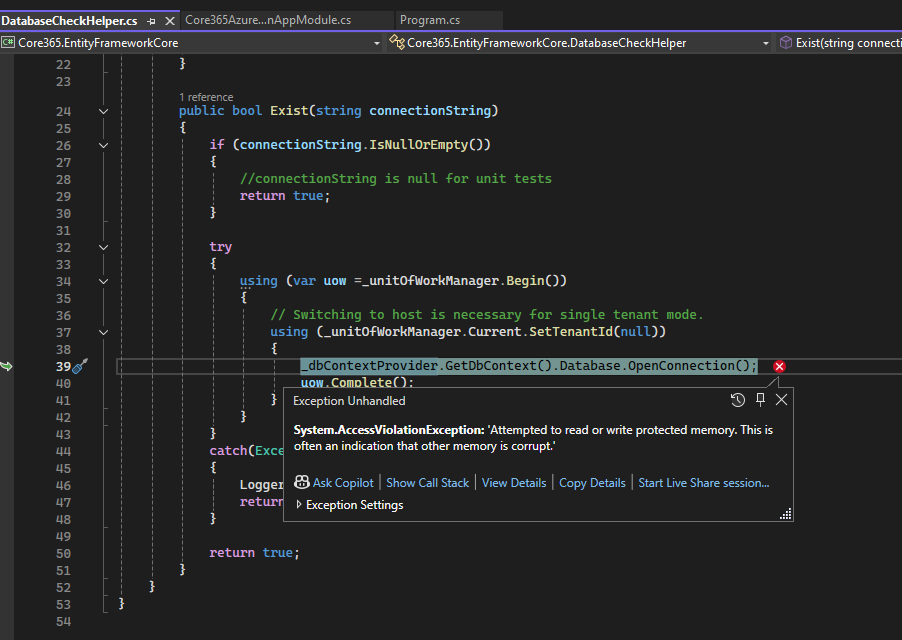
I'm trying to setup an Azure functions project, but am running into the error
The Abp Module
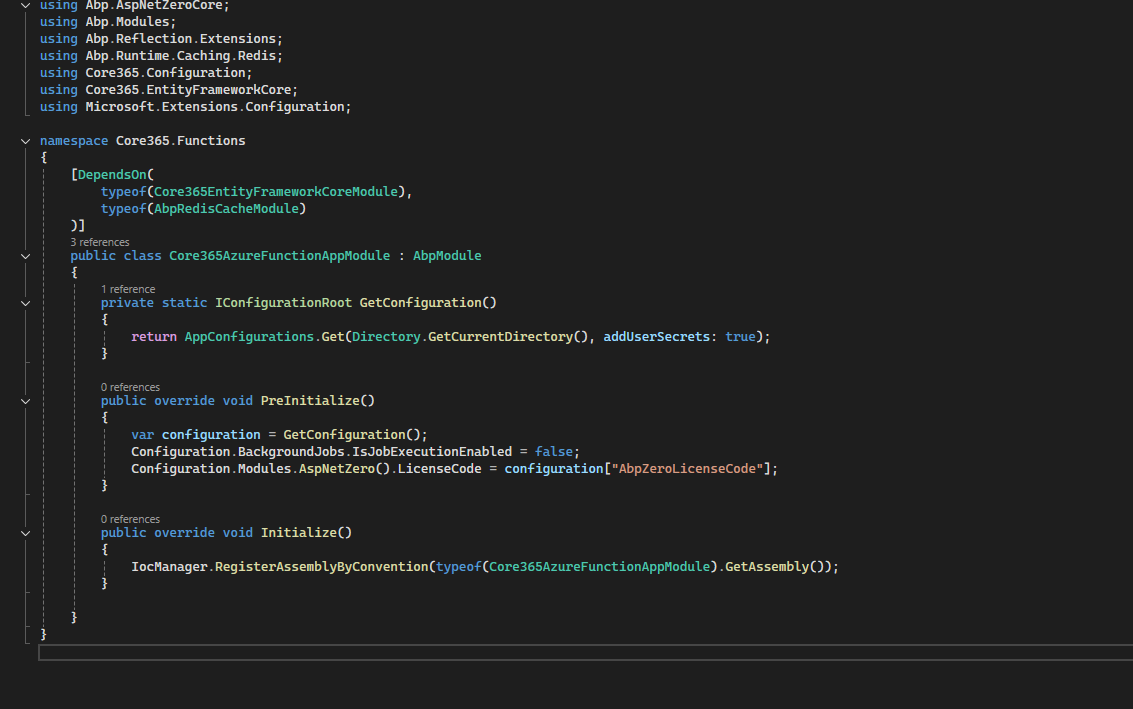
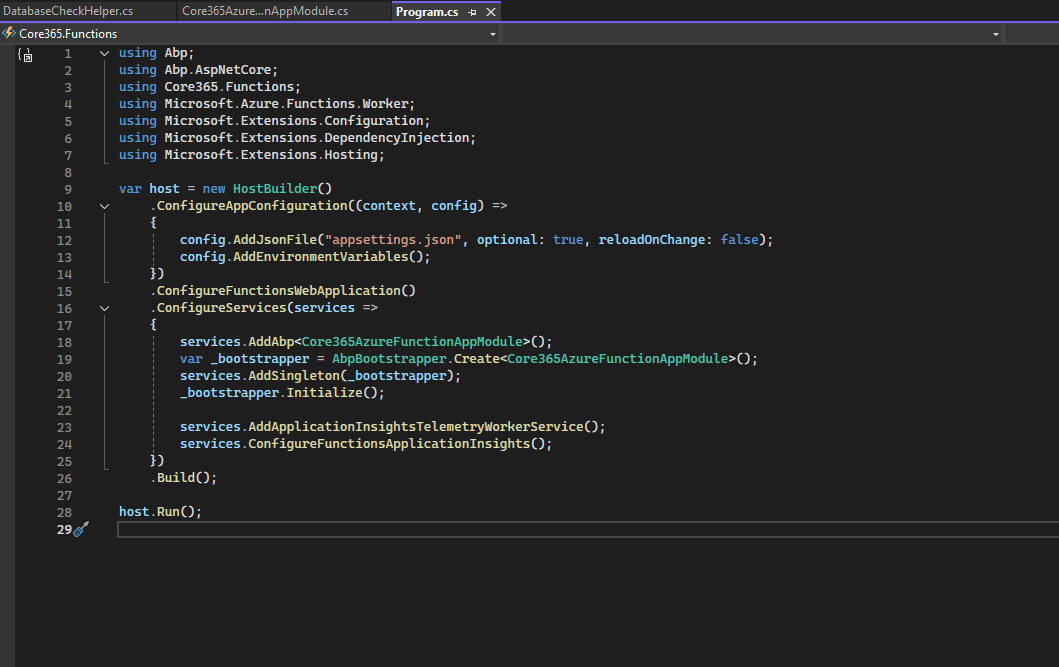
Program.cs
The error in DatabaseCheckHelper
 Markdown is supportedCopy & paste or drag & drop images (max 30 MB per image)
 -
0
I see that a blog post finally came out for Azure Functions integration.
But having some issues following the example.
- Where does AnzAzureFunctionSampleEntityFrameworkCoreModule come from?
[DependsOn(typeof(AnzAzureFunctionSampleEntityFrameworkCoreModule))] - Where does MyServiceProviderFactory come from as well? .UseServiceProviderFactory(new MyServiceProviderFactory<MyFunctionModule>())
Markdown is supportedCopy & paste or drag & drop images (max 30 MB per image) - Where does AnzAzureFunctionSampleEntityFrameworkCoreModule come from?
-
0Markdown is supportedCopy & paste or drag & drop images (max 30 MB per image)


