
Asp.net Core + Angular Solution Version 12.3.0
I am trying to setup Entra Id login using OpenIdConnect, I have followed this guide https://aspnetzero.com/blog/integrating-azure-active-directory-with-asp.net-zero but I cannot get it working. Is there any more guidance on this please like how to setup the App Registration or what configuration settings I need to use?
Currently it all looks like its working but when the page posts back to the login screen with the token in the URL, it just hangs. This is because in the code shown below, the "claims" returned by this.oauthService.getIdentityClaims() are null?
 public openIdConnectLoginCallback(resp) {
        this.initExternalLoginProviders(() => {
            let openIdProvider = _filter(this.externalLoginProviders, {
                name: 'OpenIdConnect',
            })[0];
            let authConfig = this.getOpenIdConnectConfig(openIdProvider);

            this.oauthService.configure(authConfig);
            this.spinnerService.show();

            let claims = this.oauthService.getIdentityClaims();

            const model = new ExternalAuthenticateModel();
            model.authProvider = ExternalLoginProvider.OPENID;
            model.providerAccessCode = this.oauthService.getIdToken();
            model.providerKey = claims['sub'];
            model.singleSignIn = UrlHelper.getSingleSignIn();
            model.returnUrl = UrlHelper.getReturnUrl();
18 Answer(s)
-
0
Hi
You need to update the ClaimsMapping values.
 "OpenId": {
   "IsEnabled": "true",
   "ClientId": "your_application(client)_id",
   "Authority": "https://login.microsoftonline.com/common/v2.0",
   "LoginUrl": "https://login.microsoftonline.com/common/oauth2/v2.0/authorize",
   "ValidateIssuer": "false",
   "ResponseType": "id_token",
   "ClaimsMapping": [
    {
        "claim": "http://schemas.xmlsoap.org/ws/2005/05/identity/claims/nameidentifier",
        "key": "id"
    },
    {
        "claim": "http://schemas.xmlsoap.org/ws/2005/05/identity/claims/name",
        "key": "name"
    },
    {
        "claim": "http://schemas.xmlsoap.org/ws/2005/05/identity/claims/givenname",
        "key": "given_name"
    },
    {
        "claim": "http://schemas.xmlsoap.org/ws/2005/05/identity/claims/surname",
        "key": "family_name"
    }
    {
        "claim": "http://schemas.xmlsoap.org/ws/2005/05/identity/claims/emailaddress",
        "key": "email"
    }
   ]
 },
Could you make these changes and try this again? I created an issue to update this blog post. You can follow the developments here.
If the problem persists, can you share your OpenId setting with us after censoring private information?
Markdown is supportedCopy & paste or drag & drop images (max 30 MB per image) -
0
Thanks, this has worked, I think the key part was using ResponseType id_token instead of code, which is what the documentation shows. I now have another problem though, The first time I login as that user, I set up 2 factor authentication which worked but then when i logged out and tried to log back in using the same process, it says "The user account has been locked out. Please try again later." Does having open id authentication not work with 2FA?
Markdown is supportedCopy & paste or drag & drop images (max 30 MB per image) -
0
Hi
What version are your ASP.NET Boilerplate (Abp) packages?
Markdown is supportedCopy & paste or drag & drop images (max 30 MB per image) -
0
In our production solution we are using AspNetZero 12.3.0 which has Abp 8.3.1 but I am also testing the login code with a demo copy of AspNetZero 13.4.0 which has Abp 9.4.2
Markdown is supportedCopy & paste or drag & drop images (max 30 MB per image) -
0
Hi
In this PR, this problem has been solved and the lockout mechanism has been removed as it is not suitable for external login. Updating your ABP packages to version 10.0 will solve your current problem.
Markdown is supportedCopy & paste or drag & drop images (max 30 MB per image) -
0
ABP 10 packages are not compatible with .net 8, only .net 9!
Markdown is supportedCopy & paste or drag & drop images (max 30 MB per image) -
0
Hi
You can fix the problem by applying the changes made in this PR to the relevant method. You can fix this problem by overriding the
LoginAsyncInternalmethod, which takes a UserLoginInfo parameter within theLogInManagermethod.protected virtual async Task<AbpLoginResult<Tenant, User>> LoginAsyncInternal(UserLoginInfo login, string tenancyName) { if (login == null || login.LoginProvider.IsNullOrEmpty() || login.ProviderKey.IsNullOrEmpty()) { throw new ArgumentException("login"); } //Get and check tenant Tenant tenant = null; if (!MultiTenancyConfig.IsEnabled) { tenant = await GetDefaultTenantAsync(); } else if (!string.IsNullOrWhiteSpace(tenancyName)) { tenant = await TenantRepository.FirstOrDefaultAsync(t => t.TenancyName == tenancyName); if (tenant == null) { return new AbpLoginResult<Tenant, User>(AbpLoginResultType.InvalidTenancyName); } if (!tenant.IsActive) { return new AbpLoginResult<Tenant, User>(AbpLoginResultType.TenantIsNotActive, tenant); } } int? tenantId = tenant == null ? (int?)null : tenant.Id; using (UnitOfWorkManager.Current.SetTenantId(tenantId)) { var user = await UserManager.FindAsync(tenantId, login); if (user == null) { return new AbpLoginResult<Tenant, User>(AbpLoginResultType.UnknownExternalLogin, tenant); } return await CreateLoginResultAsync(user, tenant); } }Markdown is supportedCopy & paste or drag & drop images (max 30 MB per image) -
0
I am assuming all of this will be included in the next release, v14? Is there a target release date for this as we are currently looking at upgrading our project to 13.4 but might wait for 14 if its not going to be that long?
Markdown is supportedCopy & paste or drag & drop images (max 30 MB per image) -
0
Hi
Currently v14.0.0-rc2 version is available. We are doing our final work for the v14.0 version and it will be published soon. We will make an announcement to you.
Markdown is supportedCopy & paste or drag & drop images (max 30 MB per image) -
0
I cant get v14.0.0 rc2 to run. It builds ok with no errors but immediately closes with no errors, Log file doesnt show any errors either, last few lines are:
DEBUG 2024-11-28 12:31:02,751 [1 ] Abp.BackgroundJobs.BackgroundJobManager - Start background worker: Abp.BackgroundJobs.BackgroundJobManager DEBUG 2024-11-28 12:31:02,755 [1 ] , Culture=neutral, PublicKeyToken=null]] - Start background worker: Abp.Authorization.Users.UserTokenExpirationWorker`2[[MyCompanyName.AbpZeroTemplate.MultiTenancy.Tenant, MyCompanyName.AbpZeroTemplate.Core, Version=14.0.0.0, Culture=neutral, PublicKeyToken=null],[MyCompanyName.AbpZeroTemplate.Authorization.Users.User, MyCompanyName.AbpZeroTemplate.Core, Version=14.0.0.0, Culture=neutral, PublicKeyToken=null]] DEBUG 2024-11-28 12:31:02,766 [1 ] Abp.AutoMapper.AbpAutoMapperModule - Found 6 classes define auto mapping attributes DEBUG 2024-11-28 12:31:02,767 [1 ] Abp.AutoMapper.AbpAutoMapperModule - MyCompanyName.AbpZeroTemplate.Web.Models.TokenAuth.ExternalLoginProviderInfoModel DEBUG 2024-11-28 12:31:02,768 [1 ] Abp.AutoMapper.AbpAutoMapperModule - MyCompanyName.AbpZeroTemplate.Friendships.Cache.FriendCacheItem DEBUG 2024-11-28 12:31:02,768 [1 ] Abp.AutoMapper.AbpAutoMapperModule - MyCompanyName.AbpZeroTemplate.Dto.OrganizationUnitDto DEBUG 2024-11-28 12:31:02,768 [1 ] Abp.AutoMapper.AbpAutoMapperModule - MyCompanyName.AbpZeroTemplate.Dto.RoleDto DEBUG 2024-11-28 12:31:02,768 [1 ] Abp.AutoMapper.AbpAutoMapperModule - MyCompanyName.AbpZeroTemplate.Dto.UserDto+RoleDto DEBUG 2024-11-28 12:31:02,768 [1 ] Abp.AutoMapper.AbpAutoMapperModule - MyCompanyName.AbpZeroTemplate.Dto.UserDto+OrganizationUnitDto
Markdown is supportedCopy & paste or drag & drop images (max 30 MB per image) -
0
Hi
Can you re-download the project you downloaded from the Recent Download table section as the latest version? After re-downloading, make sure that there is a License code in appsettings.json.
Markdown is supportedCopy & paste or drag & drop images (max 30 MB per image) -
0
Sorry, ignore my last message, I downloaded from git and assumed i could just enter my License Code, I hadn't noticed it in the downloads dropdown! I got it from the downloads page and now all working. Thanks!
Markdown is supportedCopy & paste or drag & drop images (max 30 MB per image) -
0
When trying to login to the demo through the public site, it uses the redirect URL to post back to the public site and fails:
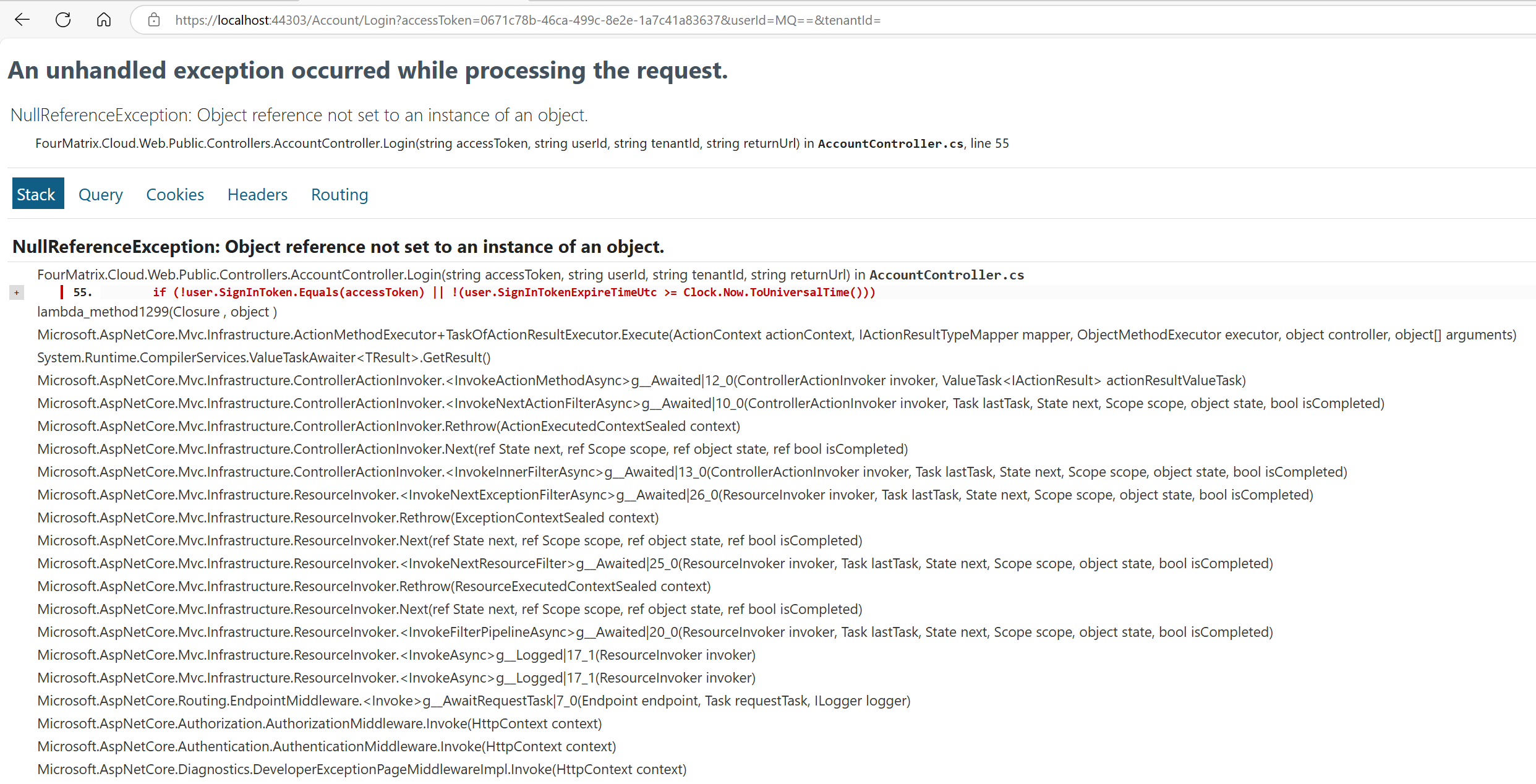
Probably the wrong place to put this, should I be posting this on github?
Markdown is supportedCopy & paste or drag & drop images (max 30 MB per image) -
0
Hi
Is the login endpoint specified on the public website actively running? MVC or Host
Markdown is supportedCopy & paste or drag & drop images (max 30 MB per image) -
0
Yes, everything is running, Web.Host project and Angular site. If I manually then go to localhost:4200 it has actually logged me in, just not on the public site
Markdown is supportedCopy & paste or drag & drop images (max 30 MB per image) -
0
We will check this.
Markdown is supportedCopy & paste or drag & drop images (max 30 MB per image) -
0
Thanks, if it helps, when i press login on the public site, it sends me here: http://localhost:4200/account/login?ss=true&returnUrl=https:%2F%2Flocalhost:44303%2FAccount%2FLogin
It successfully log me into the Angular site by the looks of things but posts me back to the public site and errors here:
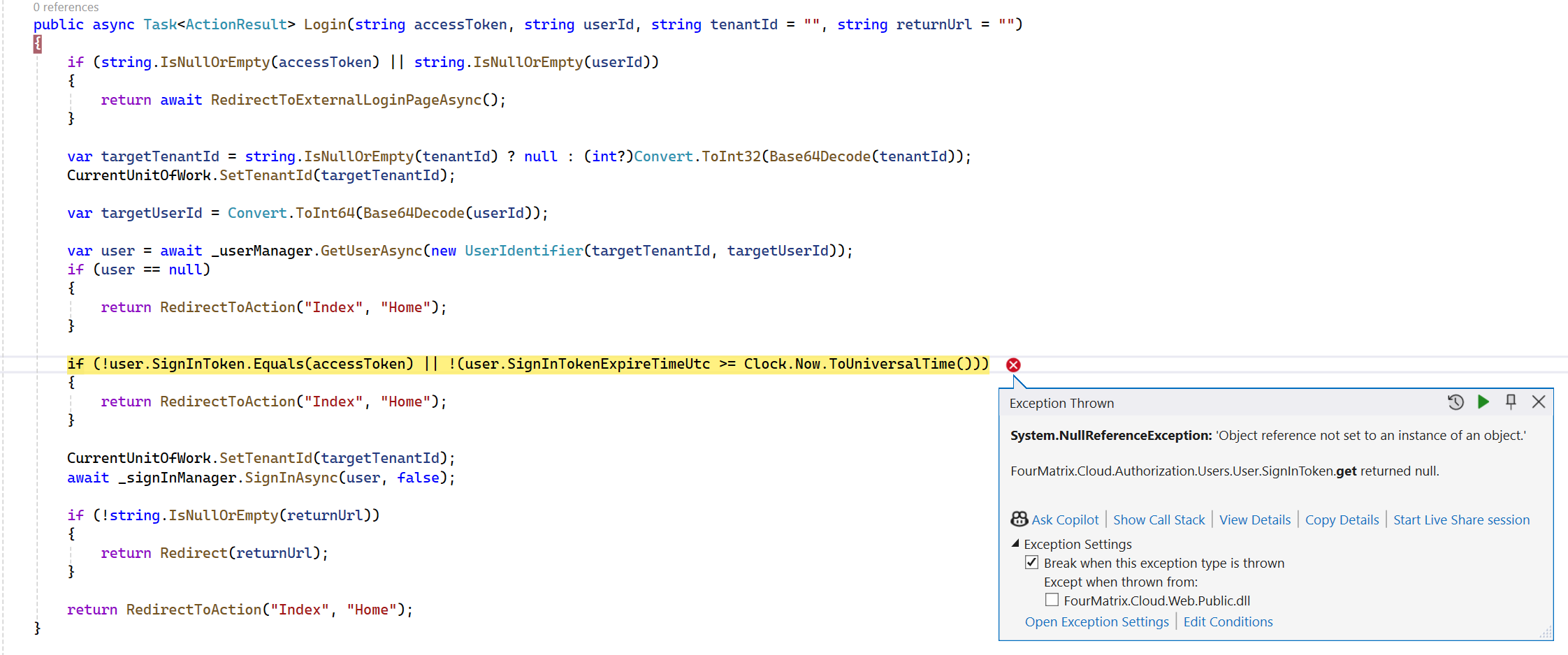
On the AccountController from the public project
The user has a value but user.SignInTokenExpireTimeUtc is null
Markdown is supportedCopy & paste or drag & drop images (max 30 MB per image) -
0
Hi
We did not encounter any problems when we checked this situation. Make sure that the user you are logged in with is an active user. Check that the user is a user created from the panel.
Thank you.
Markdown is supportedCopy & paste or drag & drop images (max 30 MB per image)
