
Hello this is the error i get on image load,
i am loading it under common\images\general folder
i have assigned permissions too for the folder

12 Answer(s)
-
0
Hi,
The attached image is a bit small, can you also share the requested url for this error ?
Thanks.
Markdown is supportedCopy & paste or drag & drop images (max 30 MB per image) -
0
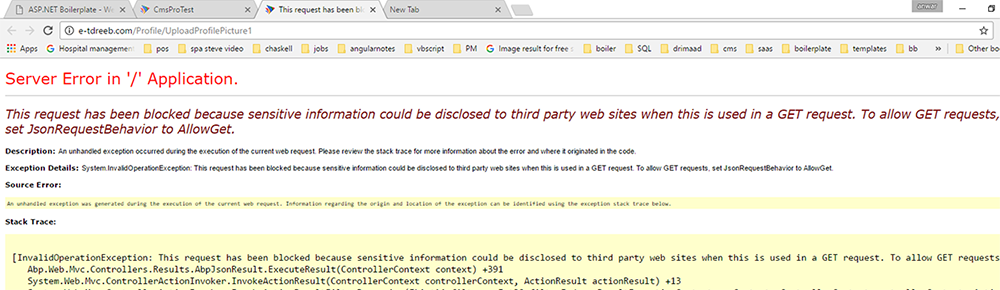
This is the error with the url
 Markdown is supportedCopy & paste or drag & drop images (max 30 MB per image)
 -
0
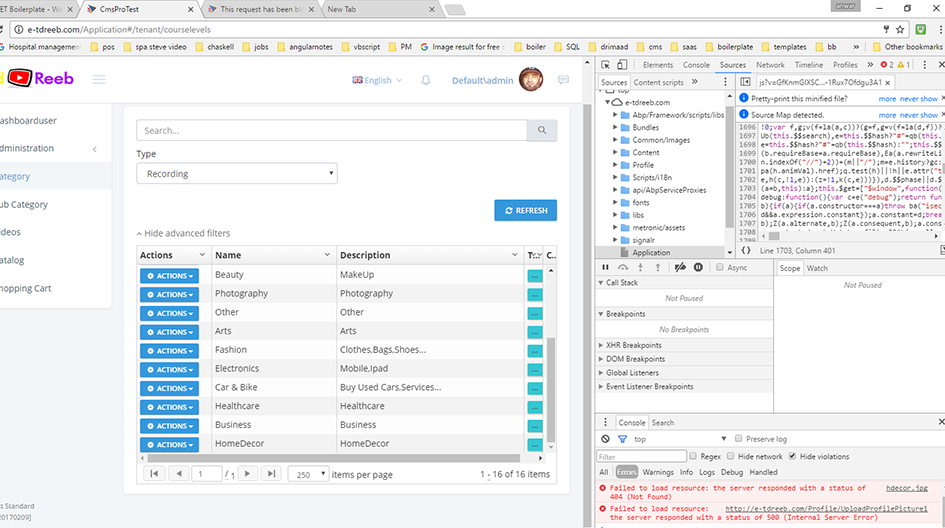
another full image with error
 Markdown is supportedCopy & paste or drag & drop images (max 30 MB per image)
 -
0
Hi,
It seems like you are making a GET request to UploadProfilePicture1 action and it is not allowed. How do you call UploadProfilePicture1 from client side, can you share that code ?
Thanks.
Markdown is supportedCopy & paste or drag & drop images (max 30 MB per image) -
0
Hi
Exactly the same process as profilepicturechange, but here is the code
vm.uploader = new fileUploader({ url: abp.appPath + 'Profile/UploadProfilePicture', headers: { "X-XSRF-TOKEN": abp.security.antiForgery.getToken() }, queueLimit: 1, autoUpload: true, removeAfterUpload: true, filters: [{ name: 'imageFilter', fn: function (item, options) { //File type check var type = '|' + item.type.slice(item.type.lastIndexOf('/') + 1) + '|'; if ('|jpg|jpeg|png|gif|'.indexOf(type) === -1) { abp.message.warn(app.localize('ProfilePicture_Warn_FileType')); return false; }
                    //File size check
                    if (item.size > 1048576) //1MB
                    {
                        abp.message.warn(app.localize('ProfilePicture_Warn_SizeLimit'));
                        return false;
                    }

                    return true;
                }
            }]
        });

        vm.uploader.onSuccessItem = function (fileItem, response, status, headers) {
            if (response.success) {
                var $profilePictureResize = $('#ProfilePictureResize');
                vm.courselevels.image = vm.uploadedFileName;
                var newCanvasHeight = response.result.height * $profilePictureResize.width() / response.result.width;
                $profilePictureResize.height(newCanvasHeight + 'px');

                var profileFilePath = abp.appPath + 'Temp/Downloads/' + response.result.fileName + '?v=' + new Date().valueOf();

                vm.uploadedFileName = fileItem.file.name;

                //    if ($jcropImage) {
                //        $jcropImage.data('Jcrop').destroy();
                //    }

                $profilePictureResize.attr('src', profileFilePath);

            }
        };
Markdown is supportedCopy & paste or drag & drop images (max 30 MB per image) -
0
Hi,
In your code you use "Profile/UploadProfilePicture" but in the error messages it seems like requests are sent to "Profile/UploadProfilePicture1". Do you have any idea where this 1 comes from at the end of UploadProfilePicture1 ?
I think that is the problem.
Markdown is supportedCopy & paste or drag & drop images (max 30 MB per image) -
0
No Brother
i changed the name to UploadProfilePicture1 but the same error UploadProfilePicture1 is a copy of UploadProfilePicture.
So if it would call UploadProfilePicture it should have still worked,
the error is what i attached image earlier.
'This request has been blocked because sensitive information could be disclosed to third party web sites when this is used in a GET request. To allow GET requests, set JsonRequestBehavior to AllowGet.'
Regards
Anwar
Markdown is supportedCopy & paste or drag & drop images (max 30 MB per image) -
0
Please respond to the error JSON
Markdown is supportedCopy & paste or drag & drop images (max 30 MB per image) -
0
Hi,
Can you send your project to <a href="mailto:[email protected]">[email protected]</a> for a faster solution.
Thanks.
Markdown is supportedCopy & paste or drag & drop images (max 30 MB per image) -
0
Hello
I have uploaded only the Application folder where i have updated the UpdateProfilePicture in the profileAppService
and in the courselevels in the web to add the code for uploading using the profileAppService.
As the project size is over 150MB unable to load to gmail. it says it will write to gmail drive,
Regards Anwar
Markdown is supportedCopy & paste or drag & drop images (max 30 MB per image) -
0
i have sent you a email with project files, could not upload the complete project but the code where i made the changes i have sent
Regards Anwar
Markdown is supportedCopy & paste or drag & drop images (max 30 MB per image) -
0
Hi Anwar,
I replied your email. You can decrease size of the project by deleting bin and obj folders. You can also delete everything inside packages folder.
Can you send the project in this way ?
Thanks.
Markdown is supportedCopy & paste or drag & drop images (max 30 MB per image)
