
Where do i setup the email configuration. example my email id is <a href="mailto:[email protected]">[email protected]</a> and pwd is xxx123 so do your have a default setup which copies current server config or do i have to setup email configuration please advise.
currently in the login page when i click email activation it throws server error i
Thanks Anwar
20 Answer(s)
-
0
Hi @avanekar02,
You should login as a host user and go to settings page. You will see email tab on that page.
Configure settings and first save them. After that, you can try to send a test email on that page.
Thanks.
Markdown is supportedCopy & paste or drag & drop images (max 30 MB per image) -
0
i logged in as admin but could not see the email tab
Markdown is supportedCopy & paste or drag & drop images (max 30 MB per image) -
0
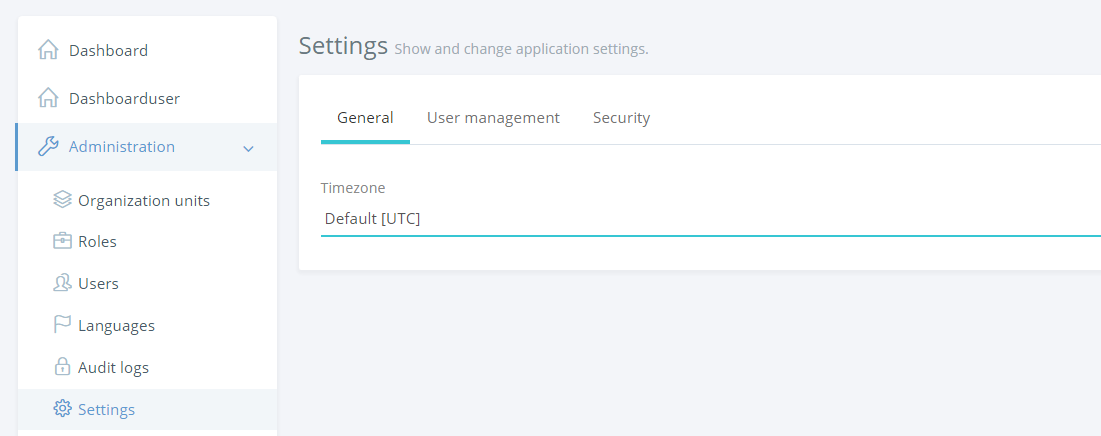
Hello could not find the email tab attached is a screen shot
thanks
 Markdown is supportedCopy & paste or drag & drop images (max 30 MB per image)
 -
0
Hi,
You have been logged in as tenant admin. You should log in as host admin to see eMail tab.
Markdown is supportedCopy & paste or drag & drop images (max 30 MB per image) -
0
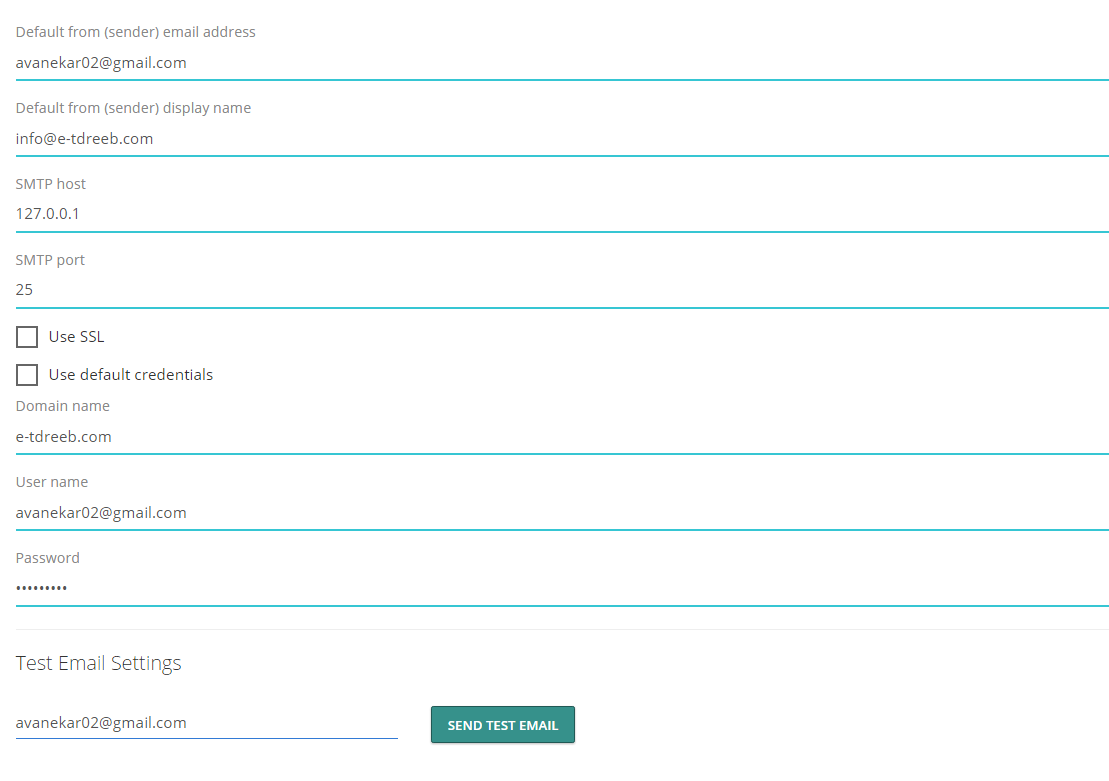
yes, thank you but after setting these details the test email does not fire email i am recieving no email can you please tell me what i am doing wrong.
Regards Anwar
 Markdown is supportedCopy & paste or drag & drop images (max 30 MB per image)
 -
0
i tried domain name with gmail.com also but it does not work, with proper gmail user and password given
Markdown is supportedCopy & paste or drag & drop images (max 30 MB per image) -
0
You should set your SMTP host configurations.
For example:
**SMTP host:**smtp.email_provider_server_name.com Domain Name: email_provider_server_name.com user Name: user_name_of_your_smtp_server **pasword:**pass_of_your_smtp_server
In your screenshoot, there may be something like: smtp.e-tdreeb.com* for SMTP Host.
Markdown is supportedCopy & paste or drag & drop images (max 30 MB per image) -
0
i did set these to gmail
host : smtp.gmail.com domain : gmail.com sender : <a href="mailto:[email protected]">[email protected]</a> to : <a href="mailto:[email protected]">[email protected]</a>also provided the password
but when i click test email it says email sent successfully but i receive no email
thanks
Markdown is supportedCopy & paste or drag & drop images (max 30 MB per image) -
0
Hello
Found that email cannot be send in debug mode so i went to CoreModule and commented the line
IocManager.Register<IEmailSender, NullEmailSender>(DependencyLifeStyle.Transient);
compiled and ran again,
it throws an internal server error says 500
<a class="postlink" href="http://localhost:6240/api/services/app/hostSettings/SendTestEmail">http://localhost:6240/api/services/app/ ... dTestEmail</a>
when i click on this link it shows
{"message":"An error has occurred.","exceptionMessage":"There is an action SendTestEmail defined for api controller app/hostSettings but with a different HTTP Verb. Request verb is GET. It should be Post","exceptionType":"Abp.AbpException","stackTrace":" at Abp.WebApi.Controllers.Dynamic.Selectors.AbpApiControllerActionSelector.GetActionDescriptorByActionName(HttpControllerContext controllerContext, DynamicApiControllerInfo controllerInfo, String actionName) in D:\Halil\GitHub\aspnetboilerplate\src\Abp.Web.Api\WebApi\Controllers\Dynamic\Selectors\AbpApiControllerActionSelector.cs:line 103\r\n at Abp.WebApi.Controllers.Dynamic.Selectors.AbpApiControllerActionSelector.SelectAction(HttpControllerContext controllerContext) in D:\Halil\GitHub\aspnetboilerplate\src\Abp.Web.Api\WebApi\Controllers\Dynamic\Selectors\AbpApiControllerActionSelector.cs:line 56\r\n at System.Web.Http.ApiController.ExecuteAsync(HttpControllerContext controllerContext, CancellationToken cancellationToken)\r\n at Castle.Proxies.DynamicApiController
1Proxy_6.ExecuteAsync_callback(HttpControllerContext controllerContext, CancellationToken cancellationToken)\r\n at Castle.Proxies.Invocations.ApiController_ExecuteAsync_6.InvokeMethodOnTarget()\r\n at Castle.DynamicProxy.AbstractInvocation.Proceed()\r\n at Abp.WebApi.Controllers.Dynamic.Interceptors.AbpDynamicApiControllerInterceptor1.Intercept(IInvocation invocation) in D:\Halil\GitHub\aspnetboilerplate\src\Abp.Web.Api\WebApi\Controllers\Dynamic\Interceptors\AbpDynamicApiControllerInterceptor.cs:line 57\r\n at Castle.DynamicProxy.AbstractInvocation.Proceed()\r\n at Castle.Proxies.DynamicApiController`1Proxy_6.ExecuteAsync(HttpControllerContext controllerContext, CancellationToken cancellationToken)\r\n at System.Web.Http.Dispatcher.HttpControllerDispatcher.Markdown is supportedCopy & paste or drag & drop images (max 30 MB per image) -
0
You don't need to change anything. Just fill the settings. And also try different ports (587 for smtp.gmail) and different SSL options.
Markdown is supportedCopy & paste or drag & drop images (max 30 MB per image) -
0
Hello, changed port to 587 but i still get internal error
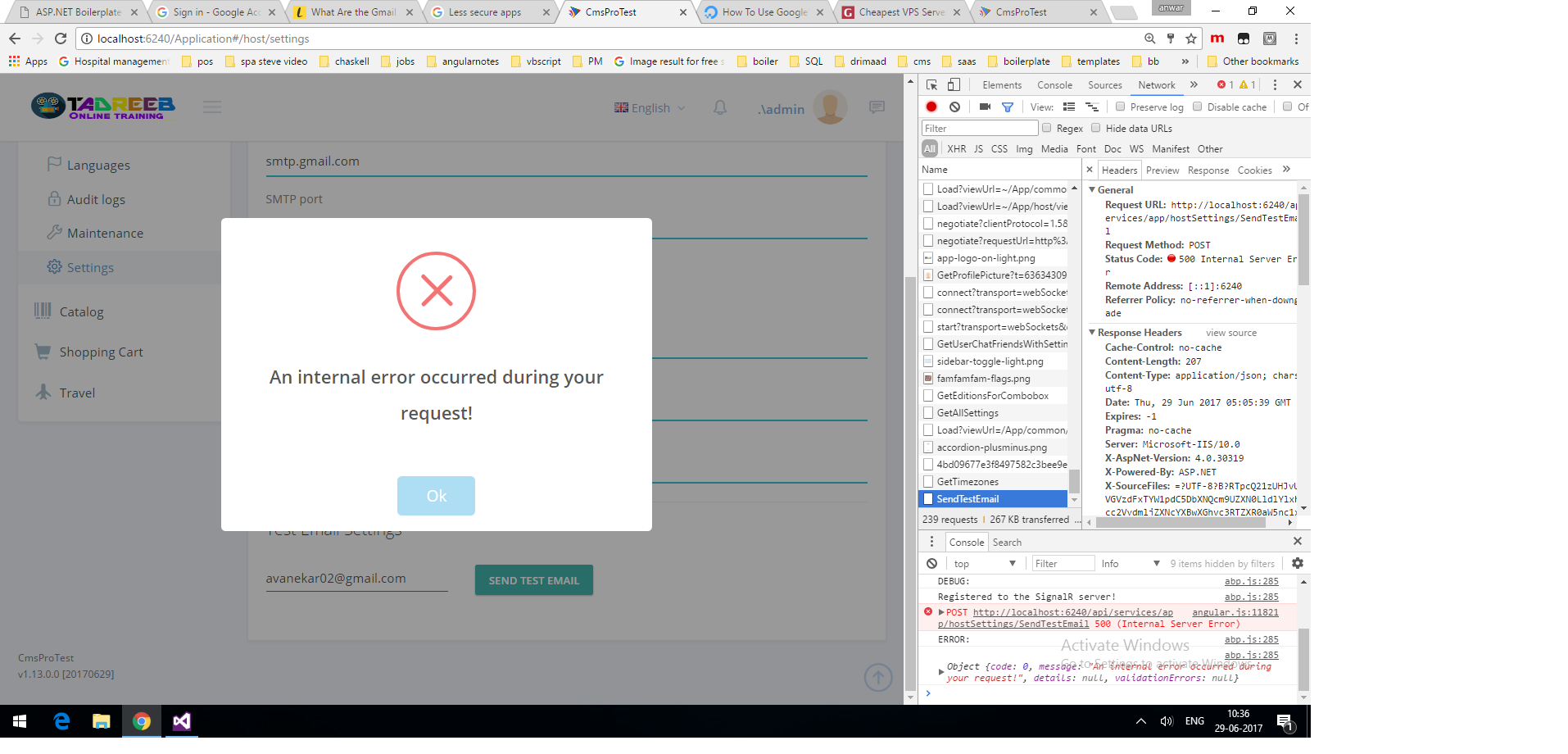
Request URL:http://localhost:6240/api/services/app/hostSettings/SendTestEmail Request Method:POST Status Code:500 Internal Server Error Remote Address:[::1]:6240 Referrer Policy:no-referrer-when-downgrade
Markdown is supportedCopy & paste or drag & drop images (max 30 MB per image) -
0
Hi @avanekar02,
You can check this article to configure your gmail smtp <a class="postlink" href="https://www.lifewire.com/what-are-the-gmail-smtp-settings-1170854">https://www.lifewire.com/what-are-the-g ... gs-1170854</a>.
You can see real error message in Logs.txt file and I think the problem is misconfiguration of smtp settings. Also, you must allow lest secure apps in your gmail account here <a class="postlink" href="https://myaccount.google.com/lesssecureapps">https://myaccount.google.com/lesssecureapps</a>. Otherwise, sending email will not work with gmail.
Thanks.
Markdown is supportedCopy & paste or drag & drop images (max 30 MB per image) -
0
I changed the less secure app in my gmail account but i still get the same error.
Markdown is supportedCopy & paste or drag & drop images (max 30 MB per image) -
0
screen shot of the same
 Markdown is supportedCopy & paste or drag & drop images (max 30 MB per image)
 -
0
My log file is attached
Markdown is supportedCopy & paste or drag & drop images (max 30 MB per image) -
0
This is the log related to email in the logs.txt
System.Net.Mail.SmtpException: The server committed a protocol violation The server response was: at System.Net.Mail.SendMailAsyncResult.End(IAsyncResult result) at System.Net.Mail.SmtpClient.SendMailCallback(IAsyncResult result) --- End of stack trace from previous location where exception was thrown --- at System.Runtime.CompilerServices.TaskAwaiter.ThrowForNonSuccess(Task task) at System.Runtime.CompilerServices.TaskAwaiter.HandleNonSuccessAndDebuggerNotification(Task task) at Abp.Net.Mail.Smtp.SmtpEmailSender.<SendEmailAsync>d__3.MoveNext() in D:\Halil\GitHub\aspnetboilerplate\src\Abp\Net\Mail\Smtp\SmtpEmailSender.cs:line 71 --- End of stack trace from previous location where exception was thrown --- at System.Runtime.CompilerServices.TaskAwaiter.ThrowForNonSuccess(Task task) at System.Runtime.CompilerServices.TaskAwaiter.HandleNonSuccessAndDebuggerNotification(Task task) at Abp.Net.Mail.EmailSenderBase.<SendAsync>d__6.MoveNext() in D:\Halil\GitHub\aspnetboilerplate\src\Abp\Net\Mail\EmailSenderBase.cs:line 51 --- End of stack trace from previous location where exception was thrown --- at System.Runtime.CompilerServices.TaskAwaiter.ThrowForNonSuccess(Task task) at System.Runtime.CompilerServices.TaskAwaiter.HandleNonSuccessAndDebuggerNotification(Task task) at Abp.Net.Mail.EmailSenderBase.<SendAsync>d__4.MoveNext() in D:\Halil\GitHub\aspnetboilerplate\src\Abp\Net\Mail\EmailSenderBase.cs:line 36 --- End of stack trace from previous location where exception was thrown --- at System.Runtime.CompilerServices.TaskAwaiter.ThrowForNonSuccess(Task task) at System.Runtime.CompilerServices.TaskAwaiter.HandleNonSuccessAndDebuggerNotification(Task task) at Abp.Net.Mail.EmailSenderBase.<SendAsync>d__2.MoveNext() in D:\Halil\GitHub\aspnetboilerplate\src\Abp\Net\Mail\EmailSenderBase.cs:line 26 --- End of stack trace from previous location where exception was thrown --- at System.Runtime.CompilerServices.TaskAwaiter.ThrowForNonSuccess(Task task) at System.Runtime.CompilerServices.TaskAwaiter.HandleNonSuccessAndDebuggerNotification(Task task) at System.Runtime.CompilerServices.TaskAwaiter.GetResult() at Samit.CmsProTest.Configuration.Host.HostSettingsAppService.<SendTestEmail>d__21.MoveNext() in E:\CmsProRecTest\Samit.CmsProTest.Application\Configuration\Host\HostSettingsAppService.cs:line 271 --- End of stack trace from previous location where exception was thrown --- at System.Runtime.CompilerServices.TaskAwaiter.ThrowForNonSuccess(Task task) at System.Runtime.CompilerServices.TaskAwaiter.HandleNonSuccessAndDebuggerNotification(Task task) at Abp.Threading.InternalAsyncHelper.<AwaitTaskWithPostActionAndFinally>d__1.MoveNext() in D:\Halil\GitHub\aspnetboilerplate\src\Abp\Threading\InternalAsyncHelper.cs:line 40 --- End of stack trace from previous location where exception was thrown --- at System.Runtime.CompilerServices.TaskAwaiter.ThrowForNonSuccess(Task task) at System.Runtime.CompilerServices.TaskAwaiter.HandleNonSuccessAndDebuggerNotification(Task task) at Abp.Threading.InternalAsyncHelper.<AwaitTaskWithFinally>d__0.MoveNext() in D:\Halil\GitHub\aspnetboilerplate\src\Abp\Threading\InternalAsyncHelper.cs:line 20 --- End of stack trace from previous location where exception was thrown --- at System.Runtime.CompilerServices.TaskAwaiter.ThrowForNonSuccess(Task task) at System.Runtime.CompilerServices.TaskAwaiter.HandleNonSuccessAndDebuggerNotification(Task task) at System.Threading.Tasks.TaskHelpersExtensions.<CastToObject>d__0.MoveNext() --- End of stack trace from previous location where exception was thrown --- at System.Runtime.CompilerServices.TaskAwaiter.ThrowForNonSuccess(Task task) at System.Runtime.CompilerServices.TaskAwaiter.HandleNonSuccessAndDebuggerNotification(Task task) at System.Web.Http.Controllers.ApiControllerActionInvoker.<InvokeActionAsyncCore>d__0.MoveNext() --- End of stack trace from previous location where exception was thrown --- at System.Runtime.CompilerServices.TaskAwaiter.ThrowForNonSuccess(Task task) at System.Runtime.CompilerServices.TaskAwaiter.HandleNonSuccessAndDebuggerNotification(Task task) at Abp.WebApi.Uow.AbpApiUowFilter.<ExecuteActionFilterAsync>d__5.MoveNext() in D:\Halil\GitHub\aspnetboilerplate\src\Abp.Web.Api\WebApi\Uow\AbpApiUowFilter.cs:line 40 --- End of stack trace from previous location where exception was thrown --- at System.Runtime.CompilerServices.TaskAwaiter.ThrowForNonSuccess(Task task) at System.Runtime.CompilerServices.TaskAwaiter.HandleNonSuccessAndDebuggerNotification(Task task) at Abp.WebApi.Validation.AbpApiValidationFilter.<ExecuteActionFilterAsync>d__5.MoveNext() in D:\Halil\GitHub\aspnetboilerplate\src\Abp.Web.Api\WebApi\Validation\AbpApiValidationFilter.cs:line 40 --- End of stack trace from previous location where exception was thrown --- at System.Runtime.CompilerServices.TaskAwaiter.ThrowForNonSuccess(Task task) at System.Runtime.CompilerServices.TaskAwaiter.HandleNonSuccessAndDebuggerNotification(Task task) at Abp.WebApi.Auditing.AbpApiAuditFilter.<ExecuteActionFilterAsync>d__4.MoveNext() in D:\Halil\GitHub\aspnetboilerplate\src\Abp.Web.Api\WebApi\Auditing\AbpApiAuditFilter.cs:line 30 --- End of stack trace from previous location where exception was thrown --- at System.Runtime.CompilerServices.TaskAwaiter.ThrowForNonSuccess(Task task) at System.Runtime.CompilerServices.TaskAwaiter.HandleNonSuccessAndDebuggerNotification(Task task) at System.Web.Http.Controllers.ActionFilterResult.<ExecuteAsync>d__2.MoveNext() --- End of stack trace from previous location where exception was thrown --- at System.Runtime.CompilerServices.TaskAwaiter.ThrowForNonSuccess(Task task) at System.Runtime.CompilerServices.TaskAwaiter.HandleNonSuccessAndDebuggerNotification(Task task) at Abp.WebApi.Security.AntiForgery.AbpAntiForgeryApiFilter.<ExecuteAuthorizationFilterAsync>d__10.MoveNext() in D:\Halil\GitHub\aspnetboilerplate\src\Abp.Web.Api\WebApi\Security\AntiForgery\AbpAntiForgeryApiFilter.cs:line 59 --- End of stack trace from previous location where exception was thrown --- at System.Runtime.CompilerServices.TaskAwaiter.ThrowForNonSuccess(Task task) at System.Runtime.CompilerServices.TaskAwaiter.HandleNonSuccessAndDebuggerNotification(Task task) at Abp.WebApi.Authorization.AbpApiAuthorizeFilter.<ExecuteAuthorizationFilterAsync>d__7.MoveNext() in D:\Halil\GitHub\aspnetboilerplate\src\Abp.Web.Api\WebApi\Authorization\AbpApiAuthorizeFilter.cs:line 55 --- End of stack trace from previous location where exception was thrown --- at System.Runtime.CompilerServices.TaskAwaiter.ThrowForNonSuccess(Task task) at System.Runtime.CompilerServices.TaskAwaiter.HandleNonSuccessAndDebuggerNotification(Task task) at System.Web.Http.Controllers.AuthenticationFilterResult.<ExecuteAsync>d__0.MoveNext() --- End of stack trace from previous location where exception was thrown --- at System.Runtime.CompilerServices.TaskAwaiter.ThrowForNonSuccess(Task task) at System.Runtime.CompilerServices.TaskAwaiter.HandleNonSuccessAndDebuggerNotification(Task task) at System.Web.Http.Controllers.ExceptionFilterResult.<ExecuteAsync>d__0.MoveNext()
Markdown is supportedCopy & paste or drag & drop images (max 30 MB per image) -
0
Hi,
Download the smtp test application and try to send email from this program. If this program sends successfully then configure the same settings for aspnet zero website. If this program fails to send email then you have a configuration problem!
<a class="postlink" href="http://www.alexnolan.net/software/SMTPProber.exe">http://www.alexnolan.net/software/SMTPProber.exe</a>
Markdown is supportedCopy & paste or drag & drop images (max 30 MB per image) -
0
Hello ,
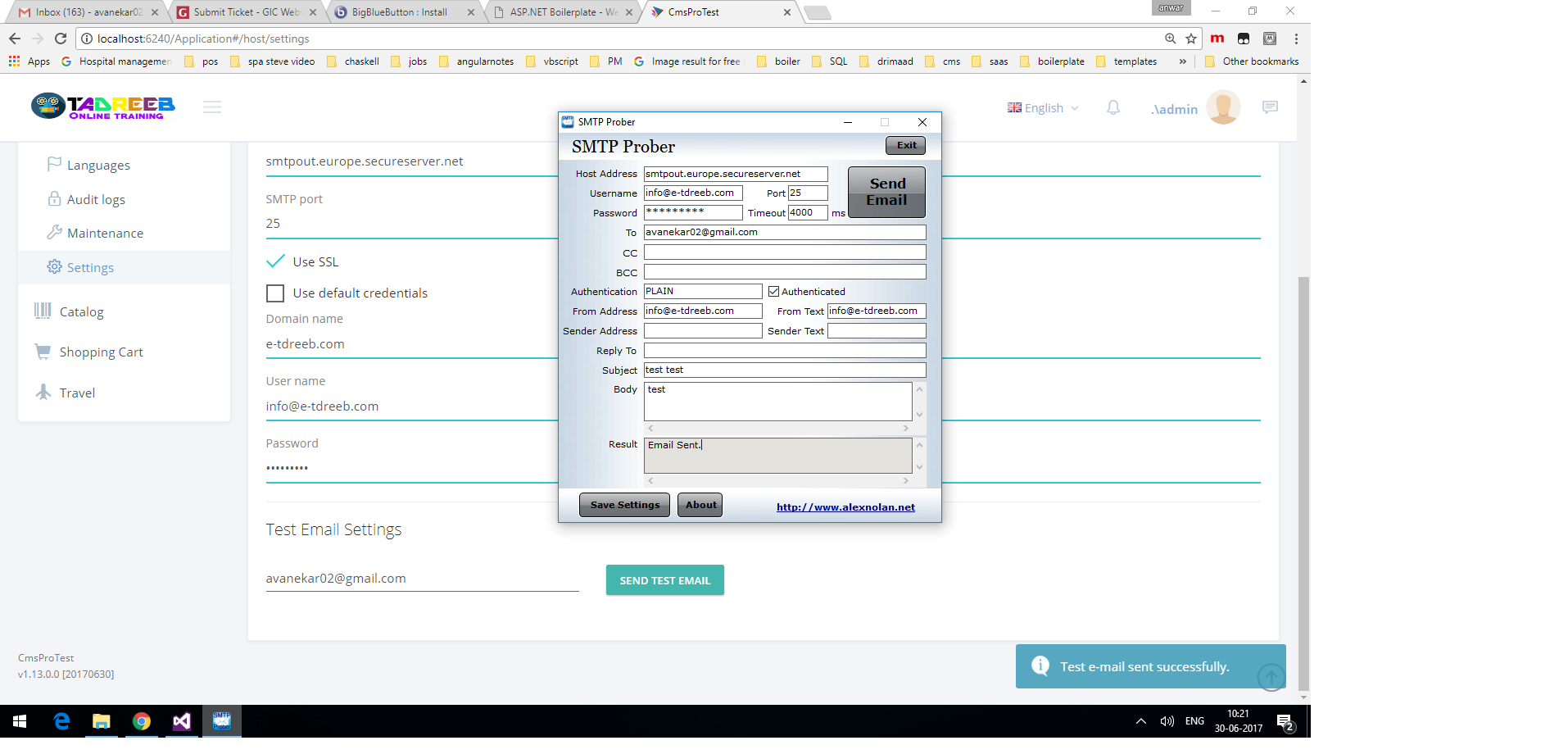
i used the smtp prober app sent by you it send the email when i set the authentication to plain and check the authenticated box.
but when i uncheck the authenticated box it says authentication required.
but it works but the same configuration when addded to our email setup page and send test email is clicked it does not send even though it displays message email sent successfully.
 Markdown is supportedCopy & paste or drag & drop images (max 30 MB per image)
 -
0
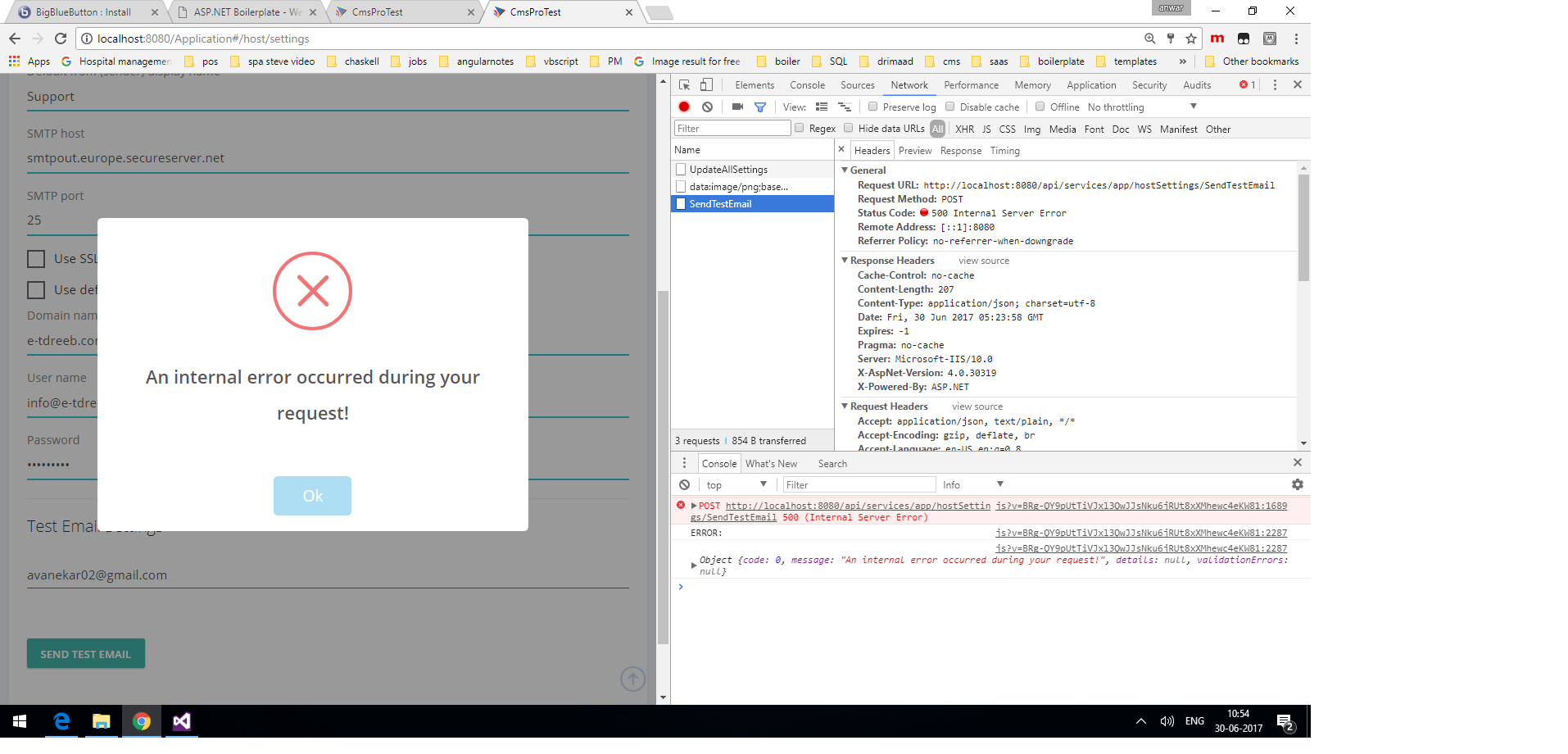
This is the error shown after a brief delay, when published to iis
 Markdown is supportedCopy & paste or drag & drop images (max 30 MB per image)
 -
0
Hi,
In debug model, emails are written to log file, so email settings are not used. Your problem on IIS is probably realted to this one #3036@c3937fb8-047d-4c60-b456-2d2b561dc746.
It seems like IIS does not allow PUT http requests.
Thanks.
Markdown is supportedCopy & paste or drag & drop images (max 30 MB per image)


