
When I published to Azure, swagger ui no longer can access the information from the server. I changed the CorsOrigins setting, is there something else I have to edit?
7 Answer(s)
-
0
What's in the error log?
Markdown is supportedCopy & paste or drag & drop images (max 30 MB per image) -
0
The Audit Logs and Web Logs do not show anything specific to Swagger. However, I do also have an issue with SignalR not working (yes, I am using .Net 4.6.1 and not just core), that error message is:
ERROR 2017-12-26 04:47:05,263 [31 ] e.Diagnostics.ExceptionHandlerMiddleware - An unhandled exception has occurred: The data protection operation was unsuccessful. This may have been caused by not having the user profile loaded for the current thread's user context, which may be the case when the thread is impersonating. System.Security.Cryptography.CryptographicException: The data protection operation was unsuccessful. This may have been caused by not having the user profile loaded for the current thread's user context, which may be the case when the thread is impersonating. at System.Security.Cryptography.ProtectedData.Protect(Byte[] userData, Byte[] optionalEntropy, DataProtectionScope scope) at System.Security.Cryptography.DpapiDataProtector.ProviderProtect(Byte[] userData) at System.Security.Cryptography.DataProtector.Protect(Byte[] userData) at Microsoft.Owin.Security.DataProtection.DpapiDataProtector.Protect(Byte[] userData) at Microsoft.AspNet.SignalR.Infrastructure.DataProtectionProviderProtectedData.Protect(String data, String purpose) at Microsoft.AspNet.SignalR.PersistentConnection.ProcessNegotiationRequest(HostContext context) at Microsoft.AspNet.SignalR.PersistentConnection.ProcessRequest(HostContext context) at Microsoft.AspNet.SignalR.Hubs.HubDispatcher.ProcessRequest(HostContext context) at Microsoft.AspNet.SignalR.PersistentConnection.ProcessRequest(IDictionary
2 environment) at Microsoft.AspNet.SignalR.Owin.Middleware.HubDispatcherMiddleware.Invoke(IOwinContext context) at Microsoft.Owin.Infrastructure.OwinMiddlewareTransition.Invoke(IDictionary2 environment) at Microsoft.Owin.Mapping.MapMiddleware.<Invoke>d__0.MoveNext() --- End of stack trace from previous location where exception was thrown --- at System.Runtime.CompilerServices.TaskAwaiter.ThrowForNonSuccess(Task task) at System.Runtime.CompilerServices.TaskAwaiter.HandleNonSuccessAndDebuggerNotification(Task task) at Microsoft.AspNetCore.Owin.WebSocketAcceptAdapter.<>c__DisplayClass6_0.<<AdaptWebSockets>b__0>d.MoveNext() --- End of stack trace from previous location where exception was thrown --- at System.Runtime.CompilerServices.TaskAwaiter.ThrowForNonSuccess(Task task) at System.Runtime.CompilerServices.TaskAwaiter.HandleNonSuccessAndDebuggerNotification(Task task) at Microsoft.AspNetCore.Localization.RequestLocalizationMiddleware.<Invoke>d__4.MoveNext() --- End of stack trace from previous location where exception was thrown --- at System.Runtime.CompilerServices.TaskAwaiter.ThrowForNonSuccess(Task task) at System.Runtime.CompilerServices.TaskAwaiter.HandleNonSuccessAndDebuggerNotification(Task task) at IdentityServer4.Hosting.IdentityServerMiddleware.<Invoke>d__3.MoveNext() --- End of stack trace from previous location where exception was thrown --- at System.Runtime.CompilerServices.TaskAwaiter.ThrowForNonSuccess(Task task) at System.Runtime.CompilerServices.TaskAwaiter.HandleNonSuccessAndDebuggerNotification(Task task) at System.Runtime.CompilerServices.TaskAwaiter.ValidateEnd(Task task) at Microsoft.AspNetCore.Authentication.AuthenticationMiddleware.<Invoke>d__6.MoveNext() --- End of stack trace from previous location where exception was thrown --- at System.Runtime.CompilerServices.TaskAwaiter.ThrowForNonSuccess(Task task) at System.Runtime.CompilerServices.TaskAwaiter.HandleNonSuccessAndDebuggerNotification(Task task) at Microsoft.AspNetCore.Cors.Infrastructure.CorsMiddleware.<Invoke>d__7.MoveNext() --- End of stack trace from previous location where exception was thrown --- at System.Runtime.CompilerServices.TaskAwaiter.ThrowForNonSuccess(Task task) at System.Runtime.CompilerServices.TaskAwaiter.HandleNonSuccessAndDebuggerNotification(Task task) at IdentityServer4.Hosting.BaseUrlMiddleware.<Invoke>d__3.MoveNext() --- End of stack trace from previous location where exception was thrown --- at System.Runtime.CompilerServices.TaskAwaiter.ThrowForNonSuccess(Task task) at System.Runtime.CompilerServices.TaskAwaiter.HandleNonSuccessAndDebuggerNotification(Task task) at Abp.AspNetZeroCore.Web.Authentication.JwtBearer.JwtTokenMiddleware.<>c__DisplayClass0_0.<<UseJwtTokenMiddleware>b__0>d.MoveNext() --- End of stack trace from previous location where exception was thrown --- at System.Runtime.CompilerServices.TaskAwaiter.ThrowForNonSuccess(Task task) at System.Runtime.CompilerServices.TaskAwaiter.HandleNonSuccessAndDebuggerNotification(Task task) at Abp.AspNetZeroCore.Web.Authentication.JwtBearer.JwtTokenMiddleware.<>c__DisplayClass0_0.<<UseJwtTokenMiddleware>b__0>d.MoveNext() --- End of stack trace from previous location where exception was thrown --- at System.Runtime.CompilerServices.TaskAwaiter.ThrowForNonSuccess(Task task) at System.Runtime.CompilerServices.TaskAwaiter.HandleNonSuccessAndDebuggerNotification(Task task) at System.Runtime.CompilerServices.TaskAwaiter.ValidateEnd(Task task) at Microsoft.AspNetCore.Authentication.AuthenticationMiddleware.<Invoke>d__6.MoveNext() --- End of stack trace from previous location where exception was thrown --- at System.Runtime.CompilerServices.TaskAwaiter.ThrowForNonSuccess(Task task) at System.Runtime.CompilerServices.TaskAwaiter.HandleNonSuccessAndDebuggerNotification(Task task) at Microsoft.AspNetCore.Diagnostics.ExceptionHandlerMiddleware.<Invoke>d__6.MoveNext(Markdown is supportedCopy & paste or drag & drop images (max 30 MB per image) -
0
Hi,
For SignalR, can you try this #3783@6f1d9bc9-04fc-44e2-99d3-85040ddbe290 ? For swagger, what is the behaviour on the swagger UI ? Can you share a screenshot ?
Markdown is supportedCopy & paste or drag & drop images (max 30 MB per image) -
0
When I go to the Swagger UI page, I just get this error:
Can't read from server. It may not have the appropriate access-control-origin settings.
By the way, the article you gave me for SignalR worked! For anyone having the same problem... Add WEBSITE_LOAD_USER_PROFILE = 1 to your App Settings on your Web.Host App Service in Azure
Markdown is supportedCopy & paste or drag & drop images (max 30 MB per image) -
0
As it turns out... I am only experiencing this issue in Microsoft Edge... it works in Chrome. I figured this out when I read another post which suggested that the Login didn't work in IE... I also have that issue... so I tried Chrome and it worked so then I also tried going to my API page and it worked.
Markdown is supportedCopy & paste or drag & drop images (max 30 MB per image) -
0
Thanks @brallierc,
We will check the issue with IE, <a class="postlink" href="https://github.com/aspnetzero/aspnet-zero-core/issues/696">https://github.com/aspnetzero/aspnet-ze ... issues/696</a>.
Markdown is supportedCopy & paste or drag & drop images (max 30 MB per image) -
0
Hi @brallierc, I tried it in edge with no errors? Could it be about edge version?
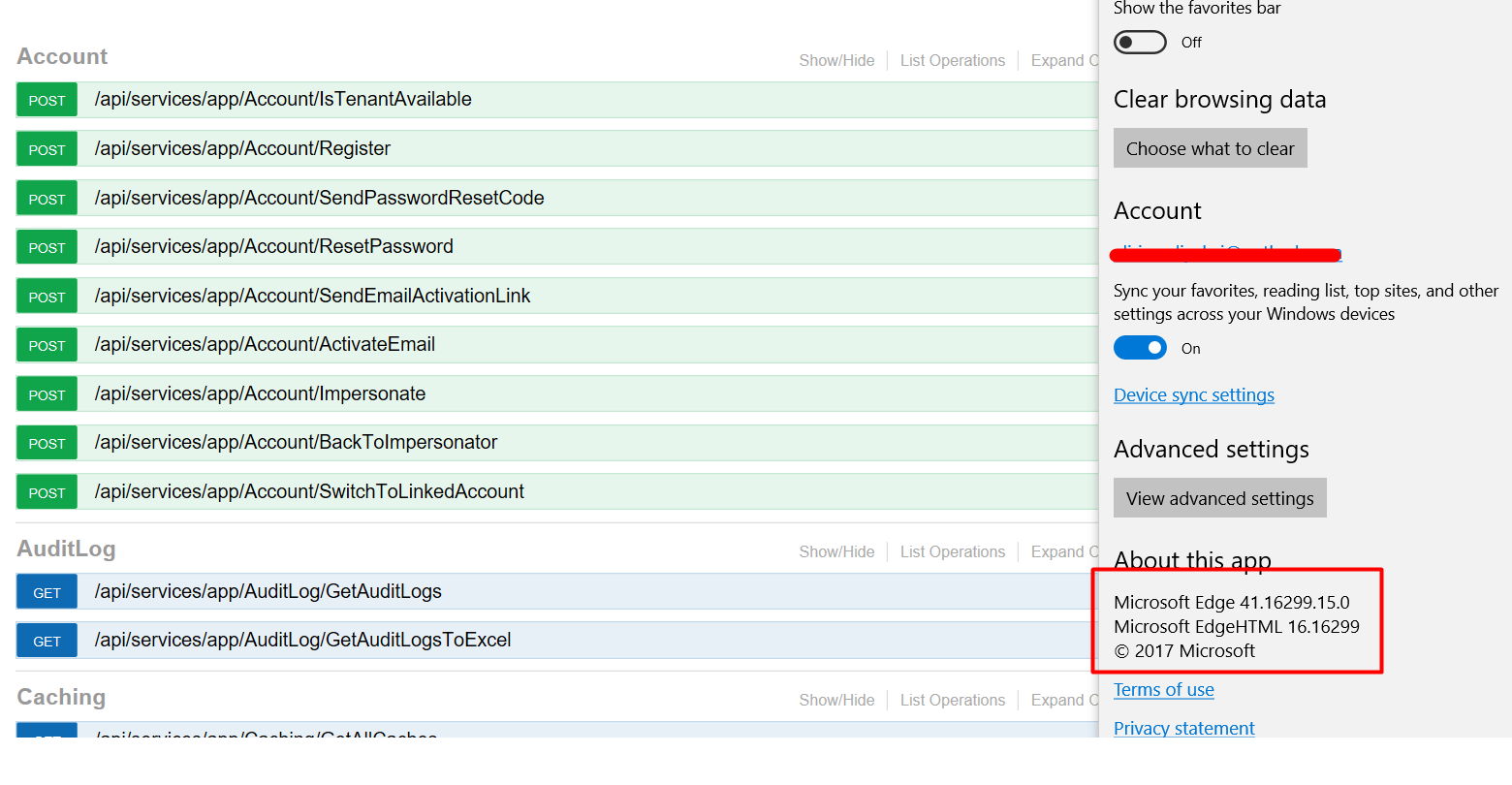 Markdown is supportedCopy & paste or drag & drop images (max 30 MB per image)


