
Hello. I'm trying to enable social login buttons for Google and Facebook. I have registered my app and have my authentication keys in appsettings.json and set "IsEnabled": "true". But GetExternalAuthenticationProviders() in TokenAuthController returns 0.
I can see that ConfigureExternalAuthProviders() in GlobalOpinionsWebHostModule class is adding my providers to the list when the solution starts up.
So why can _externalAuthConfiguration.Providers in this code return 0?
[HttpGet] public List<ExternalLoginProviderInfoModel> GetExternalAuthenticationProviders() { return ObjectMapper.Map<List<ExternalLoginProviderInfoModel>>(_externalAuthConfiguration.Providers); }
Is there something I've forgotten? I'm using the Angular version.
26 Answer(s)
-
0
Hi,
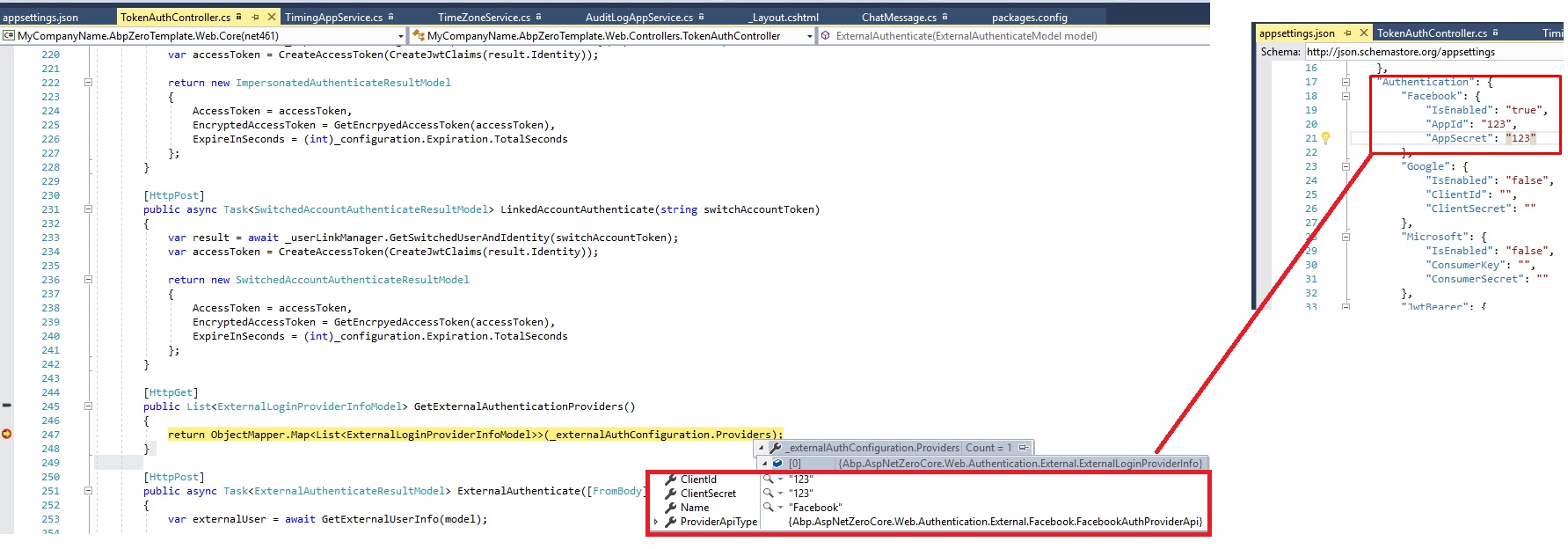
The only thing you might be missing can be appsettings.production.jsonand appsettings.Staging.json Sometimes developers forget that they are on production or stating servers. And they don't configure those settings files. You can see in the below pic, I just set appsettings.json and in debugger attached mode I see the values. [attachment=0:7twiy9l8]social-auth.jpg[/attachment:7twiy9l8]
 Markdown is supportedCopy & paste or drag & drop images (max 30 MB per image)
 -
0
No, I have not forgotten it.
ConfigureExternalAuthProviders() in GlobalOpinionsWebHostModule class is adding my providers to the list when the solution starts up. It must be something else. Where is the code that fills providers in _externalAuthConfiguration.Providers?Markdown is supportedCopy & paste or drag & drop images (max 30 MB per image) -
0
You need to be tenant to see social logins. Don't use HOST
Markdown is supportedCopy & paste or drag & drop images (max 30 MB per image) -
0
<cite>alper: </cite> You need to be tenant to see social logins. Don't use HOST
I don't understand what you mean. What do you mean you need to be a tenant? When I run in debugger attached mode, _externalAuthConfiguration.Providers returns 0;
Markdown is supportedCopy & paste or drag & drop images (max 30 MB per image) -
0
Did you select a tenant on the Login page?
Markdown is supportedCopy & paste or drag & drop images (max 30 MB per image) -
0
<cite>aaron: </cite> Did you select a tenant on the Login page?
I have disabled MultiTenancy, so this is not an option.
Markdown is supportedCopy & paste or drag & drop images (max 30 MB per image) -
0
Which version of ASP.NET Zero are you on? That was fixed in v5.1.0.
Markdown is supportedCopy & paste or drag & drop images (max 30 MB per image) -
0
<cite>aaron: </cite> Which version of ASP.NET Zero are you on? That was fixed in v5.1.0.
It says v5.0.0.0 but I just upgraded all my nuget packages , and the version did'nt change.
Markdown is supportedCopy & paste or drag & drop images (max 30 MB per image) -
0
ASP.NET Zero refers to the solution that you download, not the NuGet packages.
How to migrate existing solution: https://github.com/aspnetzero/aspnet-zero/issues/96#issuecomment-268093697
Markdown is supportedCopy & paste or drag & drop images (max 30 MB per image) -
0
Was this a major bugfix or can I get the code and paste it into my solution? It is importent for me to solve this issue.
Markdown is supportedCopy & paste or drag & drop images (max 30 MB per image) -
0
<cite>aaron: </cite> You can refer to this commit: 0c71eef
Thanks, but my problem is in the api side. If you read my first post I have described my problem. If I debug I don't get the same result as Alper. His solution returns a list of ExternalLoginProviders from TokenAuthController. But my solution returns zero even if I have configured my provider settings in appsettings.json.
Markdown is supportedCopy & paste or drag & drop images (max 30 MB per image) -
0
<cite>aaron: </cite> Then you need this commit too: b0b7919
My solution already have this code. And when I debug, I can see this code in WebHostModule work. When it starts up it adds the authentication providers to the list in ConfigureExternalAuthProviders() method. But when the method GetExternalAuthenticationProviders() in the TokenAuthController class is calling this code, it returns 0; I don't get any exceptions.
Where is the code that is going to fill _externalAuthConfiguration.Providers in this method?
[HttpGet] public List<ExternalLoginProviderInfoModel> GetExternalAuthenticationProviders() { return ObjectMapper.Map<List<ExternalLoginProviderInfoModel>>(_externalAuthConfiguration.Providers); }
Markdown is supportedCopy & paste or drag & drop images (max 30 MB per image) -
0
Where is the code that is going to fill _externalAuthConfiguration.Providers in this method?
As you have identified:
ConfigureExternalAuthProviders() in GlobalOpinionsWebHostModule class is adding my providers to the list when the solution starts up.
Markdown is supportedCopy & paste or drag & drop images (max 30 MB per image) -
0
When the api-solution starts up, PostInitialize() in WebHostModule calls ConfigureExternalAuthProviders() and adds the ExternalLoginProviders to the list. But GetExternalAuthenticationProviders() in TokenAuthController does'nt get called before the Angular solution loads the login page. And then it don't hit the code in the WebHostModule.
The interface IExternalAuthConfiguration is injected into TokenAuthController, but I can't find out how the code that resolves the mapping to this interface is :(
Markdown is supportedCopy & paste or drag & drop images (max 30 MB per image) -
0
@ismcagdas, maybe you can help me with this problem? :)
Markdown is supportedCopy & paste or drag & drop images (max 30 MB per image) -
0
But GetExternalAuthenticationProviders() in TokenAuthController does'nt get called before the Angular solution loads the login page. And then it don't hit the code in the WebHostModule.
It's called in login.service.ts.
Markdown is supportedCopy & paste or drag & drop images (max 30 MB per image) -
0
Yes, I know that. But what I'm trying to say is that GetExternalAuthenticationProviders() in TokenAuthController can't access the code in the WebHostModule in my solution.
Markdown is supportedCopy & paste or drag & drop images (max 30 MB per image) -
0
Both resolve/inject the same singleton instance.
Markdown is supportedCopy & paste or drag & drop images (max 30 MB per image) -
0
And TokenAuthController has not been changed since version 5.0.0?
Markdown is supportedCopy & paste or drag & drop images (max 30 MB per image) -
0
Yeah. You have access to the source code and commit history.
Markdown is supportedCopy & paste or drag & drop images (max 30 MB per image) -
0
It is also up to date. I have no idea what may be wrong :?
Markdown is supportedCopy & paste or drag & drop images (max 30 MB per image) -
0
@affern are you trying with a Tenant ? Becaue those buttons are not visible for Host.
Markdown is supportedCopy & paste or drag & drop images (max 30 MB per image) -
0
<cite>ismcagdas: </cite> @affern are you trying with a Tenant ? Becaue those buttons are not visible for Host.
@ismcagdas, I found the cause of the bug. I have added new properties to the User class, like Gender, Birthyear, CountryId and Address. My users need to registrate these values in my registration page. In the new version the class ExternalAuthUserInfo is an AspNetZero type, so I continued with the old ExternalAuthUserInfo class and added my own properties to this the class. But this is why I get the bug. If I use the aspnetzero type it works fine. But how should I add my properties to the ExternalAuthUserInfo? From this example (<a class="postlink" href="https://aspnetzero.com/Documents/Extending-Existing-Entities#add-new-property-to-user">https://aspnetzero.com/Documents/Extend ... ty-to-user</a>) it does'nt explain how we add properties for register page and to ExternalAuthUserInfo for social logins.
Markdown is supportedCopy & paste or drag & drop images (max 30 MB per image)


