
Hi -
I am trying to integrate Okta in Abp using OpenId and below is the documentation :
https://developer.okta.com/docs/api/resources/oidc
After going through the documentation for OpenID for Abp here are my questions :
"OpenId": { "IsEnabled": "true", "ClientId": "", "Authority": "", "LoginUrl": "" }
- What should be the Authority and Login URL in case of Okta ?
- How do I activate External authentication, I don't see the code bieng executed even if I make OpenId IsEnabled true ?
- I see the code _appConfiguration["Authentication:OpenId:ClientSecret"], but don't see any setting in the appsetting.json . Do I need to pass the client secret ever if so when should I need this
I am kind of stuck and need your help ASAP. Thanks in Advance.
12 Answer(s)
-
0
Hi @maharatha
Those information must be provided by Okta. If you have an Okta account, there should be a place which you can see those information.
On AspNet Zero side, if you enable OpenIdConnect in appsettings.json file and fill the values, there must be an icon on the login page and it should work without any extra configuration.
Markdown is supportedCopy & paste or drag & drop images (max 30 MB per image) -
0
I was able to integrate using the below information : https://{myoktadomain}/.well-known/openid-configuration and use authorization_endpoint as LoginUrl and issuer as Authority.
Now I am having below issue :
{ "model": { "authProvider": "OpenIdConnect", "providerKey": "xxxxxxxxxxxxxxxxxxxxxxxx", "providerAccessCode": "ceyJraWQiOiJBQjQ3eE1VZVp5N2FLTEpnalhfc0pxeXdZNHBXVDF2NFZDbWNfOG1mMU13IiwiYWxnIjoiUlMyNTYifQ.eyJzdWIiOiIwMHUxcTdybDBPTzF3bUY4WjM1NiIsInZlciI6MSwiaXNzIjoiaHR0cHM6Ly9jYXN0YW5kY3Jldy1kZXYub2t0YS5jb20iLCJhdWQiOiIwb2EyaXI4b2xPakQ1YlgzQTM1NiIsImlhdCI6MTUzOTuY0NDMzOSwiZXhwIjoxNTM5NjQ3OTM5LCJqdGkiOiJJRC4wNXBxbTNUbW5nMS1YQVo2alVIOEhuQ3VPbE9ucFRFbVc1TGdBVGZweEVJIiwiYW1yIjpbInB3ZCJdLCJpZHAiOiIwMG9panRnMDFtOEVXY1FTRTM1NSIsIm5vbmNlIjoieUJ3cGdocEFDekZHMllvbDA3cUNYMXVPYWNzUUx5UjhweURXdk5zdSIsImF1dGhfdGltZSI6MTUzOTY0NDIyMn0.HMEe32StW5IAfiWZU0s0VNlkJoxiuG1C87knX9LLZmesg5ykhdDG7232NuolsdSHRNqzar9HH4u-phB_BiKMo04cFcVDNnflZuruf4YTR77C_UN3j5xjSGJQU9xZifyFlfJHGUUClUBcPjyJSk3246hRxgSOk5qR10Yb0kG0QtkWkaUJd39A-7wsDZ4zoCkRTtJaDvmAZyY5VTmuPijryLVSiEcX6cAoevHJZe3bolfUtlwu596amS2pWHUBbWIgKz2IydEveAiHhhL9LRoBt9A6akJ_Pu_QP04XfV7xZZwzVr39izPKkealdMtzFNCsGgWzDd1wTaXTtw6jDfs1zSg", "returnUrl": null, "singleSignIn": false } }
Error State :
System.InvalidOperationException: Sequence contains no matching element
at System.Linq.Enumerable.First[TSource](IEnumerable
1 source, Func2 predicate)at Abp.AspNetZeroCore.Web.Authentication.External.OpenIdConnect.OpenIdConnectAuthProviderApi.GetUserInfo(String token)
at CASTANDCREW.ETC.Web.Controllers.TokenAuthController.GetExternalUserInfo(ExternalAuthenticateModel model) in C:\CASTANDCREW\NewETC\aspnet-core\src\CASTANDCREW.ETC.Web.Core\Controllers\TokenAuthController.cs:line 384
at CASTANDCREW.ETC.Web.Controllers.TokenAuthController.ExternalAuthenticate(ExternalAuthenticateModel model) in C:\CASTANDCREW\NewETC\aspnet-core\src\CASTANDCREW.ETC.Web.Core\Controllers\TokenAuthController.cs:line 266
at lambda_method(Closure , Object )
at Microsoft.AspNetCore.Mvc.Internal.ActionMethodExecutor.AwaitableObjectResultExecutor.Execute(IActionResultTypeMapper mapper, ObjectMethodExecutor executor, Object controller, Object[] arguments)
at Microsoft.AspNetCore.Mvc.Internal.ControllerActionInvoker.InvokeActionMethodAsync()
at Microsoft.AspNetCore.Mvc.Internal.ControllerActionInvoker.InvokeNextActionFilterAsync()
What am i missing?
Markdown is supportedCopy & paste or drag & drop images (max 30 MB per image) -
0
Any idea ? This seems more of Abp issue than of Okta issue.
Markdown is supportedCopy & paste or drag & drop images (max 30 MB per image) -
0
Can someone please help me on this ? I am kind of stuck and unable to proceed further
Markdown is supportedCopy & paste or drag & drop images (max 30 MB per image) -
0
@maharatha
Could you check if okta returns "name", "unique_name" and "aud" claims.
You can replace the
_externalAuthManager.GetUserInfomethod in TokenAuthController with the below one;public class OpenIdConnectAuthProviderApi : ExternalAuthProviderApiBase { public const string Name = "OpenIdConnect"; public override async Task<ExternalAuthUserInfo> GetUserInfo(string token) { var issuer = ProviderInfo.AdditionalParams["Authority"]; if (string.IsNullOrEmpty(issuer)) { throw new ApplicationException("Authentication:OpenId:Issuer configuration is required."); } var configurationManager = new ConfigurationManager<OpenIdConnectConfiguration>( issuer + "/.well-known/openid-configuration", new OpenIdConnectConfigurationRetriever(), new HttpDocumentRetriever()); var validatedToken = await ValidateToken(token, issuer, configurationManager); var fullName = validatedToken.Claims.First(c => c.Type == "name").Value; var email = validatedToken.Claims.First(c => c.Type == "unique_name").Value; var fullNameParts = fullName.Split(' '); return new ExternalAuthUserInfo { Provider = Name, ProviderKey = validatedToken.Subject, Name = fullNameParts[0], Surname = fullNameParts[1], EmailAddress = email }; } private async Task<JwtSecurityToken> ValidateToken( string token, string issuer, IConfigurationManager<OpenIdConnectConfiguration> configurationManager, CancellationToken ct = default(CancellationToken)) { if (string.IsNullOrEmpty(token)) { throw new ArgumentNullException(nameof(token)); } if (string.IsNullOrEmpty(issuer)) { throw new ArgumentNullException(nameof(issuer)); } var discoveryDocument = await configurationManager.GetConfigurationAsync(ct); var signingKeys = discoveryDocument.SigningKeys; var validationParameters = new TokenValidationParameters { ValidateIssuer = true, ValidIssuer = issuer, ValidateIssuerSigningKey = true, IssuerSigningKeys = signingKeys, ValidateLifetime = true, ClockSkew = TimeSpan.FromMinutes(5), ValidateAudience = false }; var principal = new JwtSecurityTokenHandler().ValidateToken(token, validationParameters, out var rawValidatedToken); //Validate clientId if (ProviderInfo.ClientId != principal.Claims.First(c => c.Type == "aud").Value) { throw new ApplicationException("ClientId couldn't verified."); } return (JwtSecurityToken)rawValidatedToken; } }Markdown is supportedCopy & paste or drag & drop images (max 30 MB per image) -
0
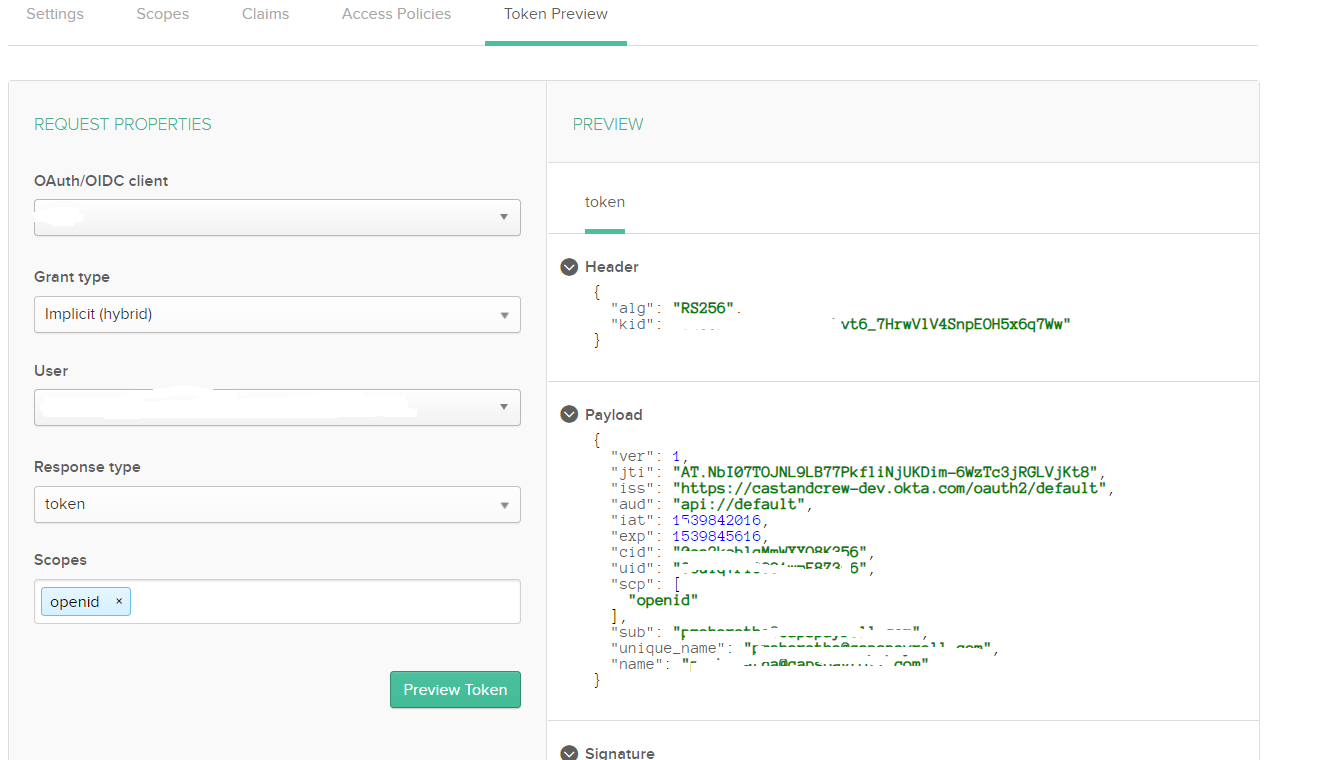
Above the token preview which Okta is passing. I have added the name and unique_name claims.
Still I am getting the same error.
regarding the above code, can you provide more details on how to implement it. I have the same question regarding the GetuserInfo as asked by the previous user, how am I going to instatiate the providerinfo.
If this doesn't work I will send you my project.
Markdown is supportedCopy & paste or drag & drop images (max 30 MB per image) -
0
You can just use GetUserInfo method I have shared for testing purpose.
Markdown is supportedCopy & paste or drag & drop images (max 30 MB per image) -
0
Ok I figured out partially :
` public class OpenIdConnectAuthProviderApi : ExternalAuthProviderApiBase { private readonly IIocResolver _iocResolver; private readonly IExternalAuthConfiguration _externalAuthConfiguration;
    public OpenIdConnectAuthProviderApi(IIocResolver iocResolver, IExternalAuthConfiguration externalAuthConfiguration)
    {
        _iocResolver = iocResolver;
        _externalAuthConfiguration = externalAuthConfiguration;
    }

    public const string Name = "OpenIdConnect";

    public  async Task<ExternalAuthUserInfo> GetUserInfo( string provider, string token )
    {
        ExternalLoginProviderInfo providerInfo = _externalAuthConfiguration.Providers.FirstOrDefault<ExternalLoginProviderInfo>((Func<ExternalLoginProviderInfo, bool>)(p => p.Name == provider));
        var issuer = providerInfo.AdditionalParams["Authority"];
        if (string.IsNullOrEmpty(issuer))
        {
            throw new ApplicationException("Authentication:OpenId:Issuer configuration is required.");
        }

        var configurationManager = new ConfigurationManager<OpenIdConnectConfiguration>(
            issuer + "/.well-known/openid-configuration",
            new OpenIdConnectConfigurationRetriever(),
            new HttpDocumentRetriever());

        var validatedToken = await ValidateToken(token, issuer, configurationManager,providerInfo);

        var fullName = validatedToken.Claims.First(c => c.Type == "fullname").Value;
        var email = validatedToken.Claims.First(c => c.Type == "unique_name").Value;
        var fullNameParts = fullName.Split('.');

        return new ExternalAuthUserInfo
        {
            Provider = Name,
            ProviderKey = validatedToken.Subject,
            Name = fullNameParts[0],
            Surname = fullNameParts[1],
            EmailAddress = email
        };
    }

    private async Task<JwtSecurityToken> ValidateToken(
        string token,
        string issuer,
        IConfigurationManager<OpenIdConnectConfiguration> configurationManager,
        ExternalLoginProviderInfo providerInfo,
        CancellationToken ct = default(CancellationToken))
    {
        if (string.IsNullOrEmpty(token))
        {
            throw new ArgumentNullException(nameof(token));
        }

        if (string.IsNullOrEmpty(issuer))
        {
            throw new ArgumentNullException(nameof(issuer));
        }

        var discoveryDocument = await configurationManager.GetConfigurationAsync(ct);
        var signingKeys = discoveryDocument.SigningKeys;

        var validationParameters = new TokenValidationParameters
        {
            ValidateIssuer = true,
            ValidIssuer = issuer,
            ValidateIssuerSigningKey = true,
            IssuerSigningKeys = signingKeys,
            ValidateLifetime = true,
            ClockSkew = TimeSpan.FromMinutes(5),
            ValidateAudience = false
        };

        var principal = new JwtSecurityTokenHandler().ValidateToken(token, validationParameters, out var rawValidatedToken);
        //Validate clientId
        if (providerInfo.ClientId != principal.Claims.First(c => c.Type == "aud").Value)
        {
            throw new ApplicationException("ClientId couldn't verified.");
        }

        return (JwtSecurityToken)rawValidatedToken;
    }


    public IDisposableDependencyObjectWrapper<IExternalAuthProviderApi> CreateProviderApi(string provider)
    {
        ExternalLoginProviderInfo providerInfo = _externalAuthConfiguration.Providers.FirstOrDefault<ExternalLoginProviderInfo>((Func<ExternalLoginProviderInfo, bool>)(p => p.Name == provider));
        if (providerInfo == null)
            throw new Exception("Unknown external auth provider: " + provider);
        IDisposableDependencyObjectWrapper<IExternalAuthProviderApi> dependencyObjectWrapper = IocResolverExtensions.ResolveAsDisposable<IExternalAuthProviderApi>(this._iocResolver, providerInfo.ProviderApiType);
        dependencyObjectWrapper.Object.Initialize(providerInfo);
        return dependencyObjectWrapper;
    }

    public override Task<ExternalAuthUserInfo> GetUserInfo(string accessCode)
    {
        throw new NotImplementedException();
    }
}
`
I had to add CreateProviderAPi else it was appearing Null with the code you provided.
Then the name token is not being passed as part of id token, which is why I have contacted Okta to get more details, but I guess we have to add the unique_name as one of the custom claims. SO when i changed the claim from name to fullName and added the custom claim it worked fine. Can you please review the code above and see if i am doing right.
I will update what Okta says about the name claim
Markdown is supportedCopy & paste or drag & drop images (max 30 MB per image) -
0
Why are you using unique_name claim when it is not a OpenID standard claim :
https://openid.net/specs/openid-connect-core-1_0.html#StandardClaims
Markdown is supportedCopy & paste or drag & drop images (max 30 MB per image) -
0
@maharatha
It is because of Azure but we can improve it first by checking the email claim and then unique_name.
Markdown is supportedCopy & paste or drag & drop images (max 30 MB per image) -
0
Hi @maharatha
I think you have figured it out. Please reopen if you haven't.
Markdown is supportedCopy & paste or drag & drop images (max 30 MB per image) -
0
Hi @mahartha and @ismcagdas,
Did this issue get sorted out?
Markdown is supportedCopy & paste or drag & drop images (max 30 MB per image)

