

Hello. I have an application built on ASP.Net Core MVC & jQuery, ASP.Net Zero version 8.1.0. The application has been deployed on an IIS server with SSL certificate, that is it is running over https.
I am getting this popup after logging into the app:
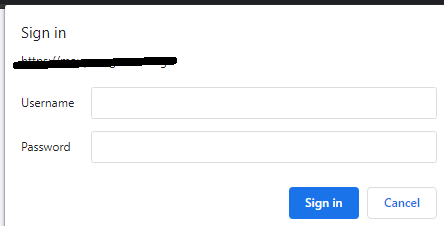
The errors captured from Chrome's developer tool are as follows: TenantDashboard:1 Mixed Content: The page at 'https://..../App/TenantDashboard' was loaded over HTTPS, but requested an insecure stylesheet 'http://fonts.googleapis.com/css?family=Roboto:400,300,300italic,400italic,500,500italic'. This request has been blocked; the content must be served over HTTPS. TenantDashboard:1 Mixed Content: The page at 'https://.../App/TenantDashboard' was loaded over HTTPS, but requested an insecure stylesheet 'http://fonts.googleapis.com/css?family=Roboto+Mono:400,400italic,500,500italic'. This request has been blocked; the content must be served over HTTPS.
I have followed the steps described at https://github.com/IdentityServer/IdentityServer4/pull/3940/files but the problem has not been resolved. Please assist urgently as we need to go live with the website as soon as possible.
Thanks and Regards Kirtee
2 Answer(s)
-
0
Hi ashvinu
Can you share your website url with me? [email protected]
Markdown is supportedCopy & paste or drag & drop images (max 30 MB per image) -
0
Hi. We managed to identify the issue. It sounds strange but the application was treating a page which we named as "EServices" as unauthorized. We renamed "EServices" to "Integrations" and this solved the problem! We are not sure if this is a problem with ASP.Net zero or our production environment with the SSL certificate.
Thanks for the assistance.
Regards Kirtee
Markdown is supportedCopy & paste or drag & drop images (max 30 MB per image)
