

Hi,
using: Core, MVC, jQuery project - v9.0.1
With EF / Net Core 3.0 - it is not possible as before to use extension method - e.g. for filtering.
Specific we have a string extension method - that checks if a string contains any string from a list/array of strings
        public static bool ContainsAny(this string str, params string[] values)
        {
            if (!string.IsNullOrEmpty(str) && values.Length > 0)
            {
                foreach (string value in values)
                {
                    if (str.ToUpper().Contains(value.ToUpper()))
                        return true;
                }
            }

            return false;
        }
used like this (searchWords variable is a string array)
            var query = _customerRepository
                 .GetAll()
                 .WhereIf(
                    ! input.Filter.IsNullOrWhiteSpace(),
                    c =>
                        c.CustomerName.ContainsAny(searchWords) );
as of Core 3.0 (EF) - this can not be converted to SQL. So we have to do a ToList() or equivalent - to get the "entire" result from DB and then start filtering...
any ideas on how to be able to use extension methods directly on the query / where clause ?
5 Answer(s)
-
0
hi deltavision
You are right, The is ef core limits. Because some methods cannot translate to sql statement. There is no good solution for now.
Markdown is supportedCopy & paste or drag & drop images (max 30 MB per image) -
0
Hi maliming
isn't it possible for you :-) to extend on the IQueryable (I don't know how...)
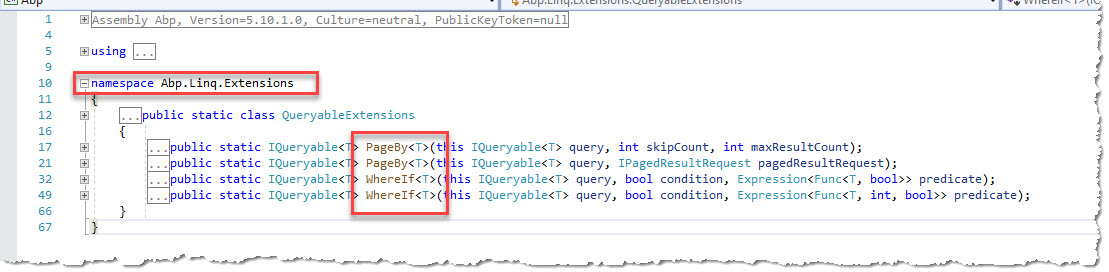
But on ABP there is already some extends: WhereIf and PageBy - which extend IQueryable - and I suppose "translates" to proper linq/SQL:
 Markdown is supportedCopy & paste or drag & drop images (max 30 MB per image)
-
0
Hi
PageBy is using standard linq methods. For example,
Skip(10).Take(10).Your method cannot be translated into SQL statements
public static bool ContainsAny(this string str, params string[] values)
{
	if (!string.IsNullOrEmpty(str) && values.Length > 0)
	{
		foreach (string value in values)
		{
			if (str.ToUpper().Contains(value.ToUpper()))
				return true;
		}
	}

	return false;
}
Related: https://docs.microsoft.com/en-us/ef/core/what-is-new/ef-core-3.0/breaking-changes#linq-queries-are-no-longer-evaluated-on-the-client https://support.aspnetzero.com/QA/Questions/8843/EF-Core-3x-breaking-existing-EF-Core-2x-query
Markdown is supportedCopy & paste or drag & drop images (max 30 MB per image) -
0
Hi deltavision The extension method implemented by ABP also follows the rules of EF Core. C# specific code like ContainsAny cannot be translated into SQL statements.
Markdown is supportedCopy & paste or drag & drop images (max 30 MB per image) -
1
Hi maliming and zony,
with inspiration from ismcagdas:
https://support.aspnetzero.com/QA/Questions/8843/EF-Core-3x-breaking-existing-EF-Core-2x-query#answer-cfa9c984-d70d-b7b3-3984-39f4951c1784
I have changed my code - and this actually works in my case :-) I also included search in sub-entities on Customers. A customer can have 0..N Calculations and a Calculation is connected to a Car.
        public async Task<PagedResultDto<CustomerListDto>> GetCustomers(GetCustomersInput input)
        {
            var searchWords = new string[] { };
            if (!input.Filter.IsNullOrWhiteSpace())
            {
                searchWords = input.Filter?.Split(new[] { " " }, StringSplitOptions.RemoveEmptyEntries);
            }

            var query = _customerRepository
                 .GetAll()
                 .Include(p => p.Calculations)
                     .ThenInclude(cm => cm.Car)
                .WhereIf(input.CustomerTypeFilter != -1,
                    p => (int)p.CustomerType == input.CustomerTypeFilter
                );

            if (searchWords.Count() > 0)
            {
                var customerFilter = PredicateBuilder.New<Customer>();

                foreach (var word in searchWords)
                {
                    customerFilter = customerFilter.Or(customer => customer.CustomerName.Contains(word));
                    customerFilter = customerFilter.Or(customer => customer.AddressStreet.Contains(word));

                    customerFilter = customerFilter.Or(customer => customer.Calculations.Any(calculation => calculation.Car.Description.Contains(word)));
                }
                query = query.Where(customerFilter);
            }

            var customerCount = await query.CountAsync();

            var customers = await query
                .OrderBy(input.Sorting)
                .PageBy(input)
                .ToListAsync();

            var customerListDtos = ObjectMapper.Map<List<CustomerListDto>>(customers);

            return new PagedResultDto<CustomerListDto>(
                customerCount,
                customerListDtos
                );
        }
Markdown is supportedCopy & paste or drag & drop images (max 30 MB per image)

