
ANZ does not conform to .NET convention, here:
https://docs.microsoft.com/en-us/aspnet/core/fundamentals/environments?view=aspnetcore-5.0
Request ANZ conform to convention (and ignore "appsettings.json").
Refer to #10197
9 Answer(s)
-
0
Hi @timmackey,
AspNet Zero uses current environment name to determine the correct appsettings.json file. So, if you set
ASPNETCORE_ENVIRONMENTin your Azure account, AspNet Zero will use appsettings.ASPNETCORE_ENVIRONMENT.json file.Markdown is supportedCopy & paste or drag & drop images (max 30 MB per image) -
0
Starting with version 8.7.0 it appears. I'm at 8.1.0.
Markdown is supportedCopy & paste or drag & drop images (max 30 MB per image) -
0
Hi @timmackey I could not reproduce the problem. Can you please try to reproduce it in clean project.
Markdown is supportedCopy & paste or drag & drop images (max 30 MB per image) -
0
project files emailed to [email protected]
Markdown is supportedCopy & paste or drag & drop images (max 30 MB per image) -
0
Hi @timmackey
How can we reproduce this problem ? What should we look for ?
Thanks,
Markdown is supportedCopy & paste or drag & drop images (max 30 MB per image) -
0
- Publish .Web.Host app
- notice 'appsettings.Development.json' file has been transferred to server.
- go to the domain login page. CORS errors occur.
- delete 'appsettings.Development.json' file on server.
- go to domain login page. No CORS error. Page displays normally.
Despite server environment being set correctly, the 'appsettings.Development.json' is not ignored.
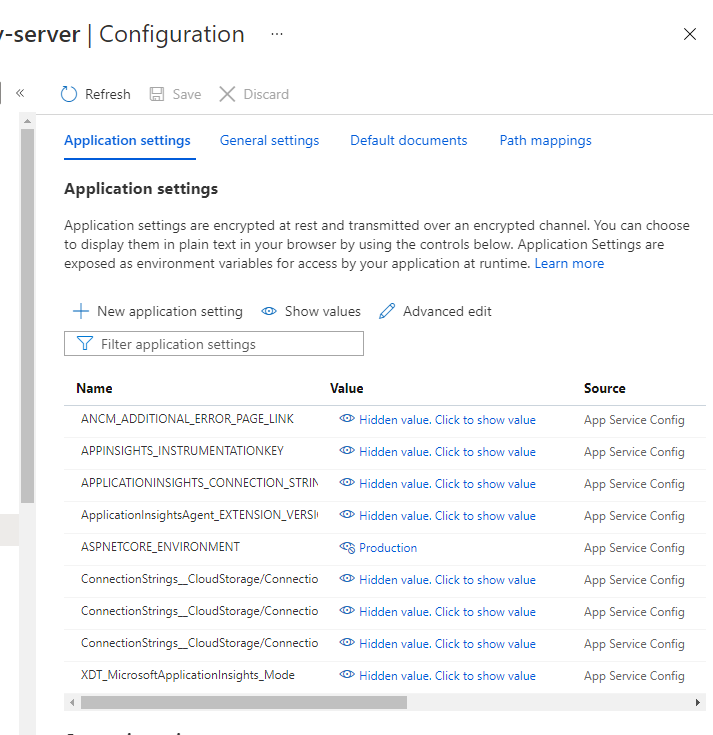 Markdown is supportedCopy & paste or drag & drop images (max 30 MB per image)
 -
0
Hi @timmackey
Thanks, we got the project this time and will check it.
Thanks,
Markdown is supportedCopy & paste or drag & drop images (max 30 MB per image) -
0
Wondering if any progress has been made in determining a solution?
Markdown is supportedCopy & paste or drag & drop images (max 30 MB per image) -
0
ANZ Team:
It's been almost 3 weeks since I sent my project to you, as requested. Wondering what the ETA is for a solution?
Markdown is supportedCopy & paste or drag & drop images (max 30 MB per image)

