
Prerequisites
- What is your product version? 11.0.0.
- What is your product type (Angular or MVC)? Angular
- What is product framework type (.net framework or .net core)? .Net 6
If issue related with ABP Framework
- What is ABP Framework version?
If issue is about UI
- Which theme are you using?
- What are the theme settings?
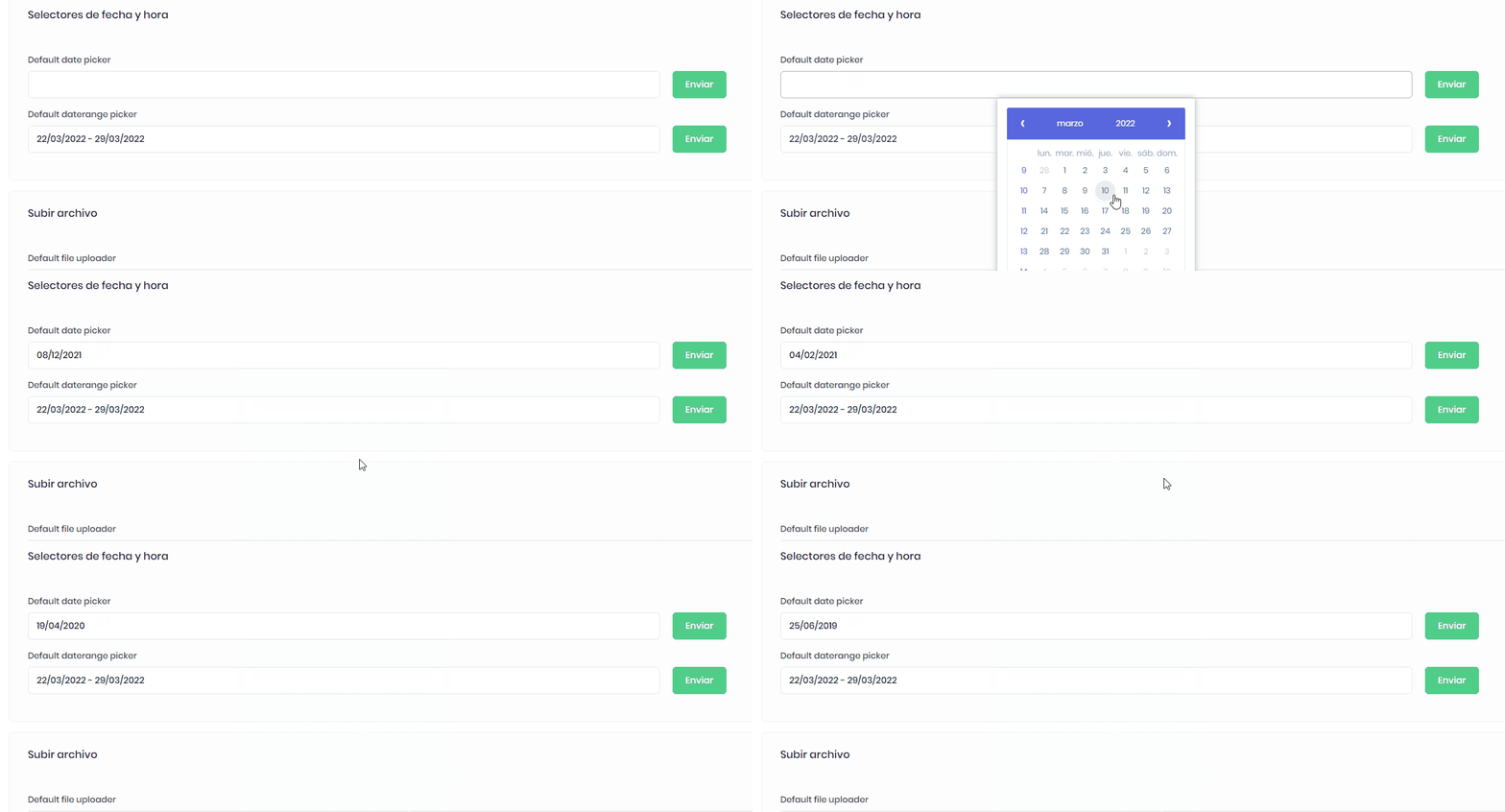
Hello guys! I have a problem. Recently the project was updated. I don't know why my date pickers has this behavior, this doesn't work. This gif was taken from demo-ui-components pages and is the same for the others components. But, the date range picker does work without problem! Can you help me please? Thanks!
10 Answer(s)
-
0
Hi @DireccionTI
Could you download a demo project and see if you have the same problem on that one ?
Markdown is supportedCopy & paste or drag & drop images (max 30 MB per image) -
0
Hi @ismcagdas I could test on base aspnetzero 11.0.0.0 and it works correctly. I'll check my code merged. When I know about the problem I'll tell you.Thanks!
Markdown is supportedCopy & paste or drag & drop images (max 30 MB per image) -
0
@DireccionTI Thanks
Markdown is supportedCopy & paste or drag & drop images (max 30 MB per image) -
0
Hi Team, My current product version is 11.1.
This is still an issue. I noticed this is happening when we set ClockProvider in "Web.Host" > Startup > Startup.cs > Constructor Clock.Provider = ClockProviders.Utc;
Once provider set to Utc and change the timezone of my local machine, Dates start flickering and keep changing.
Kindly update if there is any solution.
Markdown is supportedCopy & paste or drag & drop images (max 30 MB per image) -
0
Hi @ismcagdas, I have tried this on demo project as well. Same behaviour if clock provider is set to UTC and change the time zone of your local machine.
Markdown is supportedCopy & paste or drag & drop images (max 30 MB per image) -
0
Hi @ismcagdas
Has this been resolved at all. We are still seeing this issue in version 13.
The issue happens for us in this situation.
ClockProviders.UTC is set.
In a particular tenant the timezone is set to a value that is greater than my local timezone.
Eg: I'm in Australia, so my timezone is UTC+10. My tenant is in New Zealand they are UTC+12.
If I login to the tenant that is NZ and go to the audit logs and change the date range, I get this endless looping issue.
If I login to a tenant that is in Singapore (UTC+8). The issue doesn't occur.
Markdown is supportedCopy & paste or drag & drop images (max 30 MB per image) -
0
Looking at this further it is still related to this change I believe
https://github.com/aspnetzero/aspnet-zero-core/pull/4723/files
The date-range-picker-luxon-modifier.directive.ts is still changing the dates when it's changing the timezones. I think. It then causes it to endlessly fire and go back in time.
Markdown is supportedCopy & paste or drag & drop images (max 30 MB per image) -
0
Narrowing the problem some more.
changeTimeZone is still changing the date IF your localtimezone is before the timezone you are converting to.
This is because the below code converts to a DateTime object which is in the correct timezone and at the start of the day in that timezone, into your local machines time with toJSDate() which puts it to the previous day. In this case the date-range-picker-luxon-modifer then says the date has changed again and away you go endless loop.
return DateTime.fromObject({ year: year, month: month, day: day, hour: hour, minute: minute, second: second }, { zone: ianaTimezoneId }).toJSDate();
Markdown is supportedCopy & paste or drag & drop images (max 30 MB per image) -
0
I am encountering this problem as well as I need ClockProviders.UTC in order to support time zones for my clients. Is there a fix available for this? Seems like 11 months is a long time without any resolution indicated.
Currently, this makes Audit Logs unusable for anything other than the default date.
Also, I hope the fix will be identified in a way that we can incorporate it as patch. I'm currently on V13.0.0, but not ready to invest in updating to a later version, especially with extensive changes due to Angular update.
Markdown is supportedCopy & paste or drag & drop images (max 30 MB per image) -
0
Hi michael.pear,
We ended up heavily modifying the date-range-picker-luxon.modifier.directive.ts file to suit our needs.
Unfortunately our implementation now is pretty specific to our environment and makes heavy use of custom DateTimeService functions to manipulate dates with timezones of our tenant accounts versus the JS Date of the local browser.
My suggestion would be to focus in on this file and likely remove the call to changeTimeZone and implement your own logic to make it work correctly in your environment.
Our subscribe method looks like this now. Some of those methods in the datetimeservice are also written by us to make it work.
        .subscribe((dates: Date[]) => {
            //Heavily customized this function to make it work with timezones correctly.
            //We take the local date covert it the timezone of the account.
            //Then we convert it to a luxon in the timezone of the account.

            dates[0] = this._dateTimeService.convertJSDateTimezone(dates[0], abp.timing.timeZoneInfo.iana.timeZoneId);
            dates[1] = this._dateTimeService.convertJSDateTimezone(dates[1], abp.timing.timeZoneInfo.iana.timeZoneId);

            this.lastDates = dates;

            let startDate = this._dateTimeService.dateToLuxonTimezoneOfAccount(this.lastDates[0]);
            let endDate = this._dateTimeService.dateToLuxonTimezoneOfAccount(this.lastDates[1]);
            this.dateChange.emit([startDate, endDate]);
        });
Markdown is supportedCopy & paste or drag & drop images (max 30 MB per image)


