
- What is your product version: v11.1.0
- What is your product type (Angular or MVC): ASP.NET CORE & Angular
- What is product framework type: .net core
I am trying to create a master detail. After generating detail, when I am trying to generate master using RAD tool, I am getting the error: An error occured. : Specified argument was out of the range of valid values. Parameter name: startIndex
After closing the solution, I am trying to regenarate the master entity, I am getting the error this time after the line Starting to create child table items for ... An error occured. : Object reference not set to an instance of an object.
Here is my master entity json file:
{
  "IsRegenerate": true,
  "MenuPosition": "main",
  "RelativeNamespace": "SCM.SCMRequisitions",
  "EntityName": "SCMRequisition",
  "EntityNamePlural": "SCMRequisitions",
  "TableName": "SCMRequisitions",
  "PrimaryKeyType": "long",
  "BaseClass": "AuditedEntity",
  "EntityHistory": true,
  "AutoMigration": true,
  "UpdateDatabase": true,
  "CreateUserInterface": true,
  "CreateViewOnly": true,
  "CreateExcelExport": true,
  "IsNonModalCRUDPage": false,
  "IsMasterDetailPage": true,
  "PagePermission": {
    "Host": true,
    "Tenant": true
  },
  "Properties": [
    {
      "Name": "RequisitionNo",
      "Type": "string",
      "MaxLength": -1,
      "MinLength": -1,
      "Range": {
        "IsRangeSet": false,
        "MinimumValue": 0.0,
        "MaximumValue": 0.0
      },
      "Required": false,
      "Nullable": false,
      "Regex": "",
      "UserInterface": {
        "AdvancedFilter": true,
        "List": true,
        "CreateOrUpdate": true
      },
      "ViewType": null
    },
    {
      "Name": "RequisitionDate",
      "Type": "DateTime",
      "MaxLength": -1,
      "MinLength": -1,
      "Range": {
        "IsRangeSet": false,
        "MinimumValue": 0.0,
        "MaximumValue": 0.0
      },
      "Required": false,
      "Nullable": false,
      "Regex": "",
      "UserInterface": {
        "AdvancedFilter": true,
        "List": true,
        "CreateOrUpdate": true
      },
      "ViewType": null
    },
    {
      "Name": "Remarks",
      "Type": "string",
      "MaxLength": -1,
      "MinLength": -1,
      "Range": {
        "IsRangeSet": false,
        "MinimumValue": 0.0,
        "MaximumValue": 0.0
      },
      "Required": false,
      "Nullable": false,
      "Regex": "",
      "UserInterface": {
        "AdvancedFilter": false,
        "List": true,
        "CreateOrUpdate": true
      },
      "ViewType": null
    },
    {
      "Name": "IsCashPayment",
      "Type": "bool",
      "MaxLength": -1,
      "MinLength": -1,
      "Range": {
        "IsRangeSet": false,
        "MinimumValue": 0.0,
        "MaximumValue": 0.0
      },
      "Required": false,
      "Nullable": false,
      "Regex": "",
      "UserInterface": {
        "AdvancedFilter": true,
        "List": true,
        "CreateOrUpdate": true
      },
      "ViewType": null
    }
  ],
  "NavigationProperties": [
    {
      "Namespace": "RapidSystem.PM.PMProjects",
      "ForeignEntityName": "PMProject",
      "IdType": "long",
      "IsNullable": false,
      "PropertyName": "PMProjectId",
      "DisplayPropertyName": "ProjectName",
      "DuplicationNumber": 0,
      "RelationType": "single",
      "ViewType": "Dropdown"
    },
    {
      "Namespace": "RapidSystem.Lookup.APStatuses",
      "ForeignEntityName": "APStatus",
      "IdType": "long",
      "IsNullable": true,
      "PropertyName": "APStatusId",
      "DisplayPropertyName": "StatusName",
      "DuplicationNumber": 0,
      "RelationType": "single",
      "ViewType": "Dropdown"
    }
  ],
  "NavigationPropertyOneToManyTables": [
            {
                "EntityJson": "SCM.SCMRequisitionItems.SCMRequisitionItem.json",
                "ForeignPropertyName": "SCMRequisitionId",
                "IsNullable": "True",
                "DisplayPropertyName": "RequisitionNo",
                "ViewType": "LookupTable"
            },
        ],
  "EnumDefinitions": [],
  "DbContext": null
}
And here is the detail entity json file:
{
  "IsRegenerate": true,
  "MenuPosition": "main",
  "RelativeNamespace": "SCM.SCMRequisitionItems",
  "EntityName": "SCMRequisitionItem",
  "EntityNamePlural": "SCMRequisitionItems",
  "TableName": "SCMRequisitionItems",
  "PrimaryKeyType": "long",
  "BaseClass": "AuditedEntity",
  "EntityHistory": false,
  "AutoMigration": true,
  "UpdateDatabase": true,
  "CreateUserInterface": true,
  "CreateViewOnly": true,
  "CreateExcelExport": true,
  "IsNonModalCRUDPage": false,
  "IsMasterDetailPage": false,
  "PagePermission": {
    "Host": true,
    "Tenant": true
  },
  "Properties": [
    {
      "Name": "BOQQty",
      "Type": "decimal",
      "MaxLength": -1,
      "MinLength": -1,
      "Range": {
        "IsRangeSet": false,
        "MinimumValue": 0.0,
        "MaximumValue": 0.0
      },
      "Required": false,
      "Nullable": true,
      "Regex": "",
      "UserInterface": {
        "AdvancedFilter": false,
        "List": true,
        "CreateOrUpdate": true
      },
      "ViewType": null
    },
    {
      "Name": "ConsumedQty",
      "Type": "decimal",
      "MaxLength": -1,
      "MinLength": -1,
      "Range": {
        "IsRangeSet": false,
        "MinimumValue": 0.0,
        "MaximumValue": 0.0
      },
      "Required": false,
      "Nullable": true,
      "Regex": "",
      "UserInterface": {
        "AdvancedFilter": false,
        "List": true,
        "CreateOrUpdate": true
      },
      "ViewType": null
    },
    {
      "Name": "LastPurchasePrice",
      "Type": "decimal",
      "MaxLength": -1,
      "MinLength": -1,
      "Range": {
        "IsRangeSet": false,
        "MinimumValue": 0.0,
        "MaximumValue": 0.0
      },
      "Required": false,
      "Nullable": true,
      "Regex": "",
      "UserInterface": {
        "AdvancedFilter": false,
        "List": true,
        "CreateOrUpdate": true
      },
      "ViewType": null
    },
    {
      "Name": "MarketPrice",
      "Type": "decimal",
      "MaxLength": -1,
      "MinLength": -1,
      "Range": {
        "IsRangeSet": false,
        "MinimumValue": 0.0,
        "MaximumValue": 0.0
      },
      "Required": false,
      "Nullable": true,
      "Regex": "",
      "UserInterface": {
        "AdvancedFilter": false,
        "List": true,
        "CreateOrUpdate": true
      },
      "ViewType": null
    },
    {
      "Name": "RequisitionPrice",
      "Type": "decimal",
      "MaxLength": -1,
      "MinLength": -1,
      "Range": {
        "IsRangeSet": false,
        "MinimumValue": 0.0,
        "MaximumValue": 0.0
      },
      "Required": false,
      "Nullable": false,
      "Regex": "",
      "UserInterface": {
        "AdvancedFilter": false,
        "List": true,
        "CreateOrUpdate": true
      },
      "ViewType": null
    },
    {
      "Name": "RequiredQty",
      "Type": "decimal",
      "MaxLength": -1,
      "MinLength": -1,
      "Range": {
        "IsRangeSet": false,
        "MinimumValue": 0.0,
        "MaximumValue": 0.0
      },
      "Required": false,
      "Nullable": false,
      "Regex": "",
      "UserInterface": {
        "AdvancedFilter": false,
        "List": true,
        "CreateOrUpdate": true
      },
      "ViewType": null
    }
  ],
  "NavigationProperties": [{
      "Namespace": "RapidSystem.SCM.SCMRequisitions",
      "ForeignEntityName": "SCMRequisition",
      "IdType": "long",
      "IsNullable": true,
      "PropertyName": "SCMRequisitionId",
      "DisplayPropertyName": "RequisitionNo",
      "DuplicationNumber": 0,
      "RelationType": "single",
      "ViewType": "LookupTable",
      "IsGeneratedByMasterPage": true
   ",IsGeneratedByMasterPage": true },
    {
      "Namespace": "RapidSystem.Lookup.Items",
      "ForeignEntityName": "Item",
      "IdType": "long",
      "IsNullable": false,
      "PropertyName": "ItemId",
      "DisplayPropertyName": "ItemName",
      "DuplicationNumber": 0,
      "RelationType": "single",
      "ViewType": "LookupTable"
    },
    {
      "Namespace": "RapidSystem.Lookup.ItemSpecifications",
      "ForeignEntityName": "ItemSpecification",
      "IdType": "long",
      "IsNullable": true,
      "PropertyName": "ItemSpecificationId",
      "DisplayPropertyName": "SpecificationName",
      "DuplicationNumber": 0,
      "RelationType": "single",
      "ViewType": "LookupTable"
    },
    {
      "Namespace": "RapidSystem.Lookup.Units",
      "ForeignEntityName": "Unit",
      "IdType": "long",
      "IsNullable": false,
      "PropertyName": "UnitId",
      "DisplayPropertyName": "UnitName",
      "DuplicationNumber": 0,
      "RelationType": "single",
      "ViewType": "Dropdown"
    },
    {
      "Namespace": "RapidSystem.PM.PMProjectUnits",
      "ForeignEntityName": "PMProjectUnit",
      "IdType": "long",
      "IsNullable": true,
      "PropertyName": "PMProjectUnitId",
      "DisplayPropertyName": "UnitName",
      "DuplicationNumber": 0,
      "RelationType": "single",
      "ViewType": "Dropdown"
    }
  ],
  "NavigationPropertyOneToManyTables": [],
  "EnumDefinitions": [],
  "DbContext": null
}
Can you please help me in this regard?
27 Answer(s)
-
0
Hi @m.cseiu05
Thanks, we will check this and inform you.
Markdown is supportedCopy & paste or drag & drop images (max 30 MB per image) -
0
Hi @m.cseiu05
I could not get any error using json files you shared. Can you please share a project that contains the problem.
Markdown is supportedCopy & paste or drag & drop images (max 30 MB per image) -
0
Hi@musa.demir, Thnaks for the replay. I have shared the project with [email protected] .
Markdown is supportedCopy & paste or drag & drop images (max 30 MB per image) -
0
Thanks @m.cseiu05
We got the project and we will check it.
Markdown is supportedCopy & paste or drag & drop images (max 30 MB per image) -
0
Hi @ismcagdas, Many thanks. Is there any update?
Markdown is supportedCopy & paste or drag & drop images (max 30 MB per image) -
0
Hi @m.cseiu05
We have tried same functionality in the default template but couldn't reproduce thhe problem. Our team is working on your project to find the solution. We will inform you in 1-2 days.
Thanks,
Markdown is supportedCopy & paste or drag & drop images (max 30 MB per image) -
0
Hi@ ismcagdas
Many thanks for the support. One thing I am sharing, I do the ‘Add-Migration’ and ‘Update-Database’ commands manually till now.
Best regards, Mamun Ahammed, Dhaka, Bangladesh
Markdown is supportedCopy & paste or drag & drop images (max 30 MB per image) -
0
Hi @m.cseiu05
We will release 3.1.1 version today with the related fix.
Markdown is supportedCopy & paste or drag & drop images (max 30 MB per image) -
0
Hi @ismcagdas, Many thanks. Please give me instruction on how will I able to generate master-detail.
Markdown is supportedCopy & paste or drag & drop images (max 30 MB per image) -
0
Hi @m.cseiu05
New version of Power Tools is released. When you close your Visual Studio and reopen it, it will update itself. So, you can try to regenerate your master detail entities.
Thanks,
Markdown is supportedCopy & paste or drag & drop images (max 30 MB per image) -
0
Hi @ismcagdas, I followed the instruction but wnen I tried to generate master entity unfortunatly I got an error like An error occured. : Specified argument was out of the range of valid values.Parameter name: startIndex.
After clicking refresh.bat file wnen I tried to run the angular app I got some errorrs in child component file like error TS2554: Expected 9 arguments, but got 10 .
Markdown is supportedCopy & paste or drag & drop images (max 30 MB per image) -
0
Thanks, we will check it again on your project and inform you.
Markdown is supportedCopy & paste or drag & drop images (max 30 MB per image) -
0
Hi @m.cseiu05
Your entity json files are broken. Can you please go to
*\aspnet-core\AspNetZeroRadToolfolder and find[YOURENTITY].jsonfile and fix it manually.Markdown is supportedCopy & paste or drag & drop images (max 30 MB per image) -
0
Thanks for the support. I could not find any inconsistency in the the json files. I have restarted with my initial downloaded version and I have generated some simple entities using Rad-Tool. I am trying to generate a master-detail entity again but got the same error.
Let me explain with an example. The detail entity name is SCMRequisitionItem and master entity name is SCMRequisition. I tried to create SCMRequisitionItem and it was generated fine. Then I tried to generate master entity SCMRequisition and I got the same error.
After that I tried to generate service proxy and run the application. In that case I got 2 errors and I roughly solved those errors removing undefined parameters from 2 places. Then the angular project is running but I found a menu for SCMRequisitionItem and no menu for SCMRequisition. I found no folder inside angular project for the entity SCMRequisition.
I found a CRUD page for the detail entity only. Before generating the master-detail I took a backup and I shared the project(RS220426.zip) and required json files again through Google drive.
Markdown is supportedCopy & paste or drag & drop images (max 30 MB per image) -
0
Hi @m.cseiu05
Thanks, we got the project and will check it today.
Markdown is supportedCopy & paste or drag & drop images (max 30 MB per image) -
0
Hi @ismcagdas
Thanks. Is there any update?
Markdown is supportedCopy & paste or drag & drop images (max 30 MB per image) -
0
Hi,
Sorry for the delay, please follow https://github.com/aspnetzero/aspnet-zero-core/issues/4380. We will release a new verison as soon as fixing this problem.
Markdown is supportedCopy & paste or drag & drop images (max 30 MB per image) -
0
Hi @ismcagdas,
Thanks. I can't generate master-detail till now. Is there any update?
Markdown is supportedCopy & paste or drag & drop images (max 30 MB per image) -
0
Hi,
Could you share your JSON files for master and detail entities in the related GitHub issue ? I will take a look at this as soon as possible.
Markdown is supportedCopy & paste or drag & drop images (max 30 MB per image) -
0
Hi@ ismcagdas Many thanks. I can't generate master-detail till now. I am sharing the file links here:
Master: https://drive.google.com/file/d/1nCqZ0yqxquLD9PLSlzJWKDrkkYtflp9Y/view?usp=sharing
Detail: https://drive.google.com/file/d/1XMqHe1NJ_n9D90c2Eyw4q2FS2Yodoqek/view?usp=sharing
Markdown is supportedCopy & paste or drag & drop images (max 30 MB per image) -
0
Hi@ ismcagdas, I am trying to generate master-detail today. After generating detail entity when I am trying to generate master entity, the code generator becomes 'Not Responding' for hours.
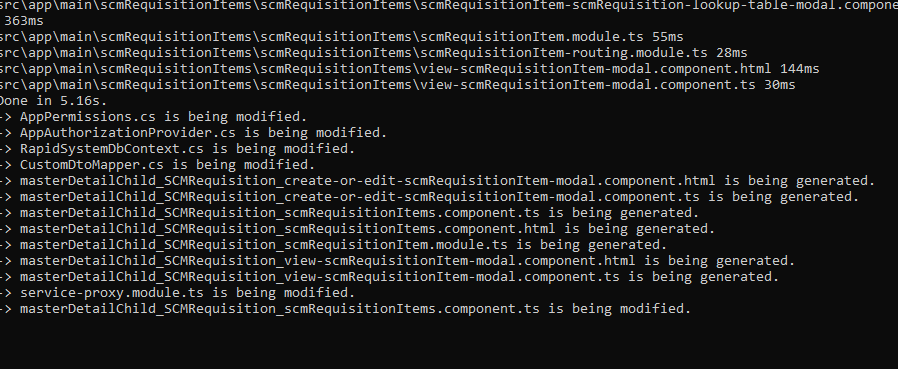
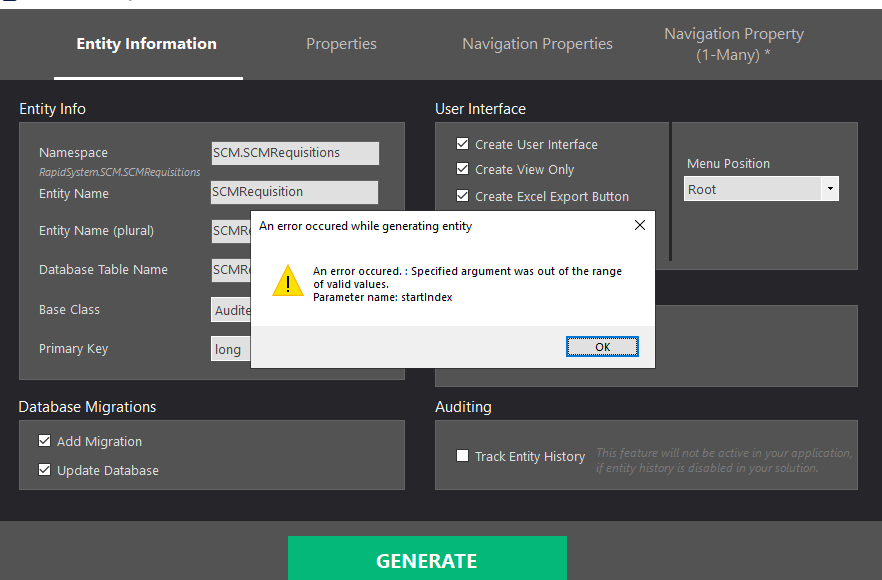 Markdown is supportedCopy & paste or drag & drop images (max 30 MB per image)
 -
0
@m.cseiu05 thanks, we are checking it and will get back to you soon.
Markdown is supportedCopy & paste or drag & drop images (max 30 MB per image) -
0
Hi @m.cseiu05
Your entities json file still has problem. See:
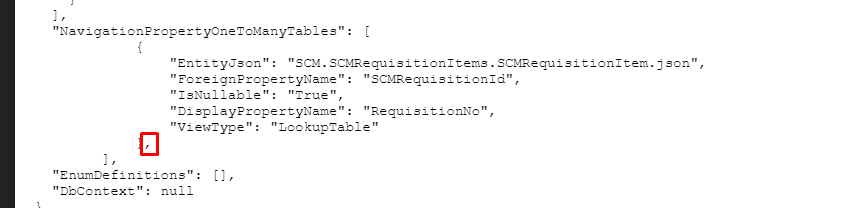
Can you please fix it and try again.
Markdown is supportedCopy & paste or drag & drop images (max 30 MB per image) -
0
Hi musa.demir Thanks for your support. This comma is autogenerated. After removing it whenever I try to regenerate the entity, the entity generation fails and the comma is generated here. Even I noticed and removed it and tried to regenerate but failed before I posted the issue. I can’t generate any(any simple master-detail) master-detail till now.
Can you please test from the project I shared?
Markdown is supportedCopy & paste or drag & drop images (max 30 MB per image) -
0
Hi musa.demir, Thanks in advance. Is there any update?
Markdown is supportedCopy & paste or drag & drop images (max 30 MB per image)

