
Hi,
We want to set the HttpOnly = true and Secure = true for the below cookies
Abp.TenantId Abp.AuthToken Abp.AuthRefreshToken
So how can we do for these cookies. And after doing it everything should work as it is.
We even try the below links for the Abp.AuthToken and Abp.TenantId but it didn't work. https://support.aspnetzero.com/QA/Questions/11542/vulnerabilities---how-to-set-AbpAuthToken-cookie-Secure-flag-to-true https://aspnetzero.com/blog/http-only-anti-forgery-token-in-asp.net-zero
We have attached the screenshot for your reference.
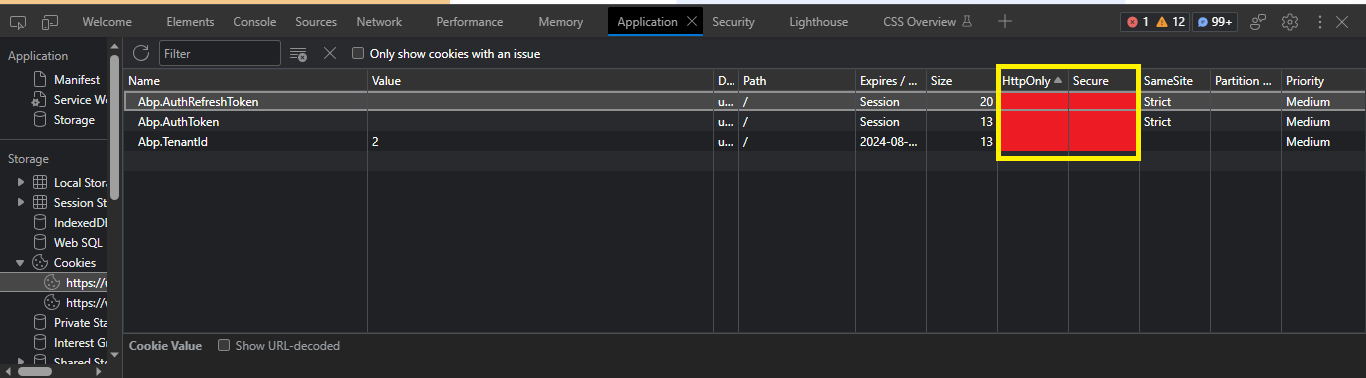
Need your urgent support on this. Thank You
20 Answer(s)
-
0
Hi @KPCS
Are you using Angular UI or MVC & jQuery ?
Markdown is supportedCopy & paste or drag & drop images (max 30 MB per image) -
0
Hi @ismcagdas
ASP.NET CORE & Angular (single solution) Framework : .NET 7.0 Version : v12.2.1
Markdown is supportedCopy & paste or drag & drop images (max 30 MB per image) -
0
Hi @ismcagdas
Any updates on above query.
Markdown is supportedCopy & paste or drag & drop images (max 30 MB per image) -
0
Hi @ismcagdas
It's been so long, not a single response from your side. This security issue is really sensitive, and we need to fix it and delivered it on time. Please give some update.
Markdown is supportedCopy & paste or drag & drop images (max 30 MB per image) -
0
Hi @KPCS
For
Abp.AuthTokenandAbp.AuthRefreshTokenyou can setHttpOnlyas shown below;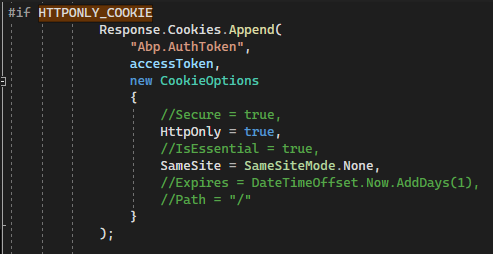
Yoıu can do the same for
Abp.TenantId. To do this, you can create a new controller in Host project and call it's method with to set a cookie value in the callback event ofIsTenantAvailablecall on login page.Then, you need to write a custom middleware to get tokens and set them to request headers as shown below;
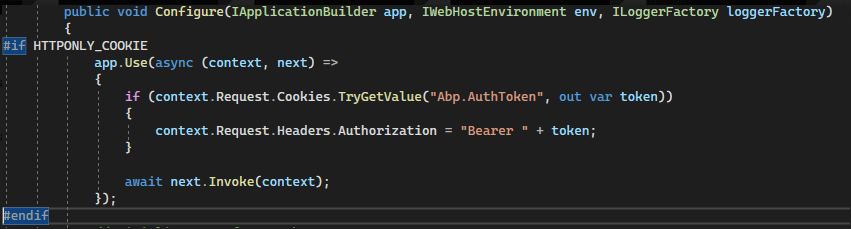 Markdown is supportedCopy & paste or drag & drop images (max 30 MB per image)
 -
0
Hi @ismcagdas
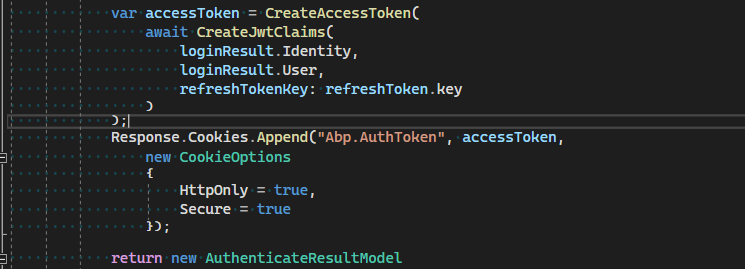
Added the above code in TokenAuthController.cs and the below code in Startup.cs
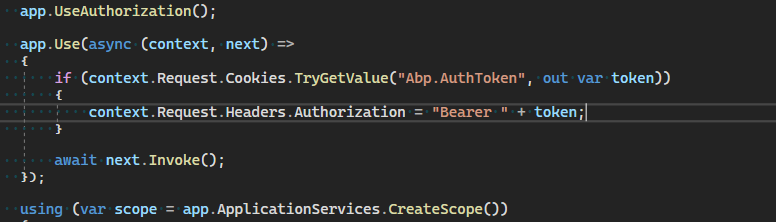
But still it's not working
 Markdown is supportedCopy & paste or drag & drop images (max 30 MB per image)
 -
0
Hi,
Is this happening on development time or on production ?
Markdown is supportedCopy & paste or drag & drop images (max 30 MB per image) -
0
Hi @ismcagdas
It is happening on both development as well as production.
Markdown is supportedCopy & paste or drag & drop images (max 30 MB per image) -
0
Do you host Angular app and Host app under the same domain ? If so, is it possible to share the live app URL via [email protected] ?
Markdown is supportedCopy & paste or drag & drop images (max 30 MB per image) -
0
Hi @ismcagdas
We have a same domain but different ports. Example: https://123.123.1.1:8084 -- Frontend -> https://qa.sapp.com https://123.123.1.1:8085 -- Backend -> https://apiqa.sapp.com
It's not possible to share a live app URL. But we share a code base (fresh boiler plate) implementing the last solution provided by you, on the above mail.
Markdown is supportedCopy & paste or drag & drop images (max 30 MB per image) -
0
Hi @KPCS
Thanks, we got the email and we will check it soon.
Markdown is supportedCopy & paste or drag & drop images (max 30 MB per image) -
0
Hi @ismcagdas
We will be waiting for your response.
Markdown is supportedCopy & paste or drag & drop images (max 30 MB per image) -
0
Hi,
Sorry for our late reply. We created a draft blog post about this use-case, you can check it here https://github.com/aspnetzero/documents/pull/277. It is currently under review but I think it will help you.
Markdown is supportedCopy & paste or drag & drop images (max 30 MB per image) -
0
Hi @ismcagdas,
Sorry for late reply. We checked your provided link, the very first condition for that implementation is to have same domain name. But unfortunately, we can't have same domain names but still we tried that solution by implementing some extra logics and efforts, but none of them worked. Can you please help us find some other solutions.
Markdown is supportedCopy & paste or drag & drop images (max 30 MB per image) -
0
Hi,
Sorry, I think I didn't get it correct. Depending on your answer , I thought, you are hosting Angular app and Host app under the same domain. If that's not the case, I'm not sure how to change the current architecture to the one you want. Becasue, different domains can't share cookies.
Are you hosting these apps under the same domain but with different subdomains ?
Markdown is supportedCopy & paste or drag & drop images (max 30 MB per image) -
0
Hi @ismcagdas,
Yes, we have different subdomains.
Example: https://123.123.1.1:8084 -- Frontend -> https://qa.sapp.com https://123.123.1.1:8085 -- Backend -> https://qaapi.sapp.com
Markdown is supportedCopy & paste or drag & drop images (max 30 MB per image) -
0
Hi,
In this case, cookie sharing should work. Is it possible to send an email to [email protected] explaining how to reproduce the problem on live app and share a test user credentials ?
Thanks,
Markdown is supportedCopy & paste or drag & drop images (max 30 MB per image) -
0
Hi,
Due to security issues, we can't share a test user credentials. But we have mailed you the base code with your last implementation (https://github.com/aspnetzero/documents/pull/277) which is also not working. We request you to provide us with the solution for this issue ASAP and reshared that codebase with us.
Markdown is supportedCopy & paste or drag & drop images (max 30 MB per image) -
0
Hi @KPCS
Thanks. We can continue via email for this ticket.
Markdown is supportedCopy & paste or drag & drop images (max 30 MB per image) -
0
I have the same challenge as @KPCS. Were you able to resolve it?
Markdown is supportedCopy & paste or drag & drop images (max 30 MB per image)

