
I want to enable both okta and auth0 for a single tenant as some users may login through okta and some through auth0. I am having a multitenant application. Do I need to custom the code or there is a functionality in the base code. Could you please help me out how can I achieve that
145 Answer(s)
-
0
Also now I am implementing login through SMS on auth0. But by default it redirects me to email login page. I want to give both option based on user selection, how can I achieve that.
Can you share a URL to see the SMS login page for auth0? Maybe auth0 has some querystring parameter to indicate the login method.
https://{auth0Domain}/authorize?client_id={auth0ClientId}&response_type={authOptions.Auth.ResponseType}&redirect_uri={redirectUri}&scope={authOptions.Auth.Scope}&organization={auth0Details.auth0OrganizationId}&connection=sms
yes the parameter name is 'connection'. I also want to pass a 'organization' parameter.
Markdown is supportedCopy & paste or drag & drop images (max 30 MB per image) -
0
hi
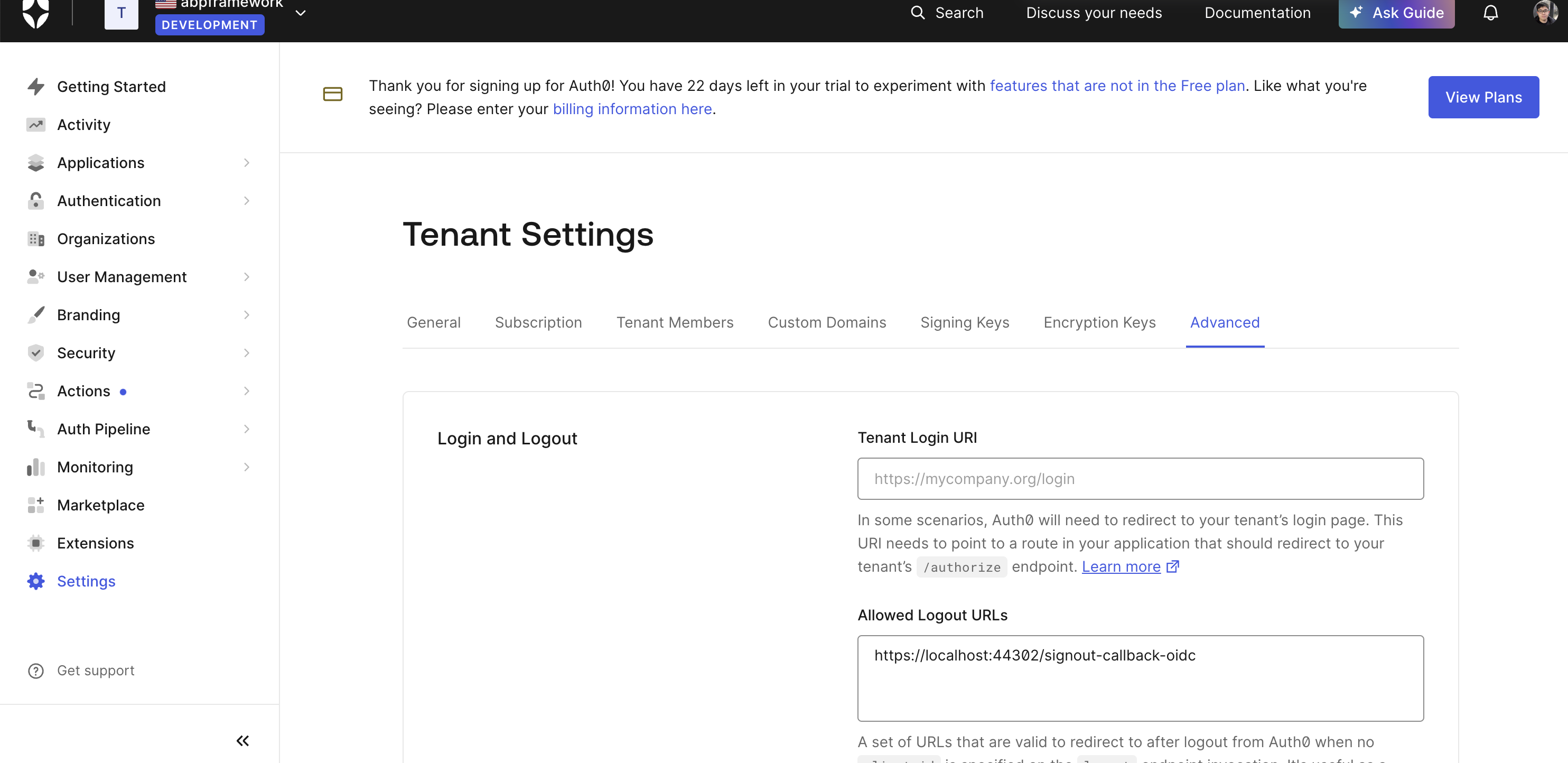
Another issue I am facing is, when I logout from the application, then it redirects me back to the login screen but in actual it doesn't logout me from the auth0
Are you still using the below code for
Logout?public async Task<ActionResult> Logout(string returnUrl = "") { await _signInManager.SignOutAsync(); var userIdentifier = AbpSession.ToUserIdentifier(); if (userIdentifier != null && _settingManager.GetSettingValue<bool>(AppSettings.UserManagement.AllowOneConcurrentLoginPerUser)) { var user = await _userManager.GetUserAsync(userIdentifier); await _userManager.UpdateSecurityStampAsync(user); } //returnUrl = NormalizeReturnUrl(returnUrl); //return SignOut(new AuthenticationProperties { RedirectUri = returnUrl }, CookieAuthenticationDefaults.AuthenticationScheme, OpenIdConnectDefaults.AuthenticationScheme); string OktaLogoutUrl = "https://dev-76726332.okta.com/oauth2/default/v1/logout"; // Replace with your Okta domain var postLogoutRedirectUri = Url.Action("Login", "Account", null, Request.Scheme); // Redirect back to your application's home page var logoutUrl = $"{OktaLogoutUrl}?post_logout_redirect_uri={Uri.EscapeDataString(postLogoutRedirectUri)}"; return Redirect(logoutUrl); if (!string.IsNullOrEmpty(returnUrl)) { returnUrl = NormalizeReturnUrl(returnUrl); return Redirect(returnUrl); } return RedirectToAction("Login"); }No my logout function is now default one as in base code.
public async Task<ActionResult> Logout(string returnUrl = "")
{
    await _signInManager.SignOutAsync();
    var userIdentifier = AbpSession.ToUserIdentifier();

    if (userIdentifier != null &&
        _settingManager.GetSettingValue<bool>(AppSettings.UserManagement.AllowOneConcurrentLoginPerUser))
    {
        var user = await _userManager.GetUserAsync(userIdentifier);
        await _userManager.UpdateSecurityStampAsync(user);
    }

    if (!string.IsNullOrEmpty(returnUrl))
    {
        returnUrl = NormalizeReturnUrl(returnUrl);
        return Redirect(returnUrl);
    }

    return RedirectToAction("Login");
}
Markdown is supportedCopy & paste or drag & drop images (max 30 MB per image) -
0
hi
The actual exception is - Unknown external auth provider: OpenIdConnect.
Please share full error logs.
Thanks.
Is below is something you are asking for?
{"ClassName":"System.Exception","Message":"Unknown external auth provider: OpenIdConnect","Data":null,"InnerException":null,"HelpURL":null,"StackTraceString":" at Abp.AspNetZeroCore.Web.Authentication.External.ExternalAuthManager.CreateProviderApi(String provider)\r\n at Abp.AspNetZeroCore.Web.Authentication.External.ExternalAuthManager.GetUserInfo(String provider, String accessCode)\r\n at CDP.Web.Controllers.TokenAuthController.GetExternalUserInfo(ExternalAuthenticateModel model) in D:\Dimple Khathuria\CDP 13.0\src\CDP.Web.Core\Controllers\TokenAuthController.cs:line 673","RemoteStackTraceString":null,"RemoteStackIndex":0,"ExceptionMethod":null,"HResult":-2146233088,"Source":"Abp.AspNetZeroCore.Web","WatsonBuckets":null}
Markdown is supportedCopy & paste or drag & drop images (max 30 MB per image) -
0
hi
I also want to pass a 'organization' parameter.
You can add your custom logic by
options.Events.OnRedirectToIdentityProvidermethod.context.ProtocolMessage.SetParameter("connection", "sms");authenticationBuilder.AddOpenIdConnect(options => { options.ClientId = configuration["Authentication:OpenId:ClientId"]; options.Authority = configuration["Authentication:OpenId:Authority"]; options.SignedOutRedirectUri = configuration["App:WebSiteRootAddress"] + "Account/Logout"; options.ResponseType = configuration["Authentication:OpenId:ResponseType"]; options.TokenValidationParameters = new TokenValidationParameters() { ValidateIssuer = bool.Parse(configuration["Authentication:OpenId:ValidateIssuer"]) }; options.Events.OnTokenValidated = context => { var jsonClaimMappings = new List<JsonClaimMap>(); configuration.GetSection("Authentication:OpenId:ClaimsMapping").Bind(jsonClaimMappings); context.AddMappedClaims(jsonClaimMappings); return Task.FromResult(0); }; var clientSecret = configuration["Authentication:OpenId:ClientSecret"]; if (!clientSecret.IsNullOrEmpty()) { options.ClientSecret = clientSecret; } options.Events.OnRedirectToIdentityProvider = context => { if (true) { context.ProtocolMessage.SetParameter("connection", "sms"); } return Task.FromResult(0); }; }); Markdown is supportedCopy & paste or drag & drop images (max 30 MB per image)
 -
0
hi
I also want to pass a 'organization' parameter.
You can add your custom logic by
options.Events.OnRedirectToIdentityProvidermethod.context.ProtocolMessage.SetParameter("connection", "sms");authenticationBuilder.AddOpenIdConnect(options => { options.ClientId = configuration["Authentication:OpenId:ClientId"]; options.Authority = configuration["Authentication:OpenId:Authority"]; options.SignedOutRedirectUri = configuration["App:WebSiteRootAddress"] + "Account/Logout"; options.ResponseType = configuration["Authentication:OpenId:ResponseType"]; options.TokenValidationParameters = new TokenValidationParameters() { ValidateIssuer = bool.Parse(configuration["Authentication:OpenId:ValidateIssuer"]) }; options.Events.OnTokenValidated = context => { var jsonClaimMappings = new List<JsonClaimMap>(); configuration.GetSection("Authentication:OpenId:ClaimsMapping").Bind(jsonClaimMappings); context.AddMappedClaims(jsonClaimMappings); return Task.FromResult(0); }; var clientSecret = configuration["Authentication:OpenId:ClientSecret"]; if (!clientSecret.IsNullOrEmpty()) { options.ClientSecret = clientSecret; } options.Events.OnRedirectToIdentityProvider = context => { if (true) { context.ProtocolMessage.SetParameter("connection", "sms"); } return Task.FromResult(0); }; });I got that, but it will based on user selection that whether he wants to login through email or sms. So it should be passed from account/login.cshtml page. But how can I pass that in authconfigure class and MyOpenIdChallengeResult class where I am setting up the options
Markdown is supportedCopy & paste or drag & drop images (max 30 MB per image) -
0
hi
Add a new hidden input in your
ExternalLoginform. you can change it by js code.Then you can get this value in
OnRedirectToIdentityProvidermethod.
 Markdown is supportedCopy & paste or drag & drop images (max 30 MB per image)
 -
0
hi
Unknown external auth provider: OpenIdConnect"
This is because we only add
OpenIdConnectExternalLoginInfoProviderinweb.hostproject in instead ofweb.mvcMaybe you shouldn't use
/api/TokenAuth/ExternalAuthenticateinweb.mvcproject Markdown is supportedCopy & paste or drag & drop images (max 30 MB per image)
 -
0
hi
when I logout from the application, then it redirects me back to the login screen but in actual it doesn't logout me from the auth0
I will share code to fix this.
but can you add
https://localhost:44302/signout-callback-oidcaspost_logout_redirect_uriin your auth0 website?invalid_request: The "post_logout_redirect_uri" querystring parameter "https://localhost:44302/signout-callback-oidc" is not defined as a valid URL in "Allowed Logout URLs". To add a new URL, please do it here: https://manage.auth0.com/#/account/advancedMarkdown is supportedCopy & paste or drag & drop images (max 30 MB per image) -
0
hi
Unknown external auth provider: OpenIdConnect"
This is because we only add
OpenIdConnectExternalLoginInfoProviderinweb.hostproject in instead ofweb.mvcMaybe you shouldn't use
/api/TokenAuth/ExternalAuthenticateinweb.mvcprojectThen which API can I use for my mobile app to provide them response with asp dot net access token details when they send me the auth0 token or id token. Do I need to build a custom API?
Markdown is supportedCopy & paste or drag & drop images (max 30 MB per image) -
0
You can copy the code from API website to MVC
 Markdown is supportedCopy & paste or drag & drop images (max 30 MB per image)
 -
0
You can copy the code from API website to MVC
You mean I should copy the below section from CDPWebHostModule class to CDPWebMvcModule class
private void ConfigureExternalAuthProviders() { var externalAuthConfiguration = IocManager.Resolve<ExternalAuthConfiguration>();
if (bool.Parse(_appConfiguration["Authentication:OpenId:IsEnabled"]))
{
    if (bool.Parse(_appConfiguration["Authentication:AllowSocialLoginSettingsPerTenant"]))
    {
        externalAuthConfiguration.ExternalLoginInfoProviders.Add(
            IocManager.Resolve<TenantBasedOpenIdConnectExternalLoginInfoProvider>());
    }
    else
    {
        var jsonClaimMappings = new List<JsonClaimMap>();
        _appConfiguration.GetSection("Authentication:OpenId:ClaimsMapping").Bind(jsonClaimMappings);

        externalAuthConfiguration.ExternalLoginInfoProviders.Add(
            new OpenIdConnectExternalLoginInfoProvider(
                _appConfiguration["Authentication:OpenId:ClientId"],
                _appConfiguration["Authentication:OpenId:ClientSecret"],
                _appConfiguration["Authentication:OpenId:Authority"],
                _appConfiguration["Authentication:OpenId:LoginUrl"],
                bool.Parse(_appConfiguration["Authentication:OpenId:ValidateIssuer"]),
                _appConfiguration["Authentication:OpenId:ResponseType"],
                jsonClaimMappings
            )
        );
    }
}

if (bool.Parse(_appConfiguration["Authentication:WsFederation:IsEnabled"]))
{
    if (bool.Parse(_appConfiguration["Authentication:AllowSocialLoginSettingsPerTenant"]))
    {
        externalAuthConfiguration.ExternalLoginInfoProviders.Add(
            IocManager.Resolve<TenantBasedWsFederationExternalLoginInfoProvider>());
    }
    else
    {
        var jsonClaimMappings = new List<JsonClaimMap>();
        _appConfiguration.GetSection("Authentication:WsFederation:ClaimsMapping").Bind(jsonClaimMappings);

        externalAuthConfiguration.ExternalLoginInfoProviders.Add(
            new WsFederationExternalLoginInfoProvider(
                _appConfiguration["Authentication:WsFederation:ClientId"],
                _appConfiguration["Authentication:WsFederation:Tenant"],
                _appConfiguration["Authentication:WsFederation:MetaDataAddress"],
                _appConfiguration["Authentication:WsFederation:Authority"],
                jsonClaimMappings
            )
        );
    }
}

if (bool.Parse(_appConfiguration["Authentication:Facebook:IsEnabled"]))
{
    if (bool.Parse(_appConfiguration["Authentication:AllowSocialLoginSettingsPerTenant"]))
    {
        externalAuthConfiguration.ExternalLoginInfoProviders.Add(
            IocManager.Resolve<TenantBasedFacebookExternalLoginInfoProvider>());
    }
    else
    {
        externalAuthConfiguration.ExternalLoginInfoProviders.Add(new FacebookExternalLoginInfoProvider(
            _appConfiguration["Authentication:Facebook:AppId"],
            _appConfiguration["Authentication:Facebook:AppSecret"]
        ));
    }
}

if (bool.Parse(_appConfiguration["Authentication:Twitter:IsEnabled"]))
{
    if (bool.Parse(_appConfiguration["Authentication:AllowSocialLoginSettingsPerTenant"]))
    {
        externalAuthConfiguration.ExternalLoginInfoProviders.Add(
            IocManager.Resolve<TenantBasedTwitterExternalLoginInfoProvider>());
    }
    else
    {
        var twitterExternalLoginInfoProvider = new TwitterExternalLoginInfoProvider(
            _appConfiguration["Authentication:Twitter:ConsumerKey"],
            _appConfiguration["Authentication:Twitter:ConsumerSecret"],
            _appConfiguration["App:ClientRootAddress"].EnsureEndsWith('/') + "account/login"
        );

        externalAuthConfiguration.ExternalLoginInfoProviders.Add(twitterExternalLoginInfoProvider);
    }
}

if (bool.Parse(_appConfiguration["Authentication:Google:IsEnabled"]))
{
    if (bool.Parse(_appConfiguration["Authentication:AllowSocialLoginSettingsPerTenant"]))
    {
        externalAuthConfiguration.ExternalLoginInfoProviders.Add(
            IocManager.Resolve<TenantBasedGoogleExternalLoginInfoProvider>());
    }
    else
    {
        externalAuthConfiguration.ExternalLoginInfoProviders.Add(
            new GoogleExternalLoginInfoProvider(
                _appConfiguration["Authentication:Google:ClientId"],
                _appConfiguration["Authentication:Google:ClientSecret"],
                _appConfiguration["Authentication:Google:UserInfoEndpoint"]
            )
        );
    }
}

if (bool.Parse(_appConfiguration["Authentication:Microsoft:IsEnabled"]))
{
    if (bool.Parse(_appConfiguration["Authentication:AllowSocialLoginSettingsPerTenant"]))
    {
        externalAuthConfiguration.ExternalLoginInfoProviders.Add(
            IocManager.Resolve<TenantBasedMicrosoftExternalLoginInfoProvider>());
    }
    else
    {
        externalAuthConfiguration.ExternalLoginInfoProviders.Add(
            new MicrosoftExternalLoginInfoProvider(
                _appConfiguration["Authentication:Microsoft:ConsumerKey"],
                _appConfiguration["Authentication:Microsoft:ConsumerSecret"]
            )
        );
    }
}
}
Markdown is supportedCopy & paste or drag & drop images (max 30 MB per image) -
0
hi
Add a new hidden input in your
ExternalLoginform. you can change it by js code.Then you can get this value in
OnRedirectToIdentityProvidermethod.It worked. Thanks.
But I noticed one thing, when I hitting the authorize URL directly in the browser it just ask me to enter email but with redirection through code its giving me additional option to continue with google which I don't need.
 Markdown is supportedCopy & paste or drag & drop images (max 30 MB per image)
 -
0
hi
when I logout from the application, then it redirects me back to the login screen but in actual it doesn't logout me from the auth0
I will share code to fix this.
but can you add
https://localhost:44302/signout-callback-oidcaspost_logout_redirect_uriin your auth0 website?invalid_request: The "post_logout_redirect_uri" querystring parameter "https://localhost:44302/signout-callback-oidc" is not defined as a valid URL in "Allowed Logout URLs". To add a new URL, please do it here: https://manage.auth0.com/#/account/advancedI added the logout URL on the auth0 application, but it didn't work
Markdown is supportedCopy & paste or drag & drop images (max 30 MB per image) -
0
Yes,
same error
Client id : jhIfmTUP3vddUEglxXYF16LaDJ2nFpxy Authority: https://fynauth0.uk.auth0.com
 Markdown is supportedCopy & paste or drag & drop images (max 30 MB per image)
 -
0
hi
This commit will fix your logout problem. It will log out auth0 at the same time.
https://github.com/maliming/CDP-Base-Zero-13.0.0/commit/aa489062c43ace937d2e602e5c29fa6ec4f49039
 Markdown is supportedCopy & paste or drag & drop images (max 30 MB per image)
 -
0
You can copy the code from API website to MVC
You mean I should copy the below section from CDPWebHostModule class to CDPWebMvcModule class
private void ConfigureExternalAuthProviders() { var externalAuthConfiguration = IocManager.Resolve<ExternalAuthConfiguration>();
if (bool.Parse(_appConfiguration["Authentication:OpenId:IsEnabled"]))
{
    if (bool.Parse(_appConfiguration["Authentication:AllowSocialLoginSettingsPerTenant"]))
    {
        externalAuthConfiguration.ExternalLoginInfoProviders.Add(
            IocManager.Resolve<TenantBasedOpenIdConnectExternalLoginInfoProvider>());
    }
    else
    {
        var jsonClaimMappings = new List<JsonClaimMap>();
        _appConfiguration.GetSection("Authentication:OpenId:ClaimsMapping").Bind(jsonClaimMappings);

        externalAuthConfiguration.ExternalLoginInfoProviders.Add(
            new OpenIdConnectExternalLoginInfoProvider(
                _appConfiguration["Authentication:OpenId:ClientId"],
                _appConfiguration["Authentication:OpenId:ClientSecret"],
                _appConfiguration["Authentication:OpenId:Authority"],
                _appConfiguration["Authentication:OpenId:LoginUrl"],
                bool.Parse(_appConfiguration["Authentication:OpenId:ValidateIssuer"]),
                _appConfiguration["Authentication:OpenId:ResponseType"],
                jsonClaimMappings
            )
        );
    }
}

if (bool.Parse(_appConfiguration["Authentication:WsFederation:IsEnabled"]))
{
    if (bool.Parse(_appConfiguration["Authentication:AllowSocialLoginSettingsPerTenant"]))
    {
        externalAuthConfiguration.ExternalLoginInfoProviders.Add(
            IocManager.Resolve<TenantBasedWsFederationExternalLoginInfoProvider>());
    }
    else
    {
        var jsonClaimMappings = new List<JsonClaimMap>();
        _appConfiguration.GetSection("Authentication:WsFederation:ClaimsMapping").Bind(jsonClaimMappings);

        externalAuthConfiguration.ExternalLoginInfoProviders.Add(
            new WsFederationExternalLoginInfoProvider(
                _appConfiguration["Authentication:WsFederation:ClientId"],
                _appConfiguration["Authentication:WsFederation:Tenant"],
                _appConfiguration["Authentication:WsFederation:MetaDataAddress"],
                _appConfiguration["Authentication:WsFederation:Authority"],
                jsonClaimMappings
            )
        );
    }
}

if (bool.Parse(_appConfiguration["Authentication:Facebook:IsEnabled"]))
{
    if (bool.Parse(_appConfiguration["Authentication:AllowSocialLoginSettingsPerTenant"]))
    {
        externalAuthConfiguration.ExternalLoginInfoProviders.Add(
            IocManager.Resolve<TenantBasedFacebookExternalLoginInfoProvider>());
    }
    else
    {
        externalAuthConfiguration.ExternalLoginInfoProviders.Add(new FacebookExternalLoginInfoProvider(
            _appConfiguration["Authentication:Facebook:AppId"],
            _appConfiguration["Authentication:Facebook:AppSecret"]
        ));
    }
}

if (bool.Parse(_appConfiguration["Authentication:Twitter:IsEnabled"]))
{
    if (bool.Parse(_appConfiguration["Authentication:AllowSocialLoginSettingsPerTenant"]))
    {
        externalAuthConfiguration.ExternalLoginInfoProviders.Add(
            IocManager.Resolve<TenantBasedTwitterExternalLoginInfoProvider>());
    }
    else
    {
        var twitterExternalLoginInfoProvider = new TwitterExternalLoginInfoProvider(
            _appConfiguration["Authentication:Twitter:ConsumerKey"],
            _appConfiguration["Authentication:Twitter:ConsumerSecret"],
            _appConfiguration["App:ClientRootAddress"].EnsureEndsWith('/') + "account/login"
        );

        externalAuthConfiguration.ExternalLoginInfoProviders.Add(twitterExternalLoginInfoProvider);
    }
}

if (bool.Parse(_appConfiguration["Authentication:Google:IsEnabled"]))
{
    if (bool.Parse(_appConfiguration["Authentication:AllowSocialLoginSettingsPerTenant"]))
    {
        externalAuthConfiguration.ExternalLoginInfoProviders.Add(
            IocManager.Resolve<TenantBasedGoogleExternalLoginInfoProvider>());
    }
    else
    {
        externalAuthConfiguration.ExternalLoginInfoProviders.Add(
            new GoogleExternalLoginInfoProvider(
                _appConfiguration["Authentication:Google:ClientId"],
                _appConfiguration["Authentication:Google:ClientSecret"],
                _appConfiguration["Authentication:Google:UserInfoEndpoint"]
            )
        );
    }
}

if (bool.Parse(_appConfiguration["Authentication:Microsoft:IsEnabled"]))
{
    if (bool.Parse(_appConfiguration["Authentication:AllowSocialLoginSettingsPerTenant"]))
    {
        externalAuthConfiguration.ExternalLoginInfoProviders.Add(
            IocManager.Resolve<TenantBasedMicrosoftExternalLoginInfoProvider>());
    }
    else
    {
        externalAuthConfiguration.ExternalLoginInfoProviders.Add(
            new MicrosoftExternalLoginInfoProvider(
                _appConfiguration["Authentication:Microsoft:ConsumerKey"],
                _appConfiguration["Authentication:Microsoft:ConsumerSecret"]
            )
        );
    }
}
}
@maliming Is there any update on this? Can you provide me some more detail for this
Markdown is supportedCopy & paste or drag & drop images (max 30 MB per image) -
0
hi
Can you share a test
"providerKey": "auth0|USER_ID","providerAccessCode": "Auth0_ID_Token",?I will test this api.
Markdown is supportedCopy & paste or drag & drop images (max 30 MB per image) -
0
hi
Can you share a test
"providerKey": "auth0|USER_ID","providerAccessCode": "Auth0_ID_Token",?I will test this api.
"providerKey": "auth0|67028e8fc3eb8d6b375769bb" "providerAccessCode":"eyJhbGciOiJSUzI1NiIsInR5cCI6IkpXVCIsImtpZCI6IlYzTUpyb2dPZ2xIVjltczNQZUpBYyJ9.eyJuaWNrbmFtZSI6ImRpbXBsZSIsIm5hbWUiOiJkaW1wbGVAZnluYW5jaWFsLmNvbSIsInBpY3R1cmUiOiJodHRwczovL3MuZ3JhdmF0YXIuY29tL2F2YXRhci9iMTZiZGI3N2I3ZTI5NGNiZGM3ZTUxOWVhMjFhNGRiNz9zPTQ4MCZyPXBnJmQ9aHR0cHMlM0ElMkYlMkZjZG4uYXV0aDAuY29tJTJGYXZhdGFycyUyRmRpLnBuZyIsInVwZGF0ZWRfYXQiOiIyMDI1LTAyLTA3VDA2OjA1OjQwLjQ0MFoiLCJlbWFpbCI6ImRpbXBsZUBmeW5hbmNpYWwuY29tIiwiZW1haWxfdmVyaWZpZWQiOmZhbHNlLCJpc3MiOiJodHRwczovL2Z5bmF1dGgwLnVrLmF1dGgwLmNvbS8iLCJhdWQiOiJqaElmbVRVUDN2ZGRVRWdseFhZRjE2TGFESjJuRnB4eSIsInN1YiI6ImF1dGgwfDY3MDI4ZThmYzNlYjhkNmIzNzU3NjliYiIsImlhdCI6MTczODkxODAyOCwiZXhwIjoxNzM4OTU0MDI4LCJzaWQiOiIzQk1jczBMRzFKTkpDSmVpWnJmRVZIQ190SFRhUkdybyJ9.FM6wr8fMtsH8A3czO5l9-ElAJ3EjllYfkj-jA3rqL-tkq0zos7QOjA3PKLiQ3RmIjY-ERAjhVW7p-BI9wFybrtZ7GMoiZOeSyGIRbqUBTkatPIaKyT-DPaQZSGGYCgY3NvAhUgTgGZhD6hRbTMgHruipUhBFCZ-uTwTrzD59NdyJWnWhobWM1muU4Tal3fJadyJo-HpxswKPbkq06PAkjYYa5ugzMftigYKlqCxCPgwgzoOO-yUnDzm9g86L194Tdo7fjScWcfzrG5sa3E060m1h0Up78KouaK8xMxvbESTOkNnzxtsR6ZrZuPrSu91FUB68eU1EYiiPWmdrzcFGUA"
Markdown is supportedCopy & paste or drag & drop images (max 30 MB per image) -
0
Also for the logout function I am facing below ss when I login through auth0.

And logout is also not working for normal login.
Markdown is supportedCopy & paste or drag & drop images (max 30 MB per image) -
0
hi
I am facing below ss when I login through auth0.
Please add a new action in
AccountControllerpublic async Task Logout(string returnUrl = "") { var scheme = ""; var external = await HttpContext.AuthenticateAsync(IdentityConstants.ExternalScheme); if (external.Succeeded) { scheme = external.Properties.Items["zero_scheme"]; } var openIdConnectOptions = HttpContext.RequestServices.GetRequiredService<IOptionsMonitor<OpenIdConnectOptions>>(); var options = openIdConnectOptions.Get("OpenIdConnect"); if (scheme == "auth0") { options.ClientId = "ZTl49s6ZXt535L5SqbfoOk0gYpu8njAQ"; options.ClientSecret = "vnnDHxuMwSKF7hkrzYrJigfDGIL7XuAw3dSmSdZRCJ7zAO7ObIVR8j9hYGrsau1E"; options.Authority = "https://abpframework.us.auth0.com"; options.MetadataAddress = "https://abpframework.us.auth0.com/.well-known/openid-configuration"; options.ResponseType = "code"; options.Scope.Clear(); options.Scope.Add("openid"); options.Scope.Add("profile"); options.Scope.Add("email"); options.ConfigurationManager = new ConfigurationManager<OpenIdConnectConfiguration>(options.MetadataAddress, new OpenIdConnectConfigurationRetriever(), new HttpDocumentRetriever(options.Backchannel) { RequireHttps = options.RequireHttpsMetadata }) { RefreshInterval = options.RefreshInterval, AutomaticRefreshInterval = options.AutomaticRefreshInterval, }; using (openIdConnectOptions.As<TenantBasedOpenIdConnectOptions>().Change(options)) { var authenticationHandlerProvider = HttpContext.RequestServices.GetRequiredService<IAuthenticationHandlerProvider>().As<MyOpenIdAuthenticationHandlerProvider>(); authenticationHandlerProvider.HandlerMap.Remove("OpenIdConnect"); var authProperties = new AuthenticationProperties { RedirectUri = "/Account/AfterLogout?returnUrl=" + Uri.EscapeDataString(returnUrl) }; await HttpContext.SignOutAsync(OpenIdConnectDefaults.AuthenticationScheme, authProperties); } } else { var authProperties = new AuthenticationProperties { RedirectUri = "/Account/AfterLogout?returnUrl=" + Uri.EscapeDataString(returnUrl) }; await HttpContext.SignOutAsync(OpenIdConnectDefaults.AuthenticationScheme, authProperties); } } public async Task<ActionResult> AfterLogout(string returnUrl = "") { await _signInManager.SignOutAsync(); var userIdentifier = AbpSession.ToUserIdentifier(); if (userIdentifier != null && _settingManager.GetSettingValue<bool>(AppSettings.UserManagement.AllowOneConcurrentLoginPerUser)) { var user = await _userManager.GetUserAsync(userIdentifier); await _userManager.UpdateSecurityStampAsync(user); } if (!string.IsNullOrEmpty(returnUrl)) { returnUrl = NormalizeReturnUrl(returnUrl); return Redirect(returnUrl); } return RedirectToAction("Login"); }Markdown is supportedCopy & paste or drag & drop images (max 30 MB per image) -
0
hi
@maliming Is there any update on this? Can you provide me some more detail for this
https://github.com/maliming/CDP-Base-Zero-13.0.0/commit/0a670f26fb9d6ebb506899230cb0cf60b06efd8b
Markdown is supportedCopy & paste or drag & drop images (max 30 MB per image) -
0
AfterLogout
So for normal login i.e. no provider login I need to call directly AfterLogout Function?
Markdown is supportedCopy & paste or drag & drop images (max 30 MB per image) -
0
hi
public async Task<ActionResult> Logout(string returnUrl = "")
{
    var scheme = "";
    var external = await HttpContext.AuthenticateAsync(IdentityConstants.ExternalScheme);
    if (!external.Succeeded)
    {
        return await AfterLogout();
    }

    scheme = external.Properties.Items["zero_scheme"];
    var openIdConnectOptions = HttpContext.RequestServices.GetRequiredService<IOptionsMonitor<OpenIdConnectOptions>>();
    var options = openIdConnectOptions.Get("OpenIdConnect");

    if (scheme == "auth0")
    {
        options.ClientId = "ZTl49s6ZXt535L5SqbfoOk0gYpu8njAQ";
        options.ClientSecret = "vnnDHxuMwSKF7hkrzYrJigfDGIL7XuAw3dSmSdZRCJ7zAO7ObIVR8j9hYGrsau1E";
        options.Authority = "https://abpframework.us.auth0.com";
        options.MetadataAddress = "https://abpframework.us.auth0.com/.well-known/openid-configuration";
        options.ResponseType = "code";
        options.Scope.Clear();
        options.Scope.Add("openid");
        options.Scope.Add("profile");
        options.Scope.Add("email");

        options.ConfigurationManager = new ConfigurationManager<OpenIdConnectConfiguration>(options.MetadataAddress, new OpenIdConnectConfigurationRetriever(),
            new HttpDocumentRetriever(options.Backchannel)
            {
                RequireHttps = options.RequireHttpsMetadata
            })
        {
            RefreshInterval = options.RefreshInterval,
            AutomaticRefreshInterval = options.AutomaticRefreshInterval,
        };

        using (openIdConnectOptions.As<TenantBasedOpenIdConnectOptions>().Change(options))
        {
            var authenticationHandlerProvider = HttpContext.RequestServices.GetRequiredService<IAuthenticationHandlerProvider>().As<MyOpenIdAuthenticationHandlerProvider>();
            authenticationHandlerProvider.HandlerMap.Remove("OpenIdConnect");

            var authProperties = new AuthenticationProperties
            {
                RedirectUri = "/Account/AfterLogout?returnUrl=" + Uri.EscapeDataString(returnUrl)
            };

            return new SignOutResult(OpenIdConnectDefaults.AuthenticationScheme, authProperties);
        }
    }
    else
    {
        var authProperties = new AuthenticationProperties
        {
            RedirectUri = "/Account/AfterLogout?returnUrl=" + Uri.EscapeDataString(returnUrl)
        };

        return new SignOutResult(OpenIdConnectDefaults.AuthenticationScheme, authProperties);
    }
}

public async Task<ActionResult> AfterLogout(string returnUrl = "")
{
    await _signInManager.SignOutAsync();
    var userIdentifier = AbpSession.ToUserIdentifier();

    if (userIdentifier != null &&
        _settingManager.GetSettingValue<bool>(AppSettings.UserManagement.AllowOneConcurrentLoginPerUser))
    {
        var user = await _userManager.GetUserAsync(userIdentifier);
        await _userManager.UpdateSecurityStampAsync(user);
    }

    if (!string.IsNullOrEmpty(returnUrl))
    {
        returnUrl = NormalizeReturnUrl(returnUrl);
        return Redirect(returnUrl);
    }

    return RedirectToAction("Login");
}
Markdown is supportedCopy & paste or drag & drop images (max 30 MB per image) -
0
The code I share is all snippets. Please re-review the code in your real project, optimize and prevent any duplication and other issues.
Thanks
Markdown is supportedCopy & paste or drag & drop images (max 30 MB per image) -
0
hi
@maliming Is there any update on this? Can you provide me some more detail for this
https://github.com/maliming/CDP-Base-Zero-13.0.0/commit/0a670f26fb9d6ebb506899230cb0cf60b06efd8b
 Markdown is supportedCopy & paste or drag & drop images (max 30 MB per image)
