
Hi,
When there is a new release deployed the users always have to press CTRL + F5 to clear the cache and reload the Javascript and CSS files correctly.
I wonder if there is a way to automatically reload or clear the cache when there is a new version deployed.
Is that the Maianentane feature ? How dsoes it work if so?
Kind regards, Oliver
22 Answer(s)
-
0
Hi pliaspzero
"Send New Release Notification" button in Maintenance will reload CSS and Javascript files along with sending notifications to users.
Markdown is supportedCopy & paste or drag & drop images (max 30 MB per image) -
0
Hi, thanks - we tried that - but Push Notification wasnt sent. Also we would expect that user after next login get something like PopUp "New Version pls press OK" or something like that? Any further hints for me? Thx in advance.
Markdown is supportedCopy & paste or drag & drop images (max 30 MB per image) -
0
Hi pliaspzero
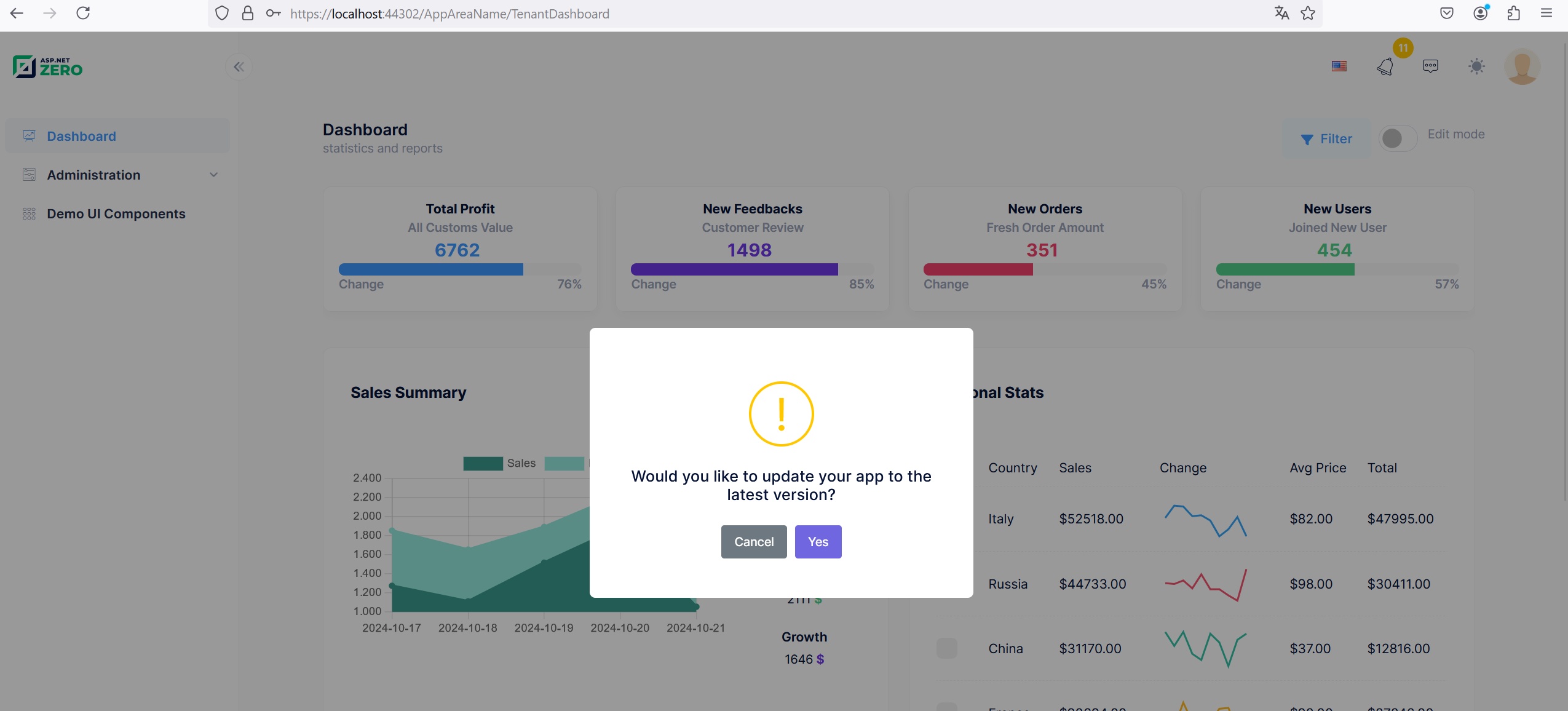
When the Send New Version Notification button is pressed, when other users log in, they are greeted with a modal as shown in the screenshot. It will not close unless you click either Cancel or Yes.
 Markdown is supportedCopy & paste or drag & drop images (max 30 MB per image)
 -
0
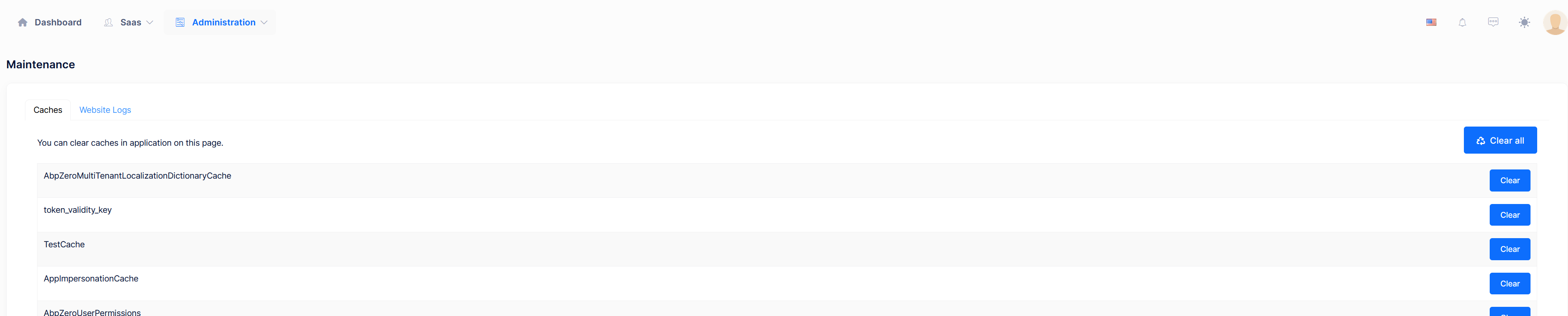
Hi, I don't see the "Send New Version Notification button" - where is it?
 Markdown is supportedCopy & paste or drag & drop images (max 30 MB per image)
 -
0Markdown is supportedCopy & paste or drag & drop images (max 30 MB per image)
-
0
We use latest version. - seems that you forgot to create the NewVersion_Create permission in the provider for Angular.
 Markdown is supportedCopy & paste or drag & drop images (max 30 MB per image)
 -
0
one more thing - notifcation is created - but PopUp is not showing up for refresh - any idea?
 Markdown is supportedCopy & paste or drag & drop images (max 30 MB per image)
 -
0
maybe because we use 2 instances? on Azure? just read this https://docs.aspnetzero.com/aspnet-core-angular/latest/Clustered-Environment
Scaling SignalR
ASPNET Zero has a built-in chat system and real-time notification system. They both use signalR. Before using multiple instances of your project, you should check signalR's scaling documentation and choose SignalR backplane providers or AzureSignalR.
Markdown is supportedCopy & paste or drag & drop images (max 30 MB per image) -
0
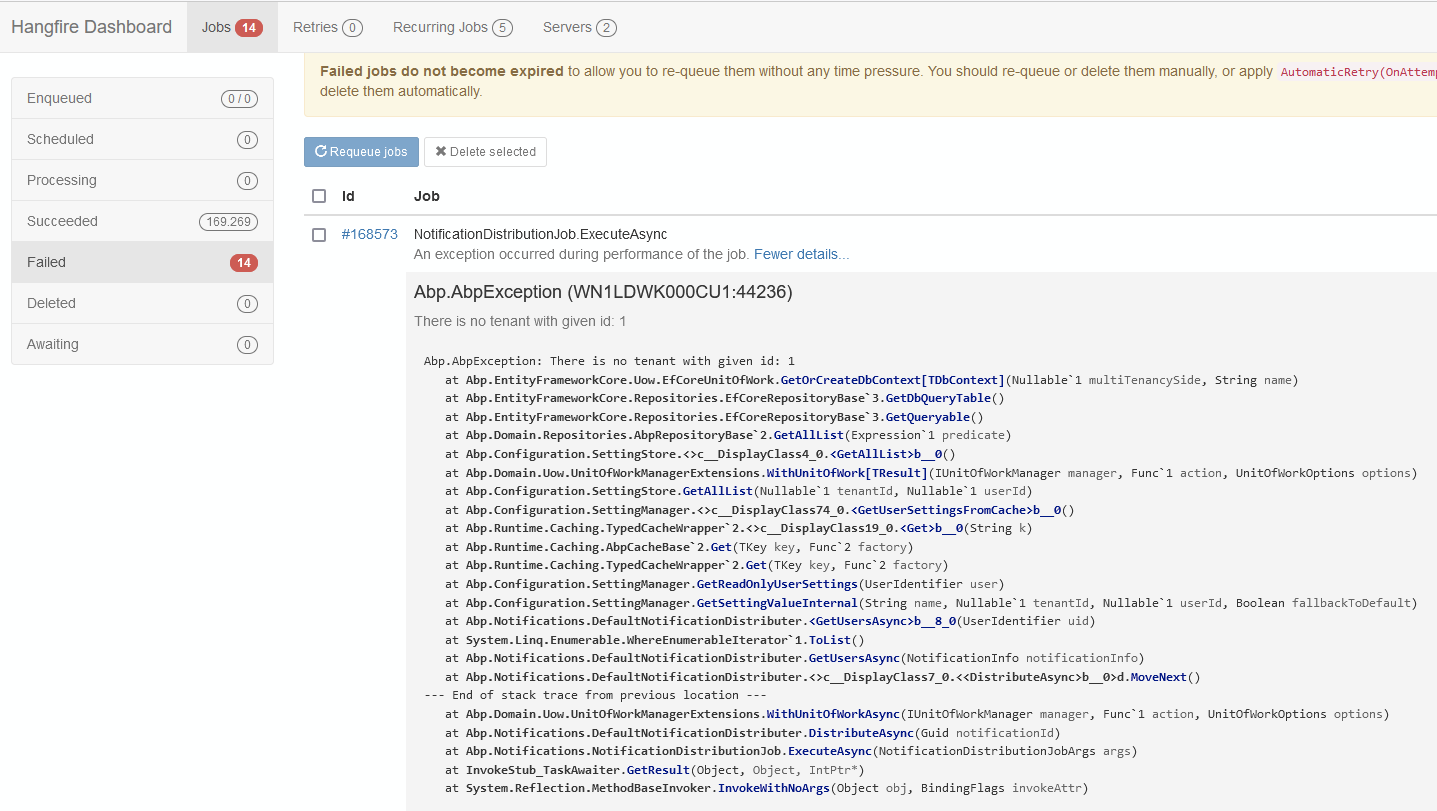
we detected this error - when tenant is deleted - it is not working
 Markdown is supportedCopy & paste or drag & drop images (max 30 MB per image)
 -
0
We get the popup now - but nothing happens - in Edge - old / temp CSS still destroyes whole page
 Markdown is supportedCopy & paste or drag & drop images (max 30 MB per image)
 -
0
this is what BOT is propoding:
Your code looks good for clearing cache data by adding the Clear-Site-Data header. To ensure the CSS and HTML are also cleared, you might need a more comprehensive approach. Here’s a refined version:
csharp
Kopieren public class BrowserCacheCleanerController : WFMOneControllerBase { private readonly INotificationAppService _notificationAppService;
public BrowserCacheCleanerController(INotificationAppService notificationAppService)
{
    _notificationAppService = notificationAppService;
}

public async Task<IActionResult> Clear()
{
    var result = await _notificationAppService.SetAllAvailableVersionNotificationAsRead();

    HttpContext.Response.Headers.Append("Clear-Site-Data", "\"cache\", \"cookies\", \"storage\", \"executionContexts\"");

    return Json(new { Result = result });
}
}
Markdown is supportedCopy & paste or drag & drop images (max 30 MB per image) -
0
Hi pliaspzero
Here, you can create an event that will be triggered when the new version notification reaches the user, so it makes sense to create a Clear method. However, if you only want to reload CSS and Javascript files, it would be more logical to use only the "cache" parameter. This is up to you depending on your scenario. In the event received function, you can call the Clear method when the notification with the NotificationName
NewVersionAvailablearrives._Header.js
abp.event.on('abp.notifications.received', function (userNotification) {
  _appUserNotificationHelper.show(userNotification);
  loadNotifications();
  //In this section you can call the Clear method
});
Markdown is supportedCopy & paste or drag & drop images (max 30 MB per image) -
0
we use the the "cache" parameter - but it do not work
Markdown is supportedCopy & paste or drag & drop images (max 30 MB per image) -
0
"destroyed" UI :
 Markdown is supportedCopy & paste or drag & drop images (max 30 MB per image)
 -
0
Hi
In which browser are you experiencing this issue? Can you share the console and error output with us? Did you use the "yarn create-bundles" command when making changes to the bundle files?
Markdown is supportedCopy & paste or drag & drop images (max 30 MB per image) -
0
this is Edge Browser Hardcopy
Markdown is supportedCopy & paste or drag & drop images (max 30 MB per image) -
0
Sent you also a video to your info@ and support@ - here a screenshot:
 Markdown is supportedCopy & paste or drag & drop images (max 30 MB per image)
 -
0
Hi @pliaspzero,
Thanks we will test it for Edge browser
Markdown is supportedCopy & paste or drag & drop images (max 30 MB per image) -
0
any idea?
Markdown is supportedCopy & paste or drag & drop images (max 30 MB per image) -
0
Hi pliaspzero
Are you experiencing this issue after calling the Clear method following the new version notification?
Markdown is supportedCopy & paste or drag & drop images (max 30 MB per image) -
0
still not working ... could this approach make sense?
Invoke Cache Clearing on Deployment
To ensure the CSS cache is cleared every time you deploy a new version of your Angular app:
Include a versioning strategy for your static assets in angular.json."configurations": { "production": { "outputHashing": "all" } }
Markdown is supportedCopy & paste or drag & drop images (max 30 MB per image) -
0
Hi @pliaspzero
As far as I remember, we (and some other developers) tried this but it didn't work. We will test this in Edge and create a GitHub issue.
Markdown is supportedCopy & paste or drag & drop images (max 30 MB per image)



