
Hi ,
I tried to change admin 4 to admin 1 follow by <a class="postlink" href="http://keenthemes.com/forums/topic/aspnetzero-starter-kit-for-your-next-net-web-application-based-on-metronic/">http://keenthemes.com/forums/topic/aspn ... -metronic/</a>. But my still got not correct. :)

25 Answer(s)
-
0
Hi,
Can you share your full Layout.cshtml code ? I will take a look at it. Thanks.
Markdown is supportedCopy & paste or drag & drop images (max 30 MB per image) -
0
Hi ismcagdas,
I did not change any code. I just replaced admin 4 layout with admin 1 material layout from metronic themes folder.:)
Markdown is supportedCopy & paste or drag & drop images (max 30 MB per image) -
0
Hi ultimatemm:
I am thinking about doing the exact same change. Can you please let me know if you were able to get this to work properly? If yes, can you let me know the files/folders you updated?
Thx!
Markdown is supportedCopy & paste or drag & drop images (max 30 MB per image) -
0
Hi exlnt,
I am busy this few week and haven't try again yet.
Thanks
Markdown is supportedCopy & paste or drag & drop images (max 30 MB per image) -
0
I posted a question on the referenced post above, on the Metronic forum and I was asked to post the same question here in this forum.
[http://keenthemes.com/forums/topic/aspnetzero-starter-kit-for-your-next-net-web-application-based-on-metronic/page/2/#post-8571])
I am working on v1.13 of the aspnetzero solution. I want to change the default theme to Layout1 Material theme. I’m tyring to follow the steps described above in post [http://keenthemes.com/forums/topic/aspnetzero-starter-kit-for-your-next-net-web-application-based-on-metronic/#post-6751]). However all of the folders/paths mentioned do not match up with the source code I have. I am using the Asp.Net MPA solution. Can you please provide updated steps to change theme based on the v1.13 solution of aspnetzero?
Thanks!
Markdown is supportedCopy & paste or drag & drop images (max 30 MB per image) -
0
Hi,
Which version of AspNet Zero do you use ? MPA or SPA ?
You can find material admin1 files in metronic template, you can download it here <a class="postlink" href="https://github.com/aspnetzero/aspnet-zero/releases/download/v1.13.0/metronic_v4.7.zip">https://github.com/aspnetzero/aspnet-ze ... c_v4.7.zip</a>.
Markdown is supportedCopy & paste or drag & drop images (max 30 MB per image) -
0
<cite>ismcagdas: </cite> Hi,
Which version of AspNet Zero do you use ? MPA or SPA ?
You can find material admin1 files in metronic template, you can download it here <a class="postlink" href="https://github.com/aspnetzero/aspnet-zero/releases/download/v1.13.0/metronic_v4.7.zip">https://github.com/aspnetzero/aspnet-ze ... c_v4.7.zip</a>.
I mentioned it all in my post above. I am on version 1.13 of ASPNETZERO. I am using the MPA solution.
Also, I have all the required metronic files for the new theme I want to implement. I just want step by step guide as given in the Keen themes forum post. I just need the steps updated for the MPA solution and version 1.13.
Markdown is supportedCopy & paste or drag & drop images (max 30 MB per image) -
0
Hi,
Sorry but we cannot provide exact steps for doing this. We have provided chaging from one theme to another roughly in keenthemes forum.
If you can share your specific problems, we can try to help.
Thanks.
Markdown is supportedCopy & paste or drag & drop images (max 30 MB per image) -
0
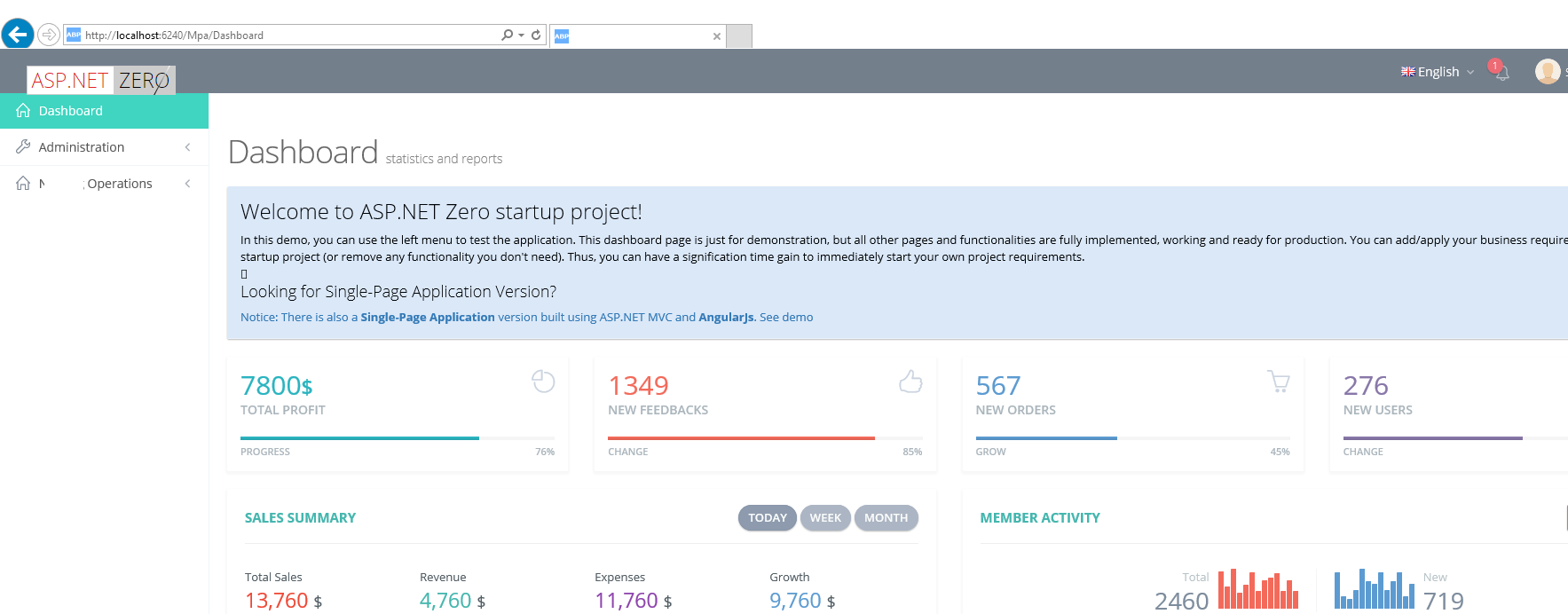
I followed the steps from original post. All I have done so far is a find and replace for all "/admin/layout4/" references to "/admin/layout1/". That is it. Now when I run my app, this what my dashboard page looks like:
[attachment=0:1e1o1ne3]Screenshot (4).png[/attachment:1e1o1ne3]
The header is mis-aligned and the navigation menu is broken. I cannot expand any of the menu items.
Can you help resolve this issue? Thanks!
 Markdown is supportedCopy & paste or drag & drop images (max 30 MB per image)
 -
0
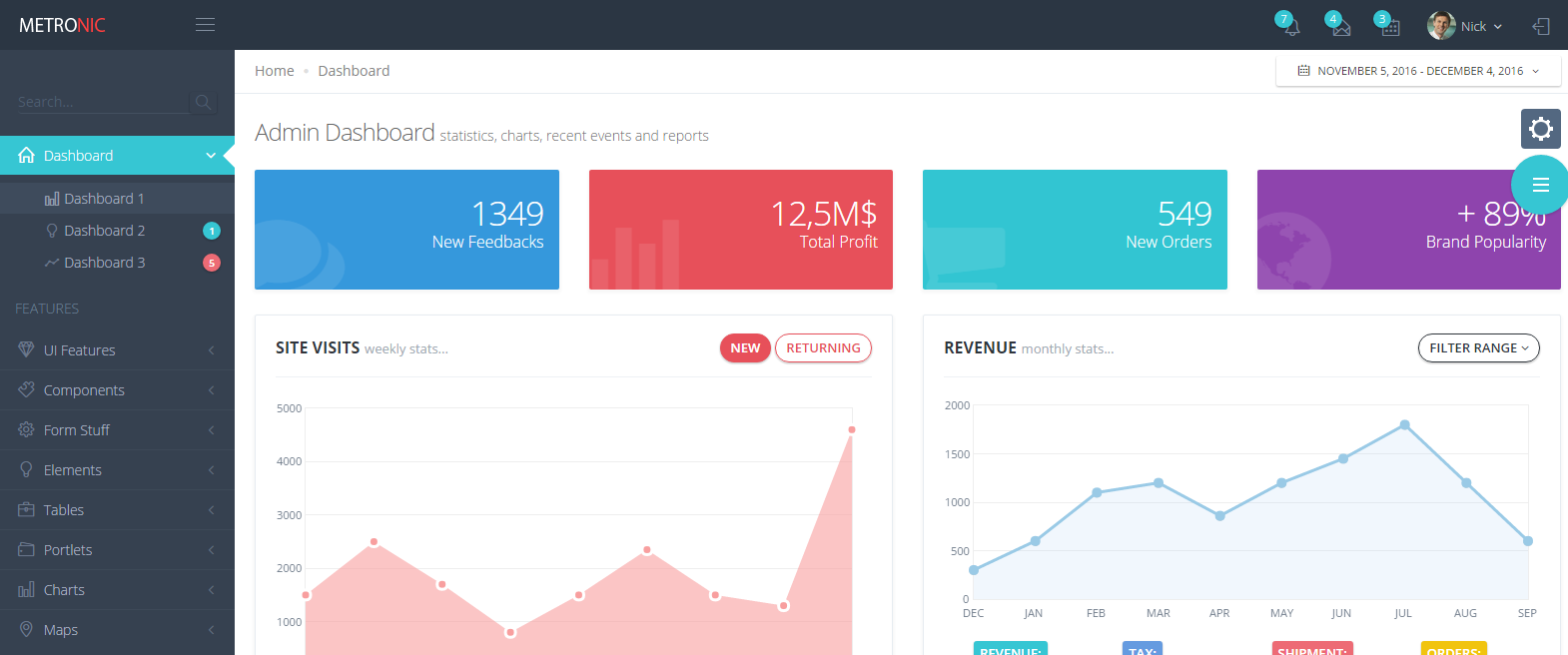
Another issue, the color scheme is also not changing to match layout1 from the Metronic Design
This is Metronic Layout1 design: [attachment=0:2vwegawu]Screenshot (37).png[/attachment:2vwegawu]
If you look at the screenshot on my previous post, the menu and header dont look the same. Is there anything additional I need to update?
 Markdown is supportedCopy & paste or drag & drop images (max 30 MB per image)
 -
0
Hi,
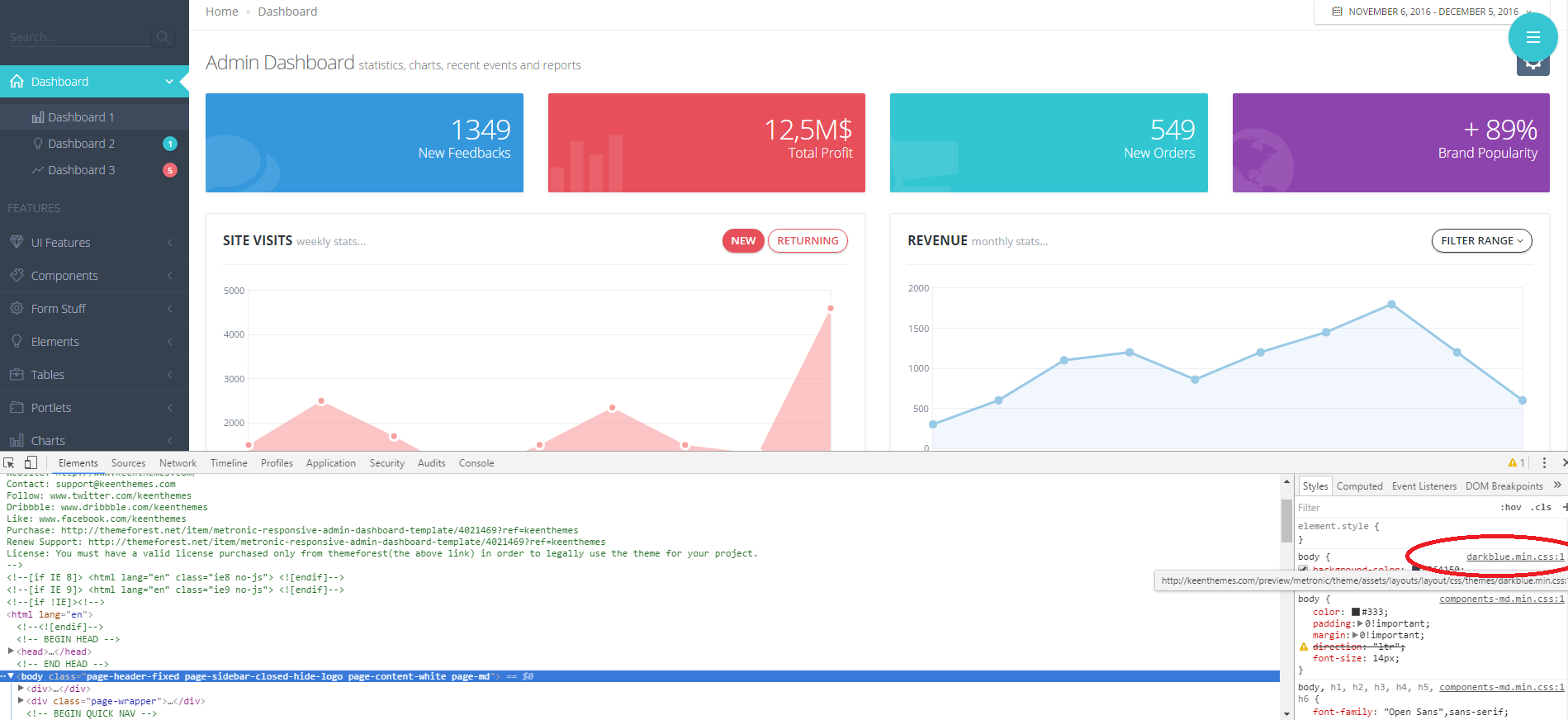
It seems like metronic is using antoher css file called darkblue.css for admin1 material layout. Please check below screenshot, I took it from metronic's official website. You need to add that css file to your layout I think.
 Markdown is supportedCopy & paste or drag & drop images (max 30 MB per image)
 -
0
That file is already there. I updated the bundle reference to use "Darkblue" so that resolved the color issue. The menu still does not work. It will not expand when you click on it. Can you help me with that?
Markdown is supportedCopy & paste or drag & drop images (max 30 MB per image) -
0
That is good :).
Do you have any javascript error your browser's developer console ?
And one more thing. I think you need to use
<script src="../assets/layouts/layout/scripts/layout.min.js" type="text/javascript"></script>instead of
<script src="../assets/layouts/layout4/scripts/layout.min.js" type="text/javascript"></script>Can you also check that ?
Markdown is supportedCopy & paste or drag & drop images (max 30 MB per image) -
0
<cite>ismcagdas: </cite> That is good :).
Do you have any javascript error your browser's developer console ?
And one more thing. I think you need to use
<script src="../assets/layouts/layout/scripts/layout.min.js" type="text/javascript"></script>instead of
<script src="../assets/layouts/layout4/scripts/layout.min.js" type="text/javascript"></script>Can you also check that ?
What file are you referring to there? Can you be more specific?
Markdown is supportedCopy & paste or drag & drop images (max 30 MB per image) -
0
<cite>exlnt: </cite> That file is already there. I updated the bundle reference to use "Darkblue" so that resolved the color issue. The menu still does not work. It will not expand when you click on it. Can you help me with that?
To fix this issue you need to edit YourApplication.Web>App>common>views>layout>sidebar.cshtml
You need to change this
<a href="javascript:;" class="auto" ng-if="childMenuItem.items.length">To this
<a href="javascript:;" class="auto nav-link nav-toggle" ng-if="menuItem.items.length">Markdown is supportedCopy & paste or drag & drop images (max 30 MB per image) -
0
Here is the original code in my Sidebar.cshtml
//Using statements here
@{
    var calculateMenuUrl = new Func<string, string>((url) =>
    {
        if (string.IsNullOrEmpty(url))
        {
            return ApplicationPath;
        }

        if (UrlChecker.IsRooted(url))
        {
            return url;
        }

        return ApplicationPath + url;
    });
}
<div class="page-sidebar navbar-collapse collapse">


    <ul class="page-sidebar-menu" data-keep-expanded="false" data-auto-scroll="true" data-slide-speed="200">
        @for (var i = 0; i < Model.Menu.Items.Count; i++)
        {
            var menuItem = Model.Menu.Items[i];

            <li class="@(i==0 ? "start" : "") @(menuItem.IsMenuActive(Model.CurrentPageName) ? "active" : "")">
                @if (menuItem.Items.IsNullOrEmpty())
                {
                    <a href="@calculateMenuUrl(menuItem.Url)">
                        <i class="@menuItem.Icon"></i>
                        <span class="title">@menuItem.DisplayName</span>
                    </a>
                }
                else
                {
                    <a href="javascript:;" class="auto">
                        <i class="@menuItem.Icon"></i>
                        <span class="title">@menuItem.DisplayName</span>
                        <span class="arrow"></span>
                    </a>
                    <ul class="sub-menu">
                        @foreach (var childMenuItem in menuItem.Items)
                        {
                            <li class="@(childMenuItem.IsMenuActive(Model.CurrentPageName) ? "active" : "")">
                                @if (childMenuItem.Items.IsNullOrEmpty())
                                {
                                    <a href="@calculateMenuUrl(childMenuItem.Url)">
                                        <span><i class="sub-menu-icon @childMenuItem.Icon"></i> @childMenuItem.DisplayName</span>
                                    </a>
                                }
                                else
                                {
                                    <a href="javascript:;" class="auto">
                                        <i class="@childMenuItem.Icon"></i>
                                        <span class="title">@childMenuItem.DisplayName</span>
                                        <span class="arrow"></span>
                                    </a>
                                    <ul class="sub-menu">
                                        @foreach (var secondLevelChildMenuItem in childMenuItem.Items)
                                        {
                                            <li class="@(secondLevelChildMenuItem.IsMenuActive(Model.CurrentPageName) ? "active" : "")">
                                                <a href="@calculateMenuUrl(secondLevelChildMenuItem.Url)">
                                                    <span><i class="sub-menu-icon @secondLevelChildMenuItem.Icon"></i> @secondLevelChildMenuItem.DisplayName</span>
                                                </a>
                                            </li>
                                        }
                                    </ul>
                                }
                            </li>
                        }
                    </ul>
                }
            </li>
        }
    </ul>

</div>
I changedthese lines: <a href="javascript:;" class="auto"> to <a href="javascript:;" class="auto nav-link nav-toggle">
And it still did not work or fix the menu issue?
Also when i check my developer tools in chrome browser there are no JS related errors, before or after click on menu item.
Markdown is supportedCopy & paste or drag & drop images (max 30 MB per image) -
0
Hi,
Can you send your project to <a href="mailto:[email protected]">[email protected]</a> ? If it does not contain any private information. I want to take a look at this issue on your project.
Thanks.
Markdown is supportedCopy & paste or drag & drop images (max 30 MB per image) -
0
I have sent you email.
Markdown is supportedCopy & paste or drag & drop images (max 30 MB per image) -
0
Hi,
Thanks for sending your project. I have modified _Sidebar.cshtml file to match admin1 layout.
There were three missing things,
- I have added "nav-item" class to all <li> items.
- added "nav-link" class to <a> items under <li> items
- added "nav-link nav-toggle" class to <a> items under <li> items if menu has a submenu.
This is the modified version of _Sidebar.cshtml
@{
    var calculateMenuUrl = new Func<string, string>((url) =>
    {
        if (string.IsNullOrEmpty(url))
        {
            return ApplicationPath;
        }

        if (UrlChecker.IsRooted(url))
        {
            return url;
        }

        return ApplicationPath + url;
    });
}
<div class="page-sidebar navbar-collapse collapse">


    <ul class="page-sidebar-menu" data-keep-expanded="false" data-auto-scroll="true" data-slide-speed="200">
        @for (var i = 0; i < Model.Menu.Items.Count; i++)
        {
            var menuItem = Model.Menu.Items[i];

            <li class="nav-item @(i==0 ? "start" : "") @(menuItem.IsMenuActive(Model.CurrentPageName) ? "active" : "")">
                @if (menuItem.Items.IsNullOrEmpty())
                {
                    <a class="nav-link" href="@calculateMenuUrl(menuItem.Url)">
                        <i class="@menuItem.Icon"></i>
                        <span class="title">@menuItem.DisplayName</span>
                    </a>
                }
                else
                {
                    <a href="javascript:;" class="nav-link nav-toggle">
                        <i class="@menuItem.Icon"></i>
                        <span class="title">@menuItem.DisplayName</span>
                        <span class="arrow"></span>
                    </a>
                    <ul class="sub-menu">
                        @foreach (var childMenuItem in menuItem.Items)
                        {
                            <li class="nav-item @(childMenuItem.IsMenuActive(Model.CurrentPageName) ? "active" : "")">
                                @if (childMenuItem.Items.IsNullOrEmpty())
                                {
                                    <a class="nav-link" href="@calculateMenuUrl(childMenuItem.Url)">
                                        <span><i class="sub-menu-icon @childMenuItem.Icon"></i> @childMenuItem.DisplayName</span>
                                    </a>
                                }
                                else
                                {
                                    <a href="javascript:;" class="nav-link nav-toggle">
                                        <i class="@childMenuItem.Icon"></i>
                                        <span class="title">@childMenuItem.DisplayName</span>
                                        <span class="arrow"></span>
                                    </a>
                                    <ul class="sub-menu">
                                        @foreach (var secondLevelChildMenuItem in childMenuItem.Items)
                                        {
                                            <li class="nav-item @(secondLevelChildMenuItem.IsMenuActive(Model.CurrentPageName) ? "active" : "")">
                                                <a class="nav-link" href="@calculateMenuUrl(secondLevelChildMenuItem.Url)">
                                                    <span><i class="sub-menu-icon @secondLevelChildMenuItem.Icon"></i> @secondLevelChildMenuItem.DisplayName</span>
                                                </a>
                                            </li>
                                        }
                                    </ul>
                                }
                            </li>
                        }
                    </ul>
                }
            </li>
        }
    </ul>

</div>
Markdown is supportedCopy & paste or drag & drop images (max 30 MB per image) -
0
Nice, do you also have the SPA version?
Markdown is supportedCopy & paste or drag & drop images (max 30 MB per image) -
0
Hi @ismcagdas...Thank you that worked!
Markdown is supportedCopy & paste or drag & drop images (max 30 MB per image) -
0
One more question, Where to get the latest metronic theme?
Markdown is supportedCopy & paste or drag & drop images (max 30 MB per image) -
0
Hi,
Here is the metronic v4.7 <a class="postlink" href="https://github.com/aspnetzero/aspnet-zero/releases/download/v1.13.0/metronic_v4.7.zip">https://github.com/aspnetzero/aspnet-ze ... c_v4.7.zip</a>. We didn't updated AspNet Zero to metronic v4.7.1 yet.
Markdown is supportedCopy & paste or drag & drop images (max 30 MB per image) -
0
Is there a v4.7.1 download available? The download url you provided I can't access, GitHub.com display 404 page, is there permission issues with my account?
Markdown is supportedCopy & paste or drag & drop images (max 30 MB per image) -
0
Hi,
v4.7.1 is not available yet. Your github username is registered as "viewtance", is that correct ? You should be able to access with that github user.
Markdown is supportedCopy & paste or drag & drop images (max 30 MB per image)


