
angular, dotnetcore, 6.8.0, .net 4.6.1 I have a validation message in an angular reactive form:
{{l("RequiredField", l('Surname'))}}
How do I use the localize pipe for both values? I can localize the second field but not the first:
{{l("RequiredField", 'Surname' | localize)}}
works. But
{{'RequiredField' | localize, 'Surname' | localize)}}
does not. Any ideas anyone?
29 Answer(s)
-
0
This should work
{{'RequiredField' | localize}} {{'Surname' | localize}}
Markdown is supportedCopy & paste or drag & drop images (max 30 MB per image) -
0
Wait, i see why yours might not work, you have an extra ")" at the end??
{{'RequiredField' | localize, 'Surname' | localize)}}
Markdown is supportedCopy & paste or drag & drop images (max 30 MB per image) -
0
@commondesk, sorry, that was a typo from typing code directly into the post - there is no following ) in my actual code:
{{'RequiredField' | localize, 'FirstNames' | localize}}throws a linting error in VS Code and several errors in the console. This is the closest I can get:
{{l("RequiredField", 'Surname' | localize)}}Markdown is supportedCopy & paste or drag & drop images (max 30 MB per image) -
0
Hi @bobingham
İt should be something like below:
{{'RequiredField' | localize : 'Surname'|localize}}Markdown is supportedCopy & paste or drag & drop images (max 30 MB per image) -
0
Hi @ismcagdas, it shoudn't be something like that, it should be exactly like that!!!! Thanks a lot.
Markdown is supportedCopy & paste or drag & drop images (max 30 MB per image) -
0
I'm still struggling with this localize pipe. I have not yet managed to get the following working and have reverted to the older method.
{{l('StringLengthDoesntMatch', l('DisplayName'), "2" , "256")}}Any suggestions?
Markdown is supportedCopy & paste or drag & drop images (max 30 MB per image) -
0
Does the below code work ?
{{'StringLengthDoesntMatch' | localize : 'DisplayName' | localize, '2', '256'}}Markdown is supportedCopy & paste or drag & drop images (max 30 MB per image) -
0
Nope, that comes up with a linting problem. I am still not sure how to inject variables using the new localize pipe.
Markdown is supportedCopy & paste or drag & drop images (max 30 MB per image) -
0
@bobingham
Could you share the lint error ? I believe the statement I shared should work. You can disable linting and see if it works.
Markdown is supportedCopy & paste or drag & drop images (max 30 MB per image) -
0
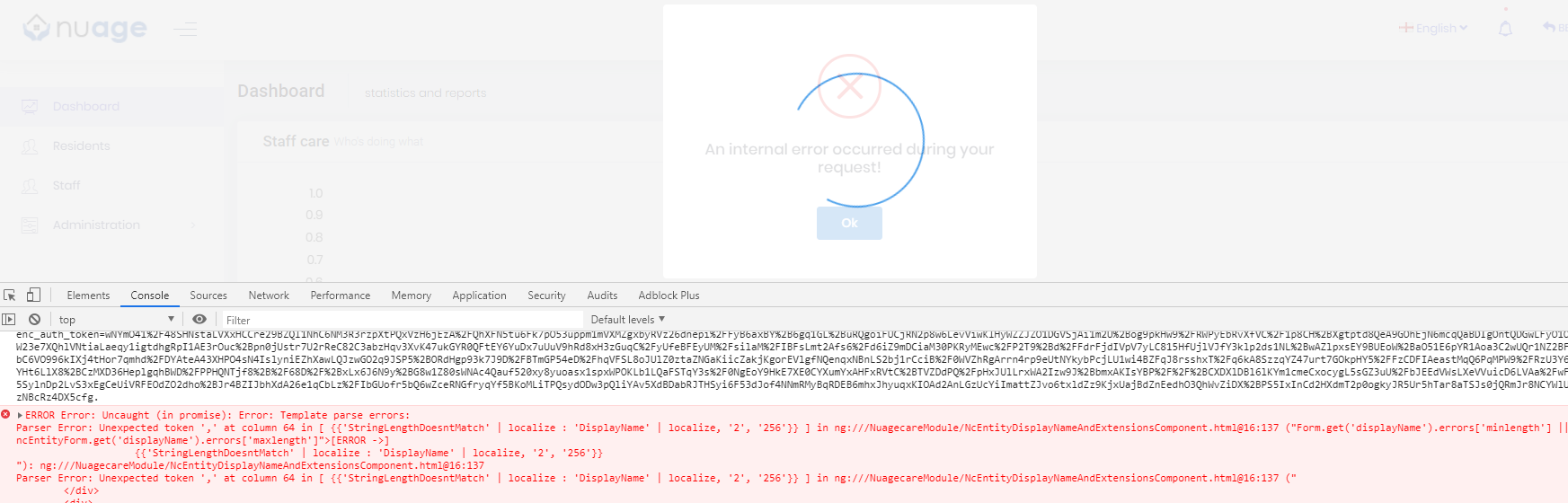
Hi @ismcagdas. Linting error as below, it throws a stream of squiggly red lines over the rest of the code on the page as you can see.
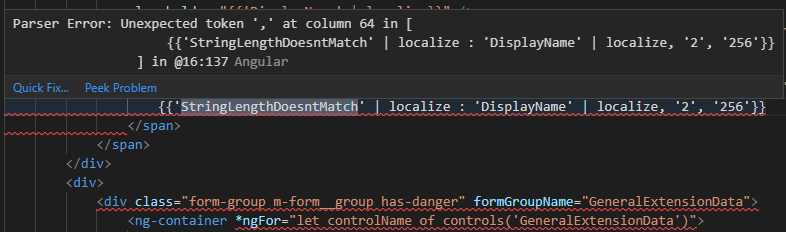 It recompiles in VS Code but throws an error in the browser:
 Markdown is supportedCopy & paste or drag & drop images (max 30 MB per image)
 -
0
In your component's template you can use multiple arguments by separating them with colons:
<small>— https://stackoverflow.com/questions/36816788/how-do-i-call-an-angular-2-pipe-with-multiple-arguments</small>
{{'StringLengthDoesntMatch' | localize : ('DisplayName' | localize) : '2' : '256'}}Markdown is supportedCopy & paste or drag & drop images (max 30 MB per image) -
0
Hi Aaron, That compiled and ran but came up with the following error message:
 I also tried:
{{'StringLengthDoesntMatch' | localize : ('DisplayName' | localize : '2' : '256')}}but that came up with:
 I have tried a variation of brackets but no luck so far!
Given that the localize pipe simply calls the abp.l method I can't see it being deprecated so the old method will do fine for the time being. Something for the guys at Volosoft to consider, however.Markdown is supportedCopy & paste or drag & drop images (max 30 MB per image)
I have tried a variation of brackets but no luck so far!
Given that the localize pipe simply calls the abp.l method I can't see it being deprecated so the old method will do fine for the time being. Something for the guys at Volosoft to consider, however.Markdown is supportedCopy & paste or drag & drop images (max 30 MB per image) -
0
How are you using it?
Markdown is supportedCopy & paste or drag & drop images (max 30 MB per image) -
0
Is this what you mean?
    <form class="m-form m-form--fit m-form--label-align-right"
        [formGroup]="ncEntityForm"
        autocomplete="new-password"
        novalidate
        (ngSubmit)="save()">
        <div class="form-group m-form__group has-danger">
            <label for="displayName">{{'DisplayName' | localize}}</label>
            <input type="text"
                id="displayName"
                formControlName="displayName"
                class="form-control form-control-danger m-input m-input--air"
                placeholder="{{'DisplayName' | localize}}" />
            <span *ngIf="ncEntityForm.get('displayName').touched && ncEntityForm.get('displayName').invalid" class="form-control-feedback">
                <span *ngIf="ncEntityForm.get('displayName').errors['required']">
                    {{l('RequiredField', 'DisplayName' | localize) }}</span>
                <span *ngIf="ncEntityForm.get('displayName').errors['minlength'] || ncEntityForm.get('displayName').errors['maxlength']">
                    {{l('StringLengthDoesntMatch', l('DisplayName'), "2" , "256")}}
                </span>
            </span>
        </div>
Markdown is supportedCopy & paste or drag & drop images (max 30 MB per image) -
-1
Yes.
<span *ngIf="ncEntityForm.get('displayName').errors['minlength'] || ncEntityForm.get('displayName').errors['maxlength']">
    {{'StringLengthDoesntMatch' | localize : ('DisplayName' | localize) : '2' : '256'}}
</span>
Markdown is supportedCopy & paste or drag & drop images (max 30 MB per image) -
0
See above:
Markdown is supportedCopy & paste or drag & drop images (max 30 MB per image) -
0
Show screenshot of your code.
Markdown is supportedCopy & paste or drag & drop images (max 30 MB per image) -
0
Good grief, Aaron, here's the html:
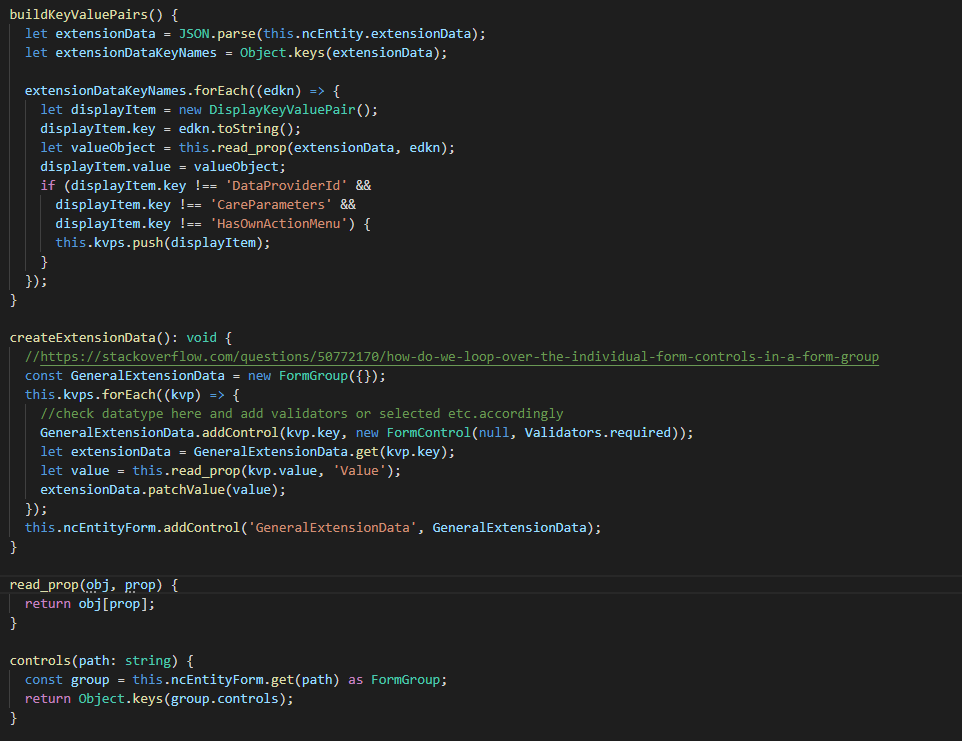
 And here's the code. I use the IExtendableObject interface to save entity properties which saves me from SQL schema changes. OnInit calls buildKeyValuePairs() and then I build the form dynamically (using reactive forms) and patch values using createExtensionData().
 It's good of you to help, I thought Angular wasn't your thing?
It's simple really, the localize directive appears to have way of injecting multiple values.Markdown is supportedCopy & paste or drag & drop images (max 30 MB per image)
It's good of you to help, I thought Angular wasn't your thing?
It's simple really, the localize directive appears to have way of injecting multiple values.Markdown is supportedCopy & paste or drag & drop images (max 30 MB per image) -
0
You aren't using the localize pipe as I have suggested.
Markdown is supportedCopy & paste or drag & drop images (max 30 MB per image) -
0
Exactly. The above code shows localization and injection working with the old method. Which is why this is no show-stopper. If I change it to this, as you suggest:
<span *ngIf="ncEntityForm.get('displayName').errors['minlength'] || ncEntityForm.get('displayName').errors['maxlength']">
    {{'StringLengthDoesntMatch' | localize : ('DisplayName' | localize) : '2' : '256'}}
</span>
I get this:
 As I explained above. I also downvoted your suggestion, which was a mistake, sorry.Markdown is supportedCopy & paste or drag & drop images (max 30 MB per image)
 -
0
Share a repro project.
Markdown is supportedCopy & paste or drag & drop images (max 30 MB per image) -
0
You make me laugh, Aaron, you really do. To share my project you will need Mongodb, Azure local storage emulator, a sample SQL database and access to my key vault for secrets. I can then spend a couple of days helping you to set it all up. Or maybe you mean for to download a fresh project and then build it up with CRUD functionality and reactive forms just so I can show you it does not appear possible to inject values using the localize pipe. The old method works fine. This problem will raise it's ugly head again when someone at Zero tries to inject using the localize pipe using reactive forms. I can wait until then. Thanks for your consideration, however. It really is appreciated.
Markdown is supportedCopy & paste or drag & drop images (max 30 MB per image) -
0
It works with a fresh project.
Markdown is supportedCopy & paste or drag & drop images (max 30 MB per image) -
0
Share the repro and I'll take a look in a couple of weeks when I have the time!
Markdown is supportedCopy & paste or drag & drop images (max 30 MB per image) -
0
Download a fresh project and use the localize pipe as I have suggested.
Markdown is supportedCopy & paste or drag & drop images (max 30 MB per image)


